EasyManua.ls Logo

Panasonic SC-PM01 - Timer Operations: Play Timer; Setting the Play Timer; Selecting Playback Source and Volume

Panasonic SC-PM01
24 pages
Print Icon
To Next Page IconTo Next Page
To Previous Page IconTo Previous Page
Loading...
Timer
operations
._j
HJsSimgj
{/"he
i^omeir
Q!Mi]0
ilbs
(^11^7
G0
DuQ^
Select
this
timer
when
you
want
to
use
the
timer
as
an
alarm
clock.
You
can
wake
up
while
listening
to
music
(CD,
tuner
or
aux)
at
a
desired
volume
level
and
time.
[IRreparation^l
©Make
sure
that
you
have
completed
“Setting
the
time”
on
page
9.
©Switch
on
the
power.
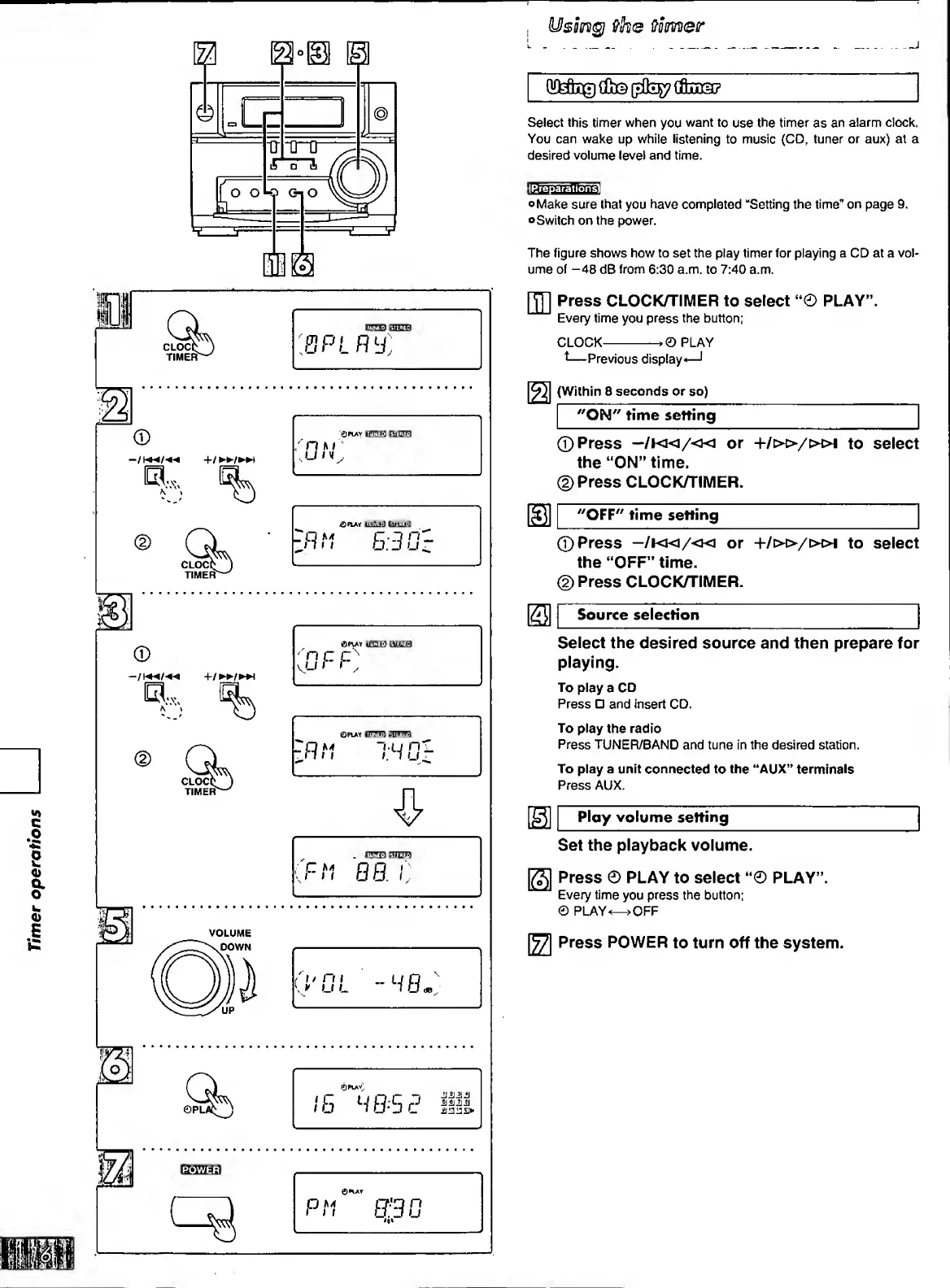
The
figure
shows
how
to
set
the
play
timer
for
playing
a
CD
at
a
vol¬
ume
of
-48
dB
from
6:30
a.m.
to
7:40
a.m.
CLOCC
TIMER"
©
CLOCt
TIMER"
©
ra,...
CLOC(
TIMER"
lill.VjJ
HILIH
BPL
00:
,0PLAt
tA^d:lrfO
to
ft
B-JD-
'
nc
c
kU
»
»
t:mir»i
tRr,
0
PLAY
onzmi
SUSS
“i.q
n'
I.
1
u
F-n
00.
/:
I2I
(Within
8
seconds
or
so)
(
I
"ON"
time
setting
[JT]
Press
CLOCK/TIMER
to
select
“0
PLAY”.
Every
time
you
press
the
button;
CLOCK-
PLAY
-Previous
display
—I
©Press
or
+/»/»!
to
select
the
“ON”
time.
(2)
Press
CLOCK/TIMER.
^
"OFF"
time
setting
©Press
—/!«/«
or
+/»/»!
to
select
the
“OFF”
time.
©Press
CLOCK/TIMER.
SI
Source
selection
Select
the
desired
source
and
then
prepare
for
playing.
To
play
a
CD
Press
and
insert
CD.
To
play
the
radio
Press
TUNER/BAND
and
tune
in
the
desired
station.
To
play
a
unit
connected
to
the
“AUX”
terminals
Press
AUX.
Ploy
volume
setting
Set
the
playback
volume.
m
Press
POWER
to
turn
off
the
system.
Press
©
PLAY
to
select
“©
PLAY”.
Every
time
you
press
the
button;
©
PLAY-OFF

Related product manuals