EasyManua.ls Logo

Panasonic SC-PM01 - Sound Quality Adjustments; Tone Control (Bass;Treble); Sound Virtualizer Effect

Panasonic SC-PM01
24 pages
Print Icon
To Next Page IconTo Next Page
To Previous Page IconTo Previous Page
Loading...
oooo
oocjoi
OOC
3
OOO
3
OOG
3
003
3
OOO
3
OOP
OB
W3
W
-TR
EB
LES
oo
'
J
R
E
J
L
i
3
'
lilt
-
B
AS
S
+
OO
3R55
i
3:
lilt
€h<sain)gBinig
^he
somd
giuKsaSoty^
e9€o
tto
0i02BO
to
03319
|(bylremotelcontrol[onl^|
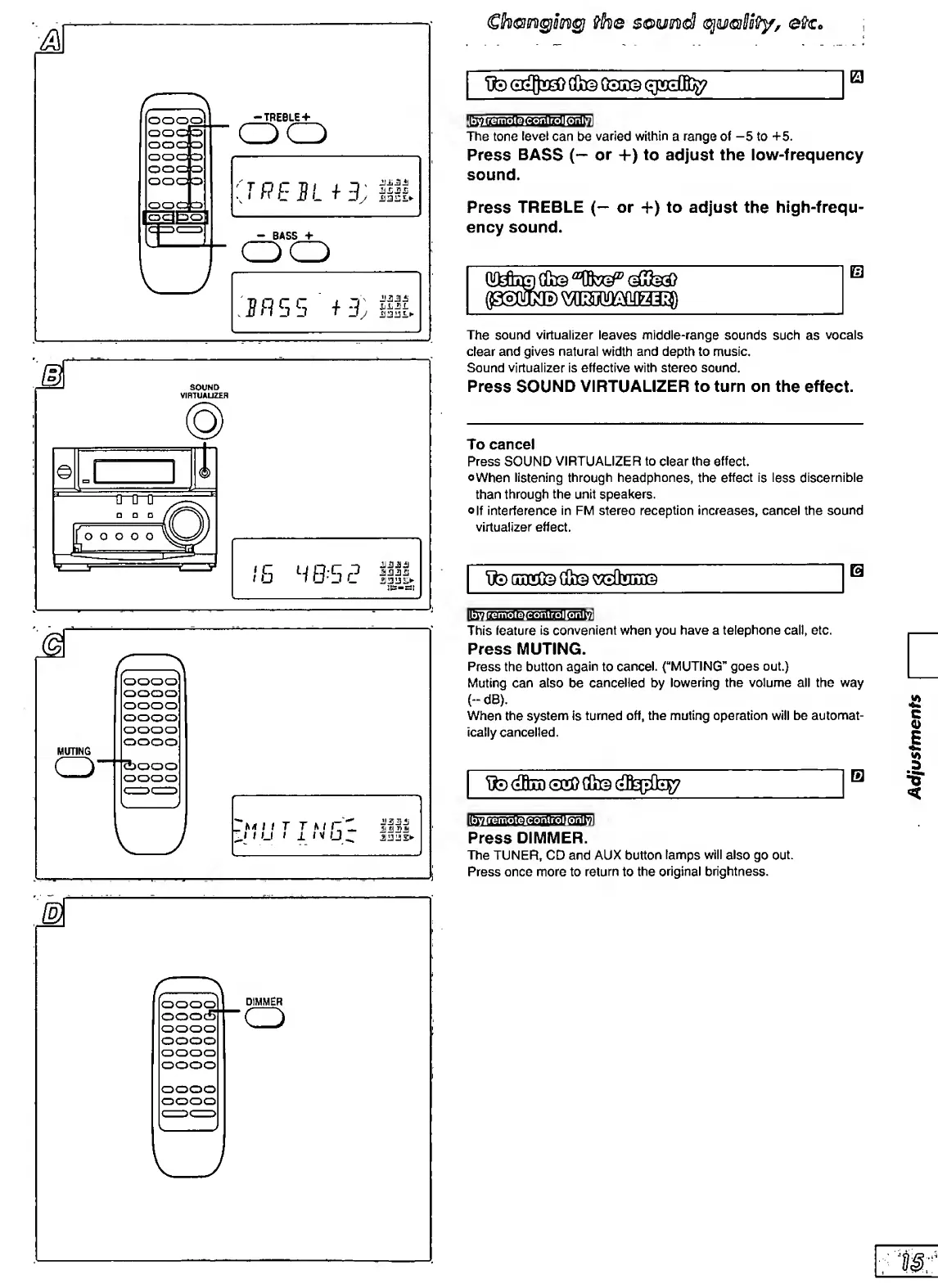
The
tone
level
can
be
varied
within
a
range
of
-5
to
+5.
Press
BASS
(*-
or
+)
to
adjust
the
low-frequency
sound.
Press
TREBLE
(-^
or
+)
to
adjust
the
high-frequ¬
ency
sound.
QMc©
GCl©
The
sound
virtualizer
leaves
nniddle*range
sounds
such
as
vocals
clear
and
gives
natural
width
and
depth
to
music.
Sound
virtualizer
is
effective
with
stereo
sound.
Press
SOUND
VIRTUALIZER
to
turn
on
the
effect.
To
cancel
Press
SOUND
VIRTUALIZER
to
clear
the
effect.
©When
listening
through
headphones,
the
effect
is
less
discernible
than
through
the
unit
speakers.
o|f
interference
in
FM
stereo
reception
increases,
cancel
the
sound
virtualizer
effect.
tto
OuDGOiS
(&3
control[orily]
ILtWgmglBt
This
feature
is
convenient
when
you
have
a
telephone
call,
etc.
Press
MUTING.
Press
the
button
again
to
cancel.
(“MUTING”
goes
out.)
Muting
can
also
be
cancelled
by
lowering
the
volume
all
the
way
(-dB).
When
the
system
is
turned
off,
the
muting
operation
will
be
automat¬
ically
cancelled.
Tto
(ifiii)
<3*1?
cfe
[byiremotelcontrollonly]
Press
DIMMER.
The
TUNER,
CD
and
AUX
button
tamps
will
also
go
out.
Press
once
more
to
return
to
the
original
brightness.
D
IMMER
o
Adjustments

Related product manuals