EasyManua.ls Logo

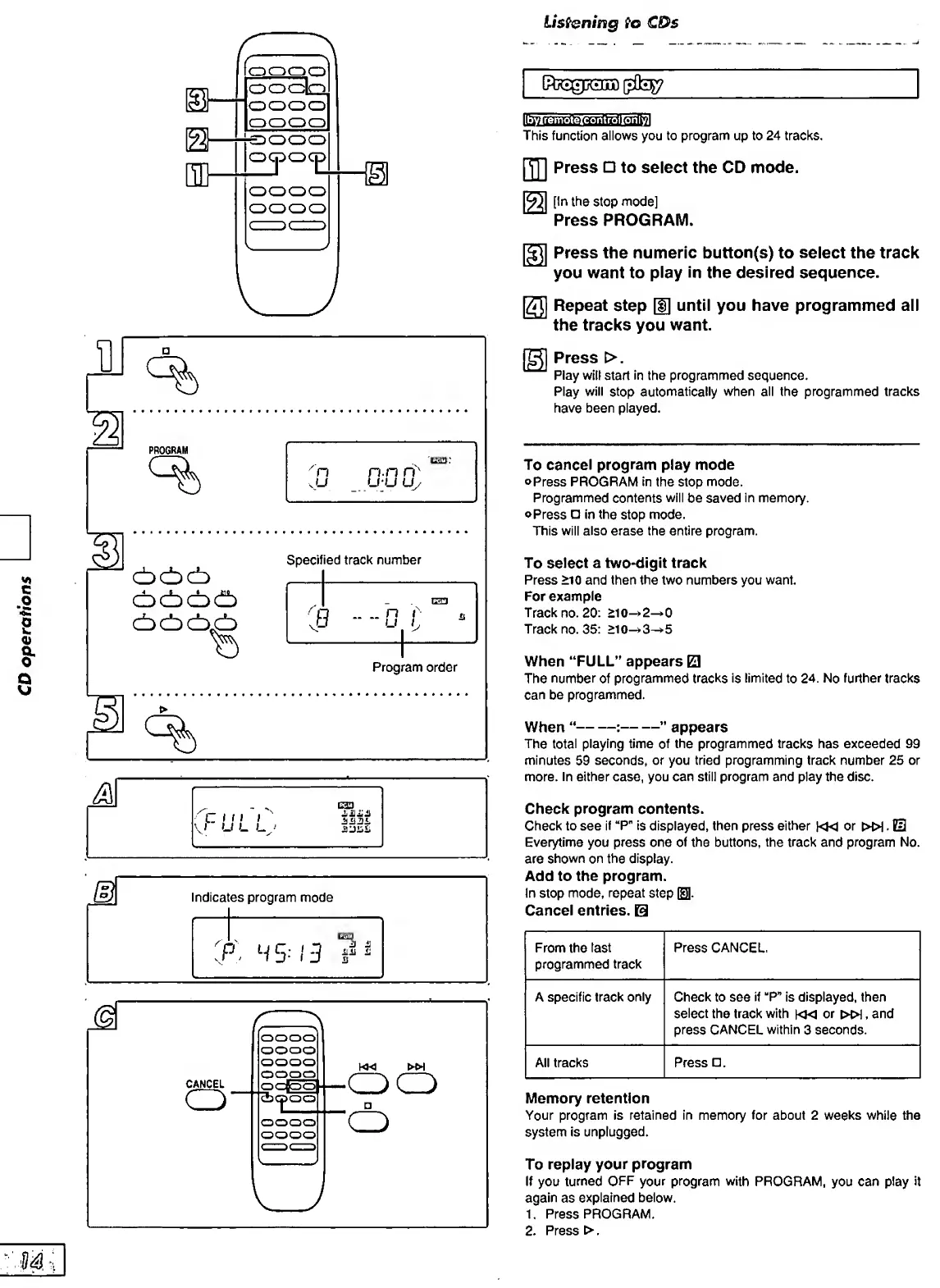
Panasonic SC-PM01 - CD Operations: Program Play; Programming Track Sequences; Program Play Controls

Panasonic SC-PM01
24 pages
Print Icon
To Next Page IconTo Next Page
To Previous Page IconTo Previous Page
Loading...
CD
operations
%
P
ROGRA
M
%
G33.
n.n
ri'
U-U
Uy
1
cbcbcb
ocbocib
<±)(±)C±)^
Specified
track
number
______
3
1
■■■■
0
_1
r
^
V
Program
order
%
M
C
t
11
I
I
u
L
L
esj
mm
Indicates
program
mode
CANCE
L
o
l<«
WH
•oo
'O
Listening
to
CDs
controllonl^
This
function
allows
you
to
program
up
to
24
tracks.
Piyi
Press
to
select
the
CD
mode.
[In
the
stop
mode]
Press
PROGRAM.
§3
Press
the
numeric
button(s)
to
select
the
track
you
want
to
play
In
the
desired
sequence.
ES
Repeat
step
[f]
until
you
have
programmed
all
the
tracks
you
want.
S
Press
>.
Play
wilt
start
in
the
programmed
sequence.
Play
will
stop
automatically
when
all
the
programmed
tracks
have
been
played.
To
cancel
program
play
mode
©Press
PROGRAM
in
the
stop
mode.
Programmed
contents
will
be
saved
in
memory.
©Press
in
the
stop
mode.
This
will
also
erase
the
entire
program.
To
select
a
two-digit
track
Press
>10
and
then
the
two
numbers
you
want.
For
example
Track
no.
20:
>10-»2^0
Track
no.
35:
>l0->3^5
When
“FULL”
appears
El
The
number
of
programmed
tracks
is
limited
to
24.
No
further
tracks
can
be
programmed.
When
“-:-”
appears
The
total
playing
time
of
the
programmed
tracks
has
exceeded
99
minutes
59
seconds,
or
you
tried
programming
track
number
25
or
more.
In
either
case,
you
can
still
program
and
play
the
disc.
Check
program
contents.
Check
to
see
if
“P"
is
displayed,
then
press
either
|«J
or
»).
@
Everytime
you
press
one
of
the
buttons,
the
track
and
program
No.
are
shown
on
the
display.
Add
to
the
program.
In
stop
mode,
repeat
step
El.
Cancel
entries.
From
the
last
programmed
track
Press
CANCEL,
A
specific
track
only
Check
to
see
if
“P”
is
displayed,
then
select
the
track
with
km
or
»!,
and
press
CANCEL
within
3
seconds.
All
tracks
Press
.
Memory
retention
Your
program
is
retained
in
memory
for
about
2
weeks
while
the
system
is
unplugged.
To
repiay
your
program
If
you
turned
OFF
your
program
with
PROGRAM,
you
can
play
it
again
as
explained
below.
1.
Press
PROGRAM.
2.
Press
>.

Related product manuals