EasyManua.ls Logo

Panasonic SC-PM01 - CD Operations: Advanced Playback; Direct Access Track Selection; Repeat and Random Play Modes

Panasonic SC-PM01
24 pages
Print Icon
To Next Page IconTo Next Page
To Previous Page IconTo Previous Page
Loading...
PL
AY
MOD
E
o
oooo
oooo
oooo
oooo
o2>oo
oooo
oooo
oooo
lb
.
.
^
IMnCSmI'
IB
W
8
6
(
?
__
Listening
to
CDs
llbylrGmdtelcontrolionljfll
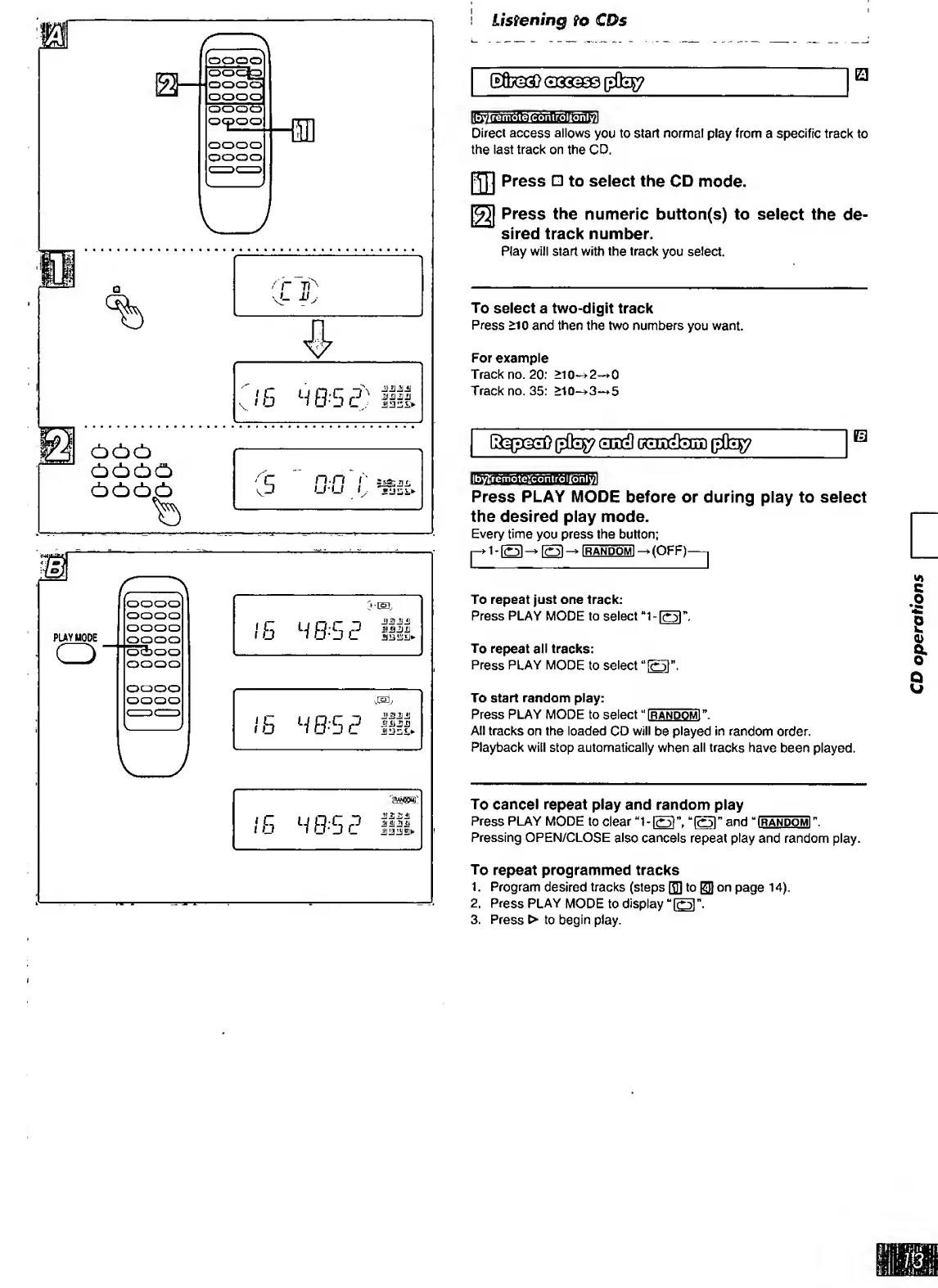
Direct
access
allows
you
to
start
normal
play
from
a
specific
track
to
the
last
track
on
the
CD.
P[]]
Press
to
select
the
CD
mode.
Press
the
numeric
button(s)
to
select
the
de¬
sired
track
number.
Play
will
start
with
the
track
you
select.
To
select
a
two-digit
track
Press
>10
and
then
the
two
numbers
you
want.
For
example
Track
no.
20;
>10-^2—»0
Track
no.
35:
>10~>3-»5
0313
0^^
||b"^emot’eTcontrdljtonly]|
Press
PLAY
MODE
before
or
during
play
to
select
the
desired
play
mode.
Every
time
you
press
the
button;
fRANDOMl-»(OFF)-1
To
repeat
just
one
track:
Press
PLAY
MODE
to
select
“1-
l
o
r
.
To
repeat
all
tracks;
Press
PLAY
MODE
to
select
To
start
random
play:
Press
PLAY
MODE
to
select
I
r
andomI
.
All
tracks
on
the
loaded
CD
will
be
played
in
random
order.
Playback
will
stop
automatically
when
all
tracks
have
been
played.
To
cancel
repeat
play
and
random
play
Press
PLAY
MODE
to
clear
and
i
R
ANOOMr
.
Pressing
OPEN/CLOSE
also
cancels
repeat
play
and
random
play.
To
repeat
programmed
tracks
1.
Program
desired
tracks
(steps
QD
to
ED
page
14).
2.
Press
PLAY
MODE
to
display
3.
Press
>
to
begin
play.
CD
operations

Related product manuals