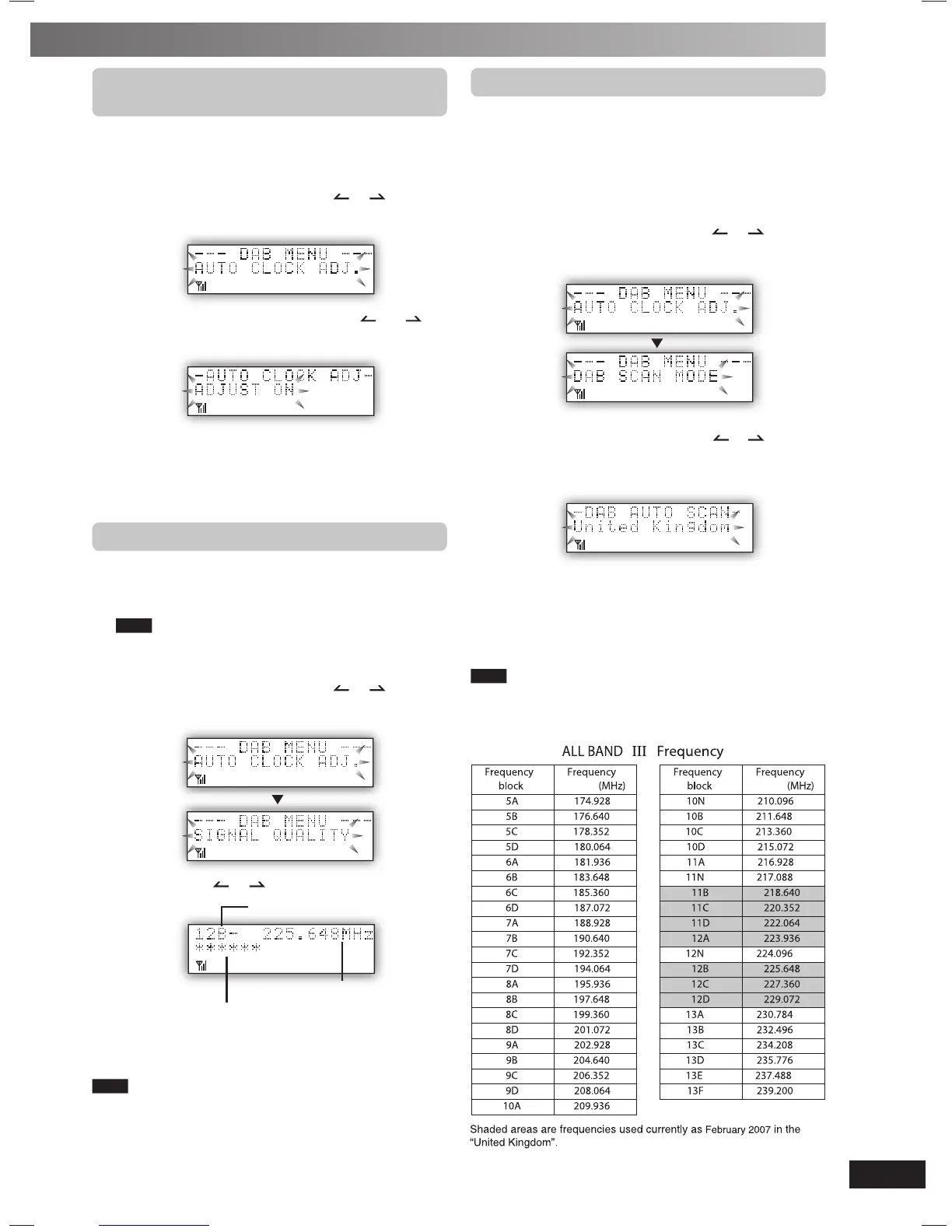
Changing the Auto scan frequency range
Changing the Auto scan frequency range
Only the frequencies currently used in the UK as of February
2007 on BAND III are Auto scanned (“United Kingdom”,
factory setting).
Select “ALL BAND III” when you want to store stations on
other frequencies to memory.
1
Press [DAB MENU] to enter menu mode.
2
Within 10 seconds, press [ALBUM or ] to select
“DAB SCAN MODE” and then press [ENTER].
3
Within 10 seconds, press [ALBUM or ] to select
“United Kingdom” or “ALL BAND III” and then press
[ENTER].
Auto scan begins automatically after the change has been
made.
To exit
Press [DAB MENU] again
Note
When the “DAB SCAN MODE” is changed, the DAB preset channels
are erased and if the DAB play timer has been set the timer switches
to off.
Turning automatic clock adjustment
Turning automatic clock adjustment
function on
To adjust the time information during DAB broadcasting and
automatic time adjustment.
1
Press [DAB MENU] to enter menu mode.
2
Within 10 seconds, press [ALBUM or ] to select
“AUTO CLOCK ADJ.” and then press [ENTER].
3
Within 10 seconds, press [ALBUM or ] to
select “ADJUST ON” and then press [ENTER].
Select “ADJUST OFF” to turn the automatic clock adjustment
function off.
To exit
Press [DAB MENU] again.
Checking the DAB signal quality
Checking the DAB signal quality
To improve reception by adjusting the antenna while
monitoring signal quality on the display.
1
Press [DAB MENU] to enter menu mode.
Note
“Scan Failed.”appears if no stations are memorized. If this
occurs, adjust the antenna and try Auto scanning or change the
Auto scan frequency range.
2
Within 10 seconds, press [ALBUM or ] to select
“SIGNAL QUALITY” and then press [ENTER].
3
Press [ALBUM or ] to select the frequency.
Frequency block
Reception quality
0 (poor) − 16 (excellent)
Frequency
To exit
Press [DAB MENU] again.
Note
In order to enjoy the new stations after adjusting the antenna, it is
necessary to perform Auto scanning to update the station memory.
PMX2DB_EB-En.indd 13PMX2DB_EB-En.indd 13 3/7/07 11:25:46 AM3/7/07 11:25:46 AM











 To Next Page