Bass or treble
Enable you to enjoy the lower or higher pitch sound.
1
Press [BASS] or [TREBLE] to select your desired
setting.
Setting Effect
BASS For lower pitch sound
TREBLE For higher pitch sound
2
Press [5] or [∞] to adjust the level.
OR
To adjust bass or treble using the main unit.
Turn [BASS] or [TREBLE] to adjust the level.
Note
The tone level can be varied within -4 to +4.
Enjoying surround sound
Enable you to add natural width and depth to the stereo
sound.
To activate
Press [SURROUND] to display “
” indicator.
To cancel
Press [SURROUND] again to clear “
”
indicator.
Note
• Surround sound is less discernible when listening through
headphones.
• If interference in FM stereo reception increases, cancel the surround
sound effect.
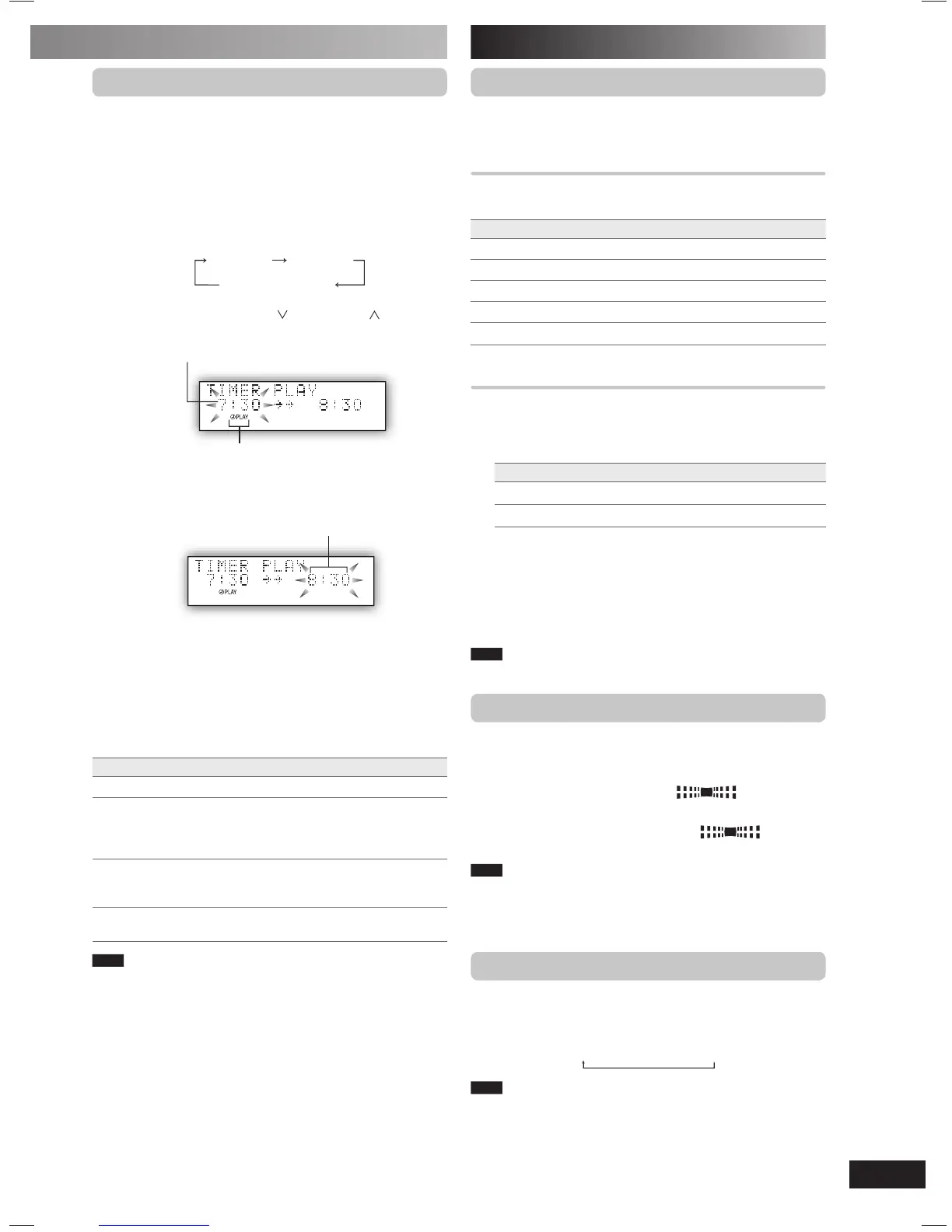
Using the play timer
You can set the play timer to come on at a certain time to
wake you up.
Preparation
Turn the unit on and set the clock.
Prepare the music source you want to listen to; disc, radio,
USB, option port or music port source, and set the volume.
1
Press [CLOCK/TIMER] repeatedly to select play
timer.
CLOCK
˚ PLAY
Original display
2
Within 5 seconds, press [ /4/1] or [/¡/¢]
to set the starting time.
Play timer indicator
Start time
3
Press [CLOCK/TIMER] to confirm.
4
Repeat steps 2 and 3 to set the finishing time.
Finish time
To activate the timer
5
Press [˚PLAY] to turn on the timer.
“˚PLAY” is displayed.
6
Press [y] to turn off the unit.
The unit must be off for the timer to operate.
To Action
change the settings Repeat steps 1 to 4 and 6.
change the source
or volume
1) Press [
˚PLAY] to clear the timer
indicator from the display.
2) Make changes to the source or volume.
3) Perform steps 5 and 6.
check the settings
(when the unit is on
or in standby mode)
Press [CLOCK/TIMER] repeatedly to select
˚PLAY.
cancel Press [˚PLAY] to clear the timer indicators
from the display.
Note
• The play timer will start at the preset time, with the volume
increasing gradually to the preset level.
• The timer comes on at the set time every day if the timer is on.
• The unit must be in the standby mode for the timer to function.
• If you turn the unit off and on again while a timer is functioning, the
fi nish time setting will not be activated.
• If MUSIC PORT or OPTION port is selected as the source when
the timer comes on, the system turns on and engages MUSIC
PORT or OPTION port as the source. If you wish to playback from
the portable audio equipment, activate the equipment’s play mode
and increase the volume. (See the portable audio equipment’s
instruction manual.)
PMX2DB_EB-En.indd 15PMX2DB_EB-En.indd 15 3/7/07 11:25:53 AM3/7/07 11:25:53 AM







 To Next Page