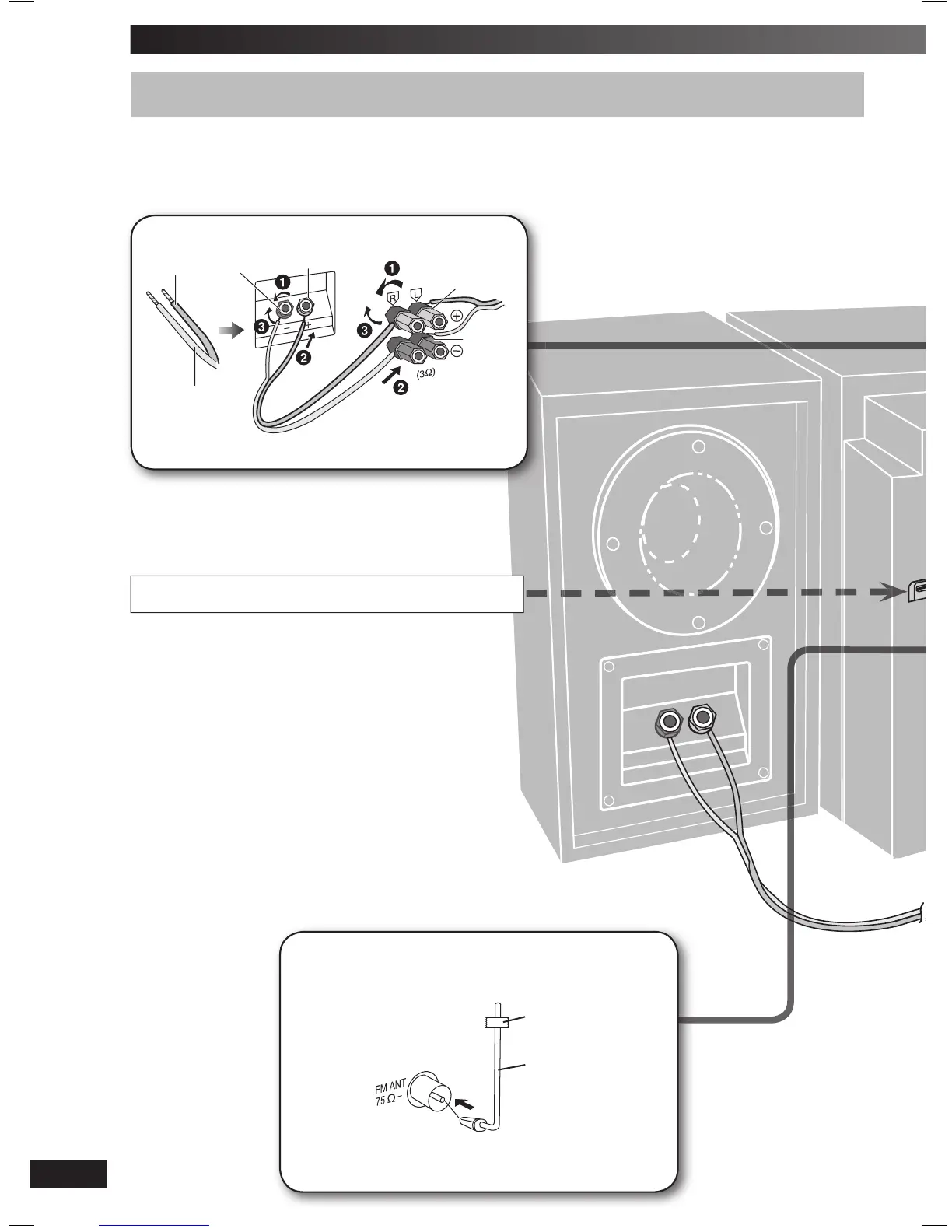
Making the connections
Connect the AC mains lead only after all the other connections have been made.
Conserving power
The main unit consumes a small amount of power, even when it is in standby mode (approx. 0.7 W). To save power when the unit is not to be
used for a long time, unplug it from the household mains socket. You will need to reset some memory items after plugging in the unit.
Tape the antenna to a wall or column, in a position with least amount
of interference.
Connect the FM indoor antenna.
Adhesive
tape
FM indoor
antenna
Please refer to “Connecting the Universal Dock for iPod” and
“Connecting and playing a Bluetooth device” on page 17.
Connect the speaker cables.
Copper (ª)
Silver (·)
Red (ª)
Black (·)
Red (ª)
Black (·)
Incorrect connection can damage the unit.
PMX3DB_EB_EN.indd 4PMX3DB_EB_EN.indd 4 6/18/08 9:49:15 AM6/18/08 9:49:15 AM







 To Next Page