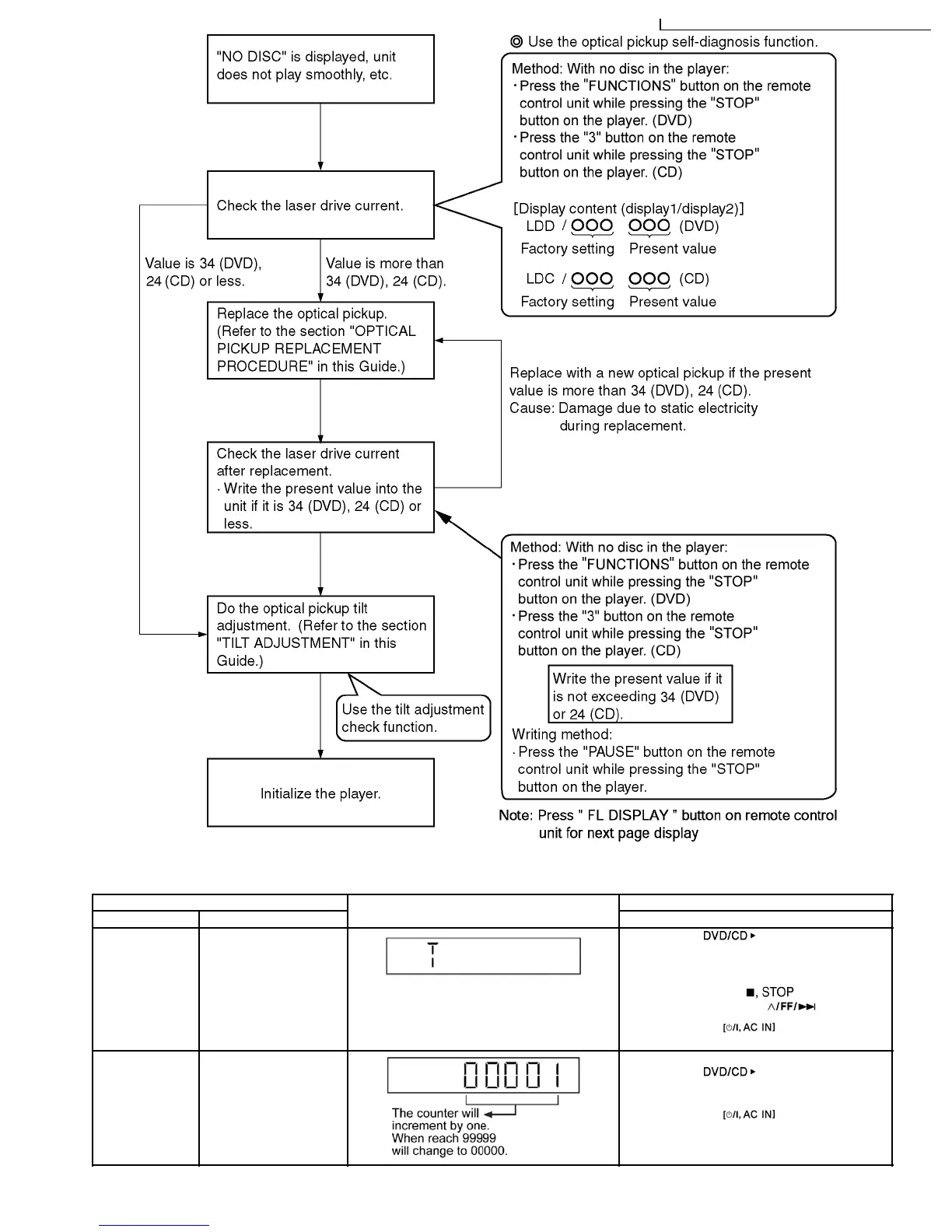
10.3. Special Mode Table 2
Item FL Display Key Operation
Mode Name Description Front Key
Self -Diagnostic
Mode
To enter into self
diagnostic checking for
main unit.
1. Select [ ] for DVD/CD mode.
(Ensure no disc is inserted into the drive
unit.)
2. Press and hold [
] button for 3
seconds follow by [
].
To exit, press
button on main
unit or remote control.
CD Changer
Reliability Test
(CRS1D)
To determine the
reliability of CD/DVD
Changer Unit.
In Self-Diagnostic Mode:
1. Select [
] for CD mode.
2. Press [1] on remote control..
To exit, press
button on main
unit or remote control.
(The tray will return to PLAY position and then
power off)
33
SA-VK950GC / SA-VK950GS / SA-VK950GCS / SA-VK950GC
32
manual de servicio SC-TM910DVD



 To Next Page