5
TQBM0927
5
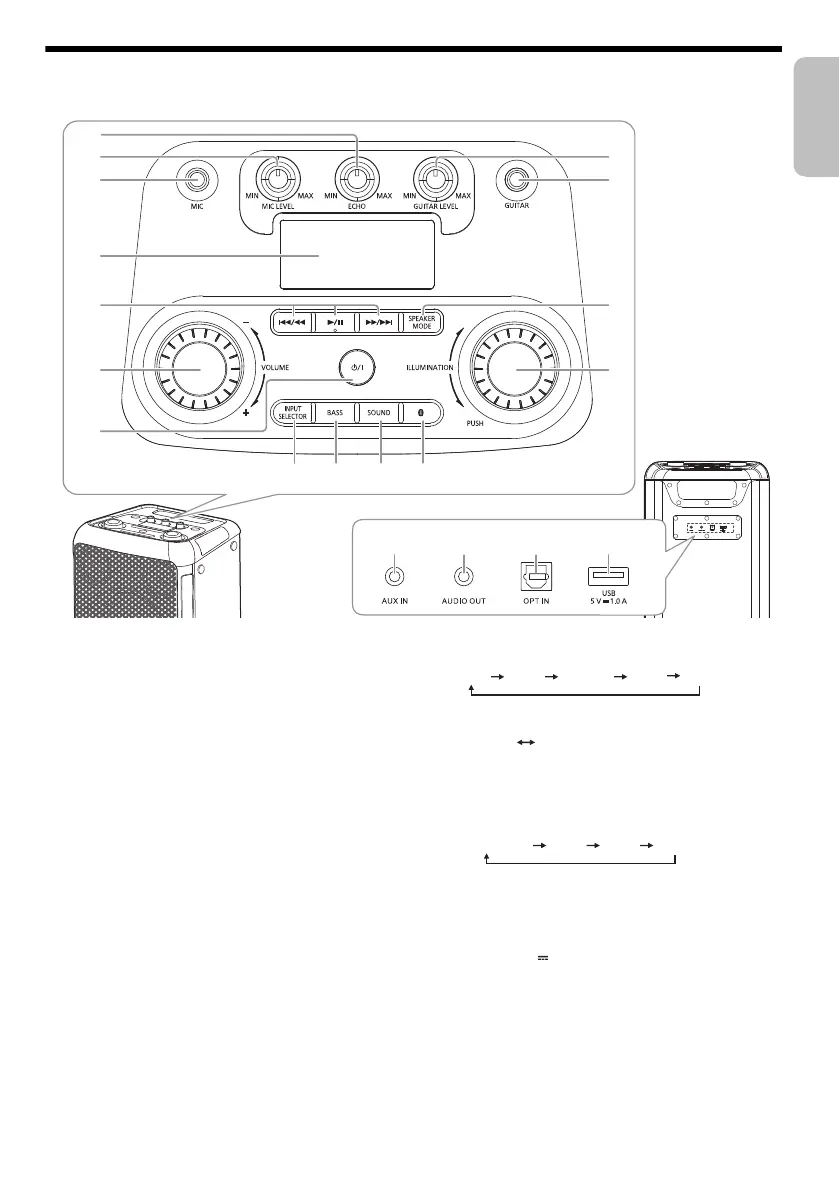
Overview of unit
A Standby/on switch [1]
Press to switch the unit from on to standby mode or
vice versa. In standby mode, the unit is still consuming
a small amount of power.
B Adjust the volume level
C Basic playback control
D Display panel
E Microphone jack
F Adjust the microphone volume level
G Adjust the microphone echo level
H Adjust the guitar volume level
I Guitar jack
J Select the speaker mode
K Select the illumination effects and colours
L Select Bluetooth
®
as the source
M Select the sound effect
N Switch on or switch off the bass effect
Note:
When you switch on the bass effect, the sound effect will
switch off, and vice versa.
O Select the audio source
P AUX IN jack
Q AUDIO OUT jack
R Optical In jack
S USB port (5 V 1.0 A)
2
3
H
I
J
K
P
R SQ
MNL
1
4
6
5
O
7
USB AUX
BLUETOOTH
OPT
tmax45.book Page 5 Friday, July 28, 2023 1:47 PM




 To Next Page