7
TQBM0927
7
USB playback
You can playback MP3 files in the USB device.
Press [INPUT SELECTOR] repeatedly to select “USB”.
Note:
• Files are defined as tracks and folders are defined as
albums.
• Tracks must have the extension “.mp3” or “.MP3”.
• Tracks will not necessarily be played in the order you
recorded them.
• Some files can fail to work because of the sector size.
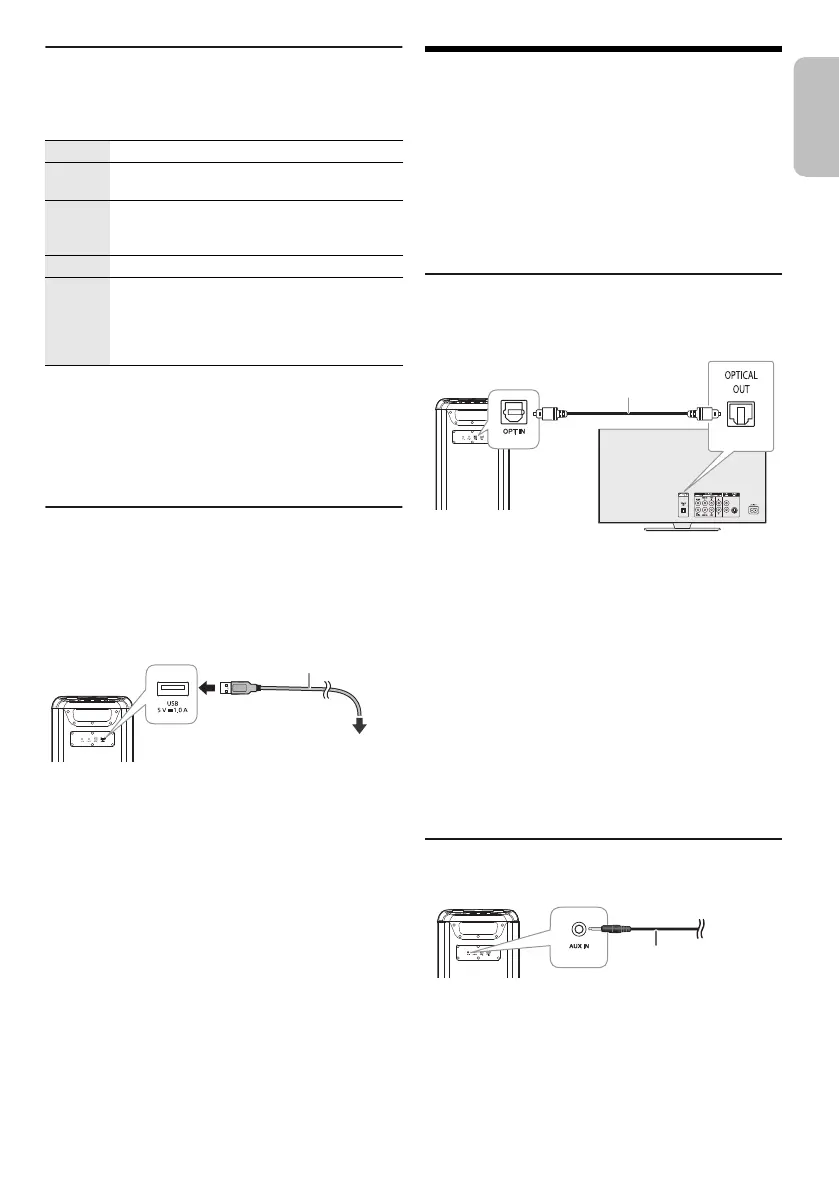
Charging a device
Charging starts when a device (rated value: 5 V/1 A) is
connected to the USB port of this unit.
Preparation
Switch on the unit.
Connect a device.
Confirm from the screen of the connected device, etc. to
make sure charging has started.
Note:
• A cable compatible with your device is required. Use the
cable that comes with your device.
• Even if you connect a cable compatible with the USB port of
this unit, your device may not be charged. In that case, use
the charger that comes with the device.
• Do not connect a device with a rated value higher than
5 V/1 A to this unit.
• To check if charging is complete, look at the screen of the
connected device, etc.
• Once fully charged, remove the USB cable from the USB
port.
• Charging stops if auto off function is activated.
External equipment
Preparation
• Disconnect the AC mains lead.
• Switch off all equipment and read the appropriate
operating instructions.
Note:
• Do not bend cables at sharp angles.
• Components and cables are sold separately.
• Switch off the equalizer or reduce the volume of the external
device. High level of input signal can distort the sound.
Using the optical input
You can connect a TV, VCR, DVD player etc., and listen to
the audio through this unit.
1 Connect an external device.
2 Switch on the unit.
3 Press [INPUT SELECTOR] repeatedly to select
“OPT”.
4 Play the external device.
Note:
• This system supports linear PCM signal.
• Supported Sampling frequency: 32 kHz, 44.1 kHz, 48 kHz,
88.2 kHz, up to 96 kHz
• The sound is muted or noise could occur if the signal format
or frequency is not supported.
• If there are sounds coming from the TV’s speakers,
decrease the volume of the TV to its minimum.
Using the auxiliary input
1 Connect an external device.
Plug type: Ø 3.5 mm stereo
2 Switch on the unit.
3 Press [INPUT SELECTOR] repeatedly to select
“AUX”.
4 Play the external device.
Play Press [4/9].
Pause Press [4/9].
Press again to continue playback.
Skip Press [2/3] or [5/6] to skip track.
During pause, press and hold [4/9] to skip
album.
Search Press and hold [2/3] or [5/6].
Repeat During playback, press and hold [4/9]
repeatedly to select a repeat mode.
ONE REPEAT: Repeat a single track.
ALL REPEAT: Repeat all tracks.
OFF REPEAT: Cancel repeat.
Rear view
To the compatible device
USB cable (not supplied)
Optical digital audio
cable (supplied)
Rear view
TV (not supplied)
Rear view
Audio cable
(not supplied)
tmax45.book Page 7 Friday, July 28, 2023 1:47 PM




 To Next Page