6
TQBM0927
6
Bluetooth
®
operation
You can connect and play an audio device wirelessly
through Bluetooth
®
.
Preparation
• Switch on the unit.
• Switch on the Bluetooth
®
feature of the device and put
the device near the system.
• Read the operating instructions of the device for details.
Pairing a device
1 Press [ ].
“PAIRING” is shown.
2 Select “SC-TMAX45” or “SC-TMAX15” from the
Bluetooth
®
menu of the device.
If prompted for a passkey, input “0000”.
The device connects with this system automatically
after pairing is complete.
Note:
• If a Bluetooth
®
device is connected, you need to disconnect
the device before pairing a new device (~“Disconnecting a
device”).
• You can pair up to 8 devices with this system. If a 9th device
is paired, the device that has been paired for the longest
time will be replaced.
• Depending on the searching functionality of the Bluetooth
®
device and the surrounding environment, if the product
name is not shown on the Bluetooth
®
menu of the device,
switch off and then switch on the Bluetooth
®
feature of the
device repeatedly during the pairing process.
Connecting a device
1 Press [ ].
2 Select “SC-TMAX45” or “SC-TMAX15” from the
Bluetooth
®
menu of the device.
3 Start playback on the device.
Note:
• A device must be paired to connect.
• When “BLUETOOTH” is selected as the source, this system
will automatically try to connect to the last connected device.
Bluetooth
®
playback
Note:
Depending on the Bluetooth
®
device, some operations may not
work.
Multi Connect
This system supports Multi Connect, which can connect
up to 2 devices simultaneously.
To switch between the connected devices
When one of the connected devices is playing, you can
easily switch control to another connected device simply
by starting a playback on that device. The previous
playback will be paused automatically.
Note:
This function may not work for some apps or devices
(depending on app or device specifications).
Disconnecting a device
While a Bluetooth
®
device is connected
Press and hold [4/9].
“PAIRING” is shown.
Note:
• This function disconnects all connected devices.
• A device is disconnected when you:
– Select a different source.
– Move the device out of the maximum range.
– Disable the Bluetooth
®
transmission of the device.
– Switch off the unit or the device.
Bluetooth
®
standby
This function automatically switches on the system when
you establish a Bluetooth
®
connection from a paired device.
Press and hold [ ] to switch on this function.
“ON BLUETOOTH STANDBY” is shown.
To cancel, press and hold the button again until “OFF
BLUETOOTH STANDBY” is shown.
Note:
• Some devices may take longer to respond. If you are
connected to a Bluetooth
®
device before switching off the
system, wait for a minimum of 5 seconds before connecting
to this system from your Bluetooth
®
device again.
• When you disconnect and connect the AC mains lead, the
Bluetooth
®
standby function may not work even though the
setting is on. In this case, switch on the unit and check the
Bluetooth
®
standby setting.
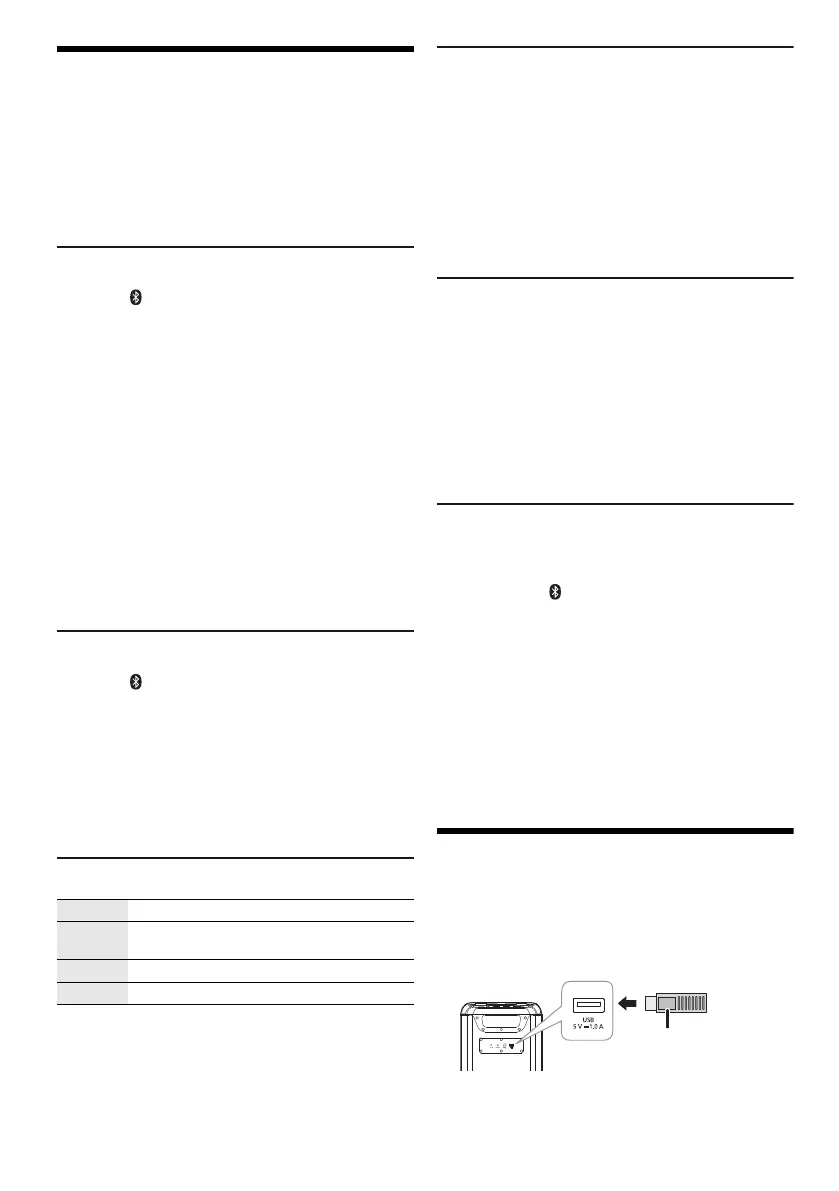
Using a USB device
Preparation
Before you connect a USB device to the system, make
sure you do a backup of the data.
Decrease the volume and connect the USB device to
the USB port.
Hold the unit when connecting or disconnecting the USB
device.
Note:
Do not use a USB extension cable. The system cannot
recognize USB device connected through a cable.
Play Press [4/9].
Pause Press [4/9].
Press again to continue playback.
Skip Press [2/3] or [5/6] to skip track.
Search Press and hold [2/3] or [5/6].
USB device
(not supplied)
Rear view
tmax45.book Page 6 Friday, July 28, 2023 1:47 PM




 To Next Page