EasyManua.ls Logo

Panasonic SG-40 - Cassette Tape Deck Alignment; Bias Alignment Procedures; Azimuth, Dolby, and Rec Current Alignment; Alignment Test Points

Panasonic SG-40
24 pages
Print Icon
To Next Page IconTo Next Page
To Previous Page IconTo Previous Page
Loading...
aS
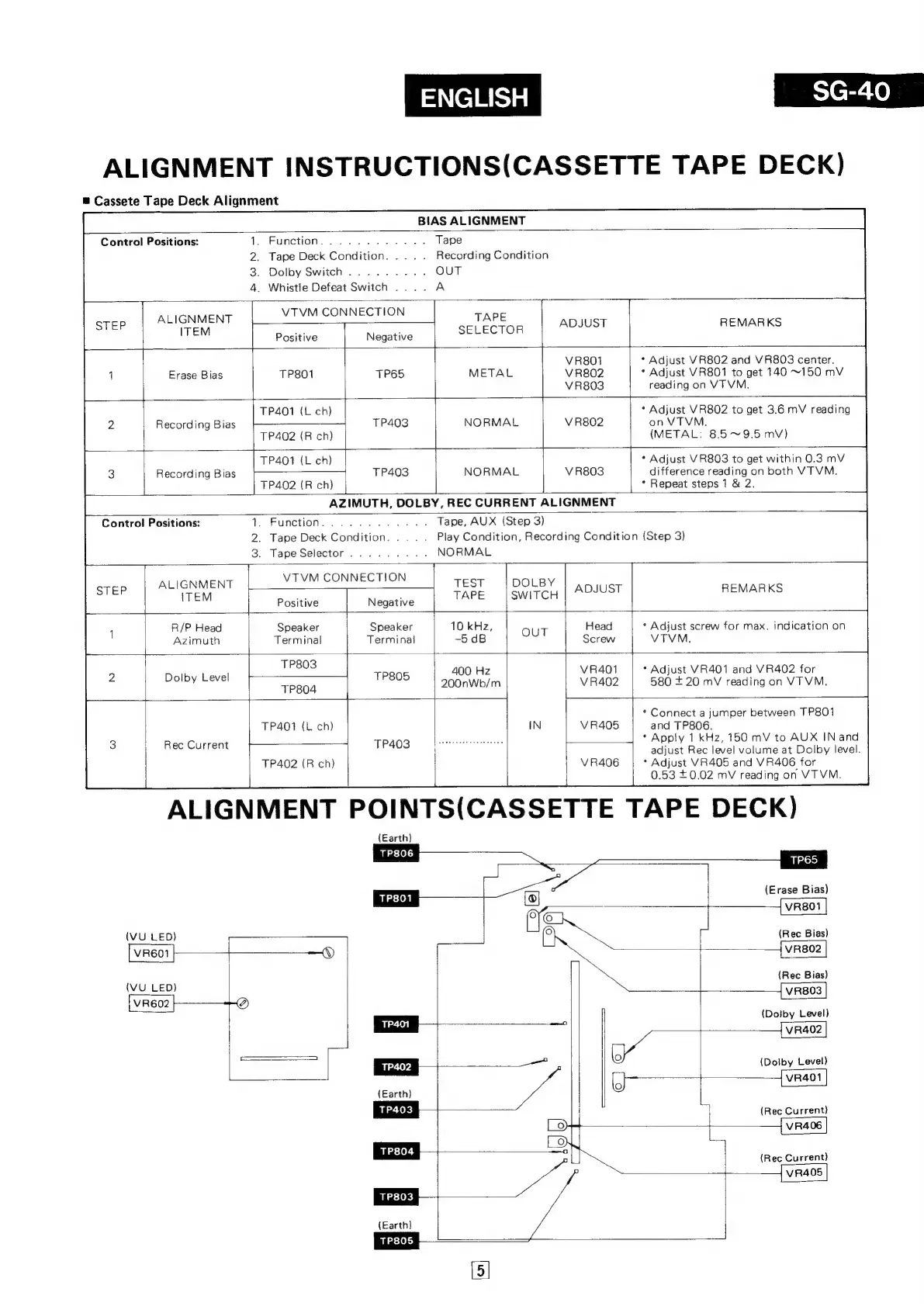
ALIGNMENT
INSTRUCTIONS(CASSETTE
TAPE
DECK)
Cassete
Tape
Deck
Alignment
BIAS
ALIGNMENT
.
Function
.
Tape
Deck
Condition
.
Dolby
Switch
.
Whistle
Defeat
Switch
....
A
Control
Positions:
Recording
Condition
VTVM
CONNECTION
TAPE
T
Negative
SELECTOR
ALIGNMENT
ITEM
REMARKS
ADJUST
Positive
*
Adjust
VR802
and
VR803
center.
*
Adjust
VR801
to
get
140
~150
mV
reading
on
VTVM.
VR801
VR802
V
R803
Erase
Bias
TP801
TP65
Recording
Bias
TP401
(L
ch)
TP402
(R
ch)
NORMAL
V
R802
*
Adjust
VR802
to
get
3.6
mV
reading
on
VTVM.
(METAL:
85~9.5
mv)
*
Adjust
VR803
to
get
within
0.3
mV
TP401
(L
ch)
nee
eee
difference
reading
on
both
VTVM.
*
Repeat
steps
1
&
2.
Recording
Bias
TP403
NORMAL
V
R803
TP402
(R
ch)
AZIMUTH,
DOLBY,
REC
CURRENT
ALIGNMENT
Tape,
AUX
(Step
3)
Play
Condition,
Recording
Condition
(Step
3)
NORMAL
Control
Positions:
1.
Function
2.
Tape
Deck
Condition
3.
Tape
Selector
VTVM
CONNECTION
DOLBY
SWITCH
TEST
TAPE
ALIGNMENT
ITEM
ADJUST
REMARKS
Positive
Negative
*
Adjust
screw
for
max.
indication
on
VTVM.
10
kHz,
-5
dB
Speaker
Terminal
R/P
Head
Azimuth
Speaker
Terminal
TP803
*
Adjust
VR401
and
VR402
for
400
Hz
580
+
20
mV
reading
on
VTVM.
TRSOS
200nWb/m
Dolby
Level
TP804
*
Connect
a
jumper
between
TP801
and
TP806.
*
Apply
1
kHz,
150
mV
to
AUX
INand
adjust
Rec
level
volume
at
Dolby
level.
*
Adjust
VR405
and
VR406
for
0.53
0.02
mV
reading
on
VTVM.
ALIGNMENT
POINTS(CASSETTE
TAPE
DECK)
TP401
(L
ch)
|
TP402
(R
ch}
Rec
Current
(Earth)
TP806
TP65
(Erase
Bias)
VR801
(VU
LED
f
(Rec
Bias)
VR601
HY
VR802
wu
(Rec
Bias)
ED
VR803
VR602
|—-——+-
a
(Dolby
Level)
|
~
VR402
_————
ee
(Dolby
Level)
i
VvR401
(Earth)
(Rec
Current)
VR406
7
(Rec
Current)
VR405
(Earth)

Related product manuals