EasyManua.ls Logo

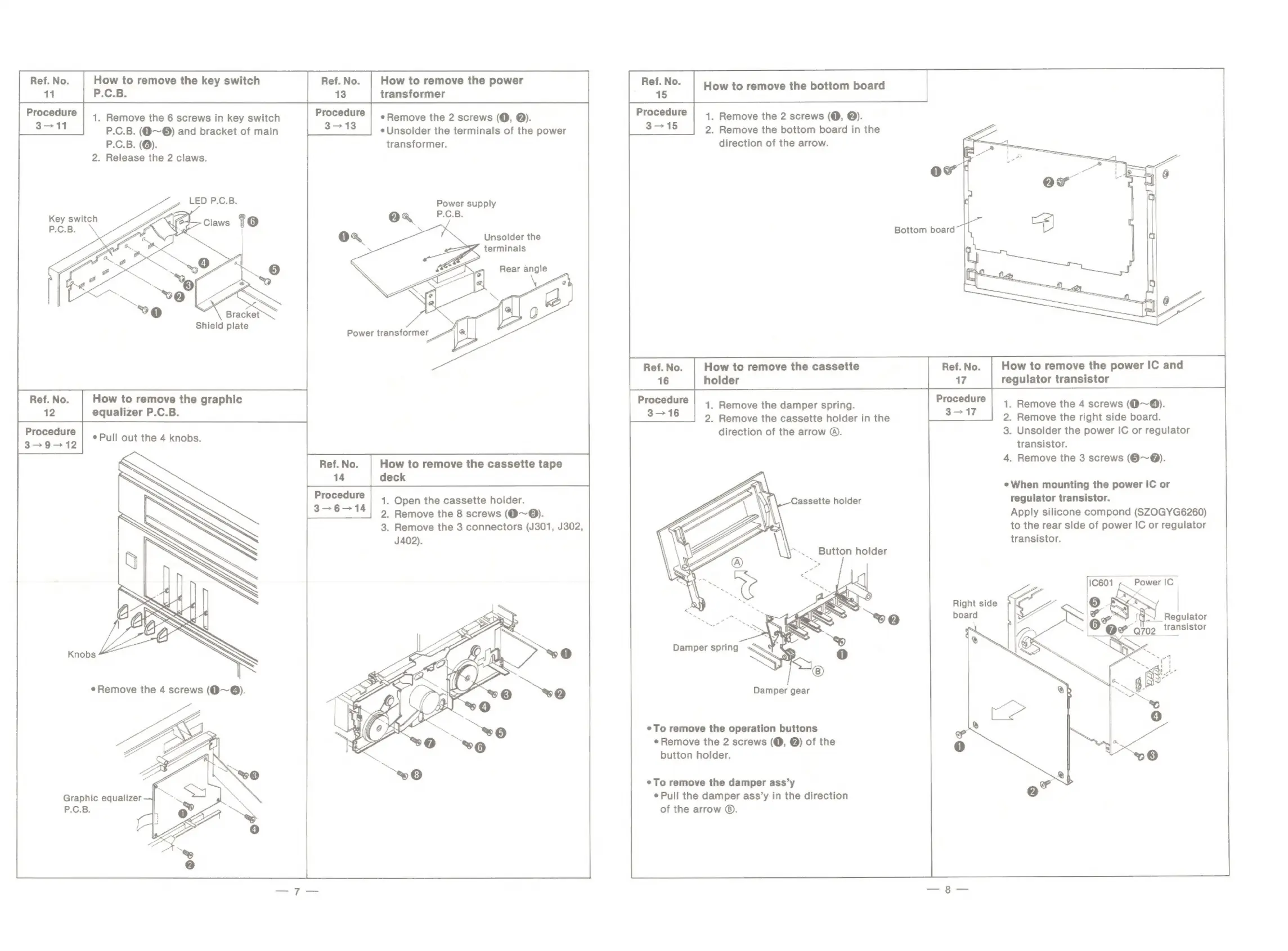
Panasonic SG-D16 - How to remove the key switch P.C.B.; How to remove the graphic equalizer P.C.B.; How to remove the power transformer; How to remove the bottom board

Panasonic SG-D16
22 pages
Print Icon
To Next Page IconTo Next Page
To Previous Page IconTo Previous Page
Loading...
Ref.
No.
How
to
remove
the
key
switch
Ref.No.
|
How
to
remove
the
power
11
P.C.B.
13
transformer
Procedure
|
1
Remove
the
6
screws
in
key
switch
ery
¢
Remove
the
2
screws
(O,
@).
eee
How
to
remove
the
bottom
board
Procedure
|
1
Remove
the
2
screws
(O,
@).
315
2.
Remove
the
bottom
board
in
the
direction
of
the
arrow.
3-11
P.C.B.
(@~©)
and
bracket
of
main
eUnsolder
the
terminals
of
the
power
P.C.B.
(@).
transformer.
.
Release
the
2
claws.
Power
supply
ea
P.C.B.
SS
Unsolder
the
Shield
plate
Ref.
No.
17
Procedure
3—
17
How
to
remove
the
power
IC
and
regulator
transistor
1
.
Remove
the
4
screws
(0~@).
2.
Remove
the
right
side
board.
3.
Unsolder
the
power
IC
or
regulator
transistor.
4.
Remove
the
3
screws
(@~@).
Ref.
No.
How
to
remove
the
graphic
12
equalizer
P.C.B.
Procedure
aex6=080
¢
Pull
out
the
4
knobs.
ih
ean
1.
Remove
the
damper
spring.
im
2.
Remove
the
cassette
holder
in
the
direction
of
the
arrow
©.
¢When
mounting
the
power
IC
or
regulator
transistor.
Apply
silicone
compond
(SZOGYG6260)
to
the
rear
side
of
power
IC
or
regulator
transistor.
Procedure
3-6-—
14
1.
Open
the
cassette
holder.
2.
Remove
the
8
screws
(@~®).
3.
Remove
the
3
connectors
(J301,
J302,
J402).
Ref.
No.
How
to
remove
the
cassette
tape
14
deck
Right
side
board
Nf
Regulator
transistor
Knobs
e
Remove
the
4
screws
(@9~@).
Damper
gear
To
remove
the
operation
buttons
e
Remove
the
2
screws
(@,
@)
of
the
button
holder.
°
To
remove
the
damper
ass’y
Pull
the
damper
ass’y
in
the
direction
of
the
arrow
©.
Graphic
equalizer
P.C.B.

Related product manuals