Setup
8
8
RQTX1131
Setup
∫ Wireless system
Preparation
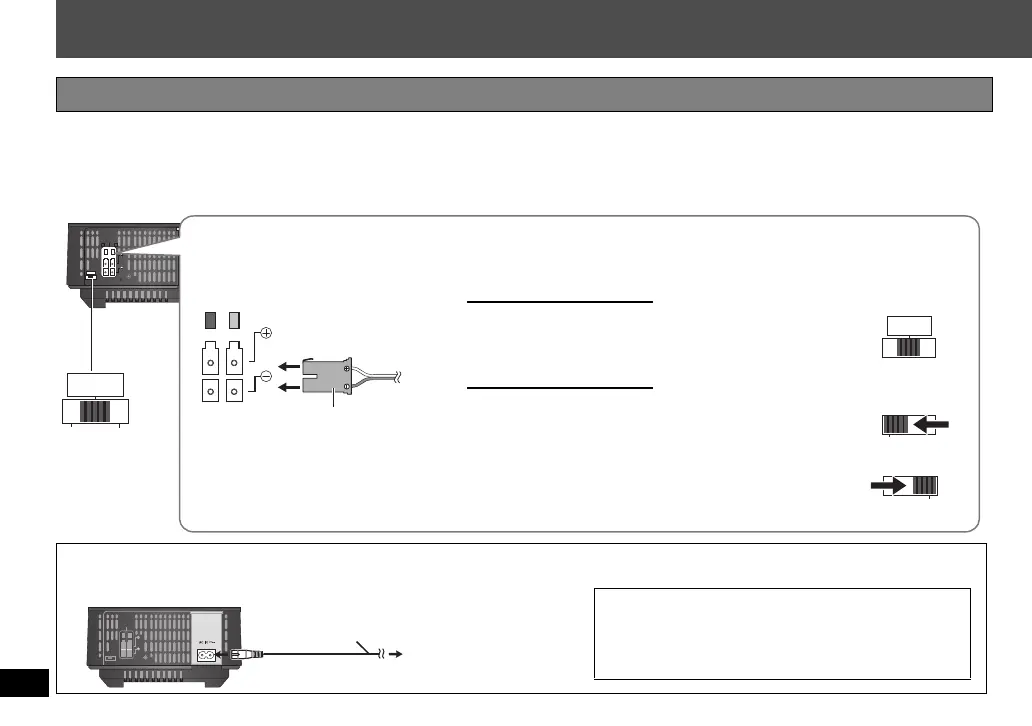
If the surround speaker cables (with a blue connector and a grey connector) have already been connected, disconnect
the surround speaker cables from your home theater unit.
Connections
∫ AC mains lead
SPEAKERS
ENCEINTES
LS / RB LB / RS
SURR
I/D SET
AC IN
SURROUND (3 – 6 )
AMBIOPHONIQUES
L
SIDE
R
SIDE
SURR
L
SIDE
R
SIDE
SURR
L
SIDE
R
SIDE
Surround
selector
Connecting the speakers to the wireless system
Connect to terminals of the same colour.
Insert fully.
Speaker cable
For 5.1ch connection
SURROUND (LS): Blue
SURROUND (RS): Grey
For 7.1ch connection
SURROUND (LS): Blue
SURROUND BACK (LB): Grey
SURROUND (RS): Grey
SURROUND BACK (RB): Blue
Selector setting for the
left and right speakers
Selector setting for the
left speakers
Selector setting for the
right speakers
Impedance: 3 ≠ to 6 ≠
Speaker input power: 100 W (min)
To household mains
socket
AC mains lead (included)
≥
Do not use any other AC mains lead
except the supplied one.
[For[the[United[Kingdom[
BE SURE TO READ THE CAUTION FOR
THE AC MAINS LEAD ON PAGE 3 BEFORE
CONNECTION.
SH-FX71_RQTX1131-B_En.book Page 8 Thursday, January 14, 2010 5:18 PM


 To Next Page