Using Media Player | Using HEXABOOST | Using the Menu Functions
13
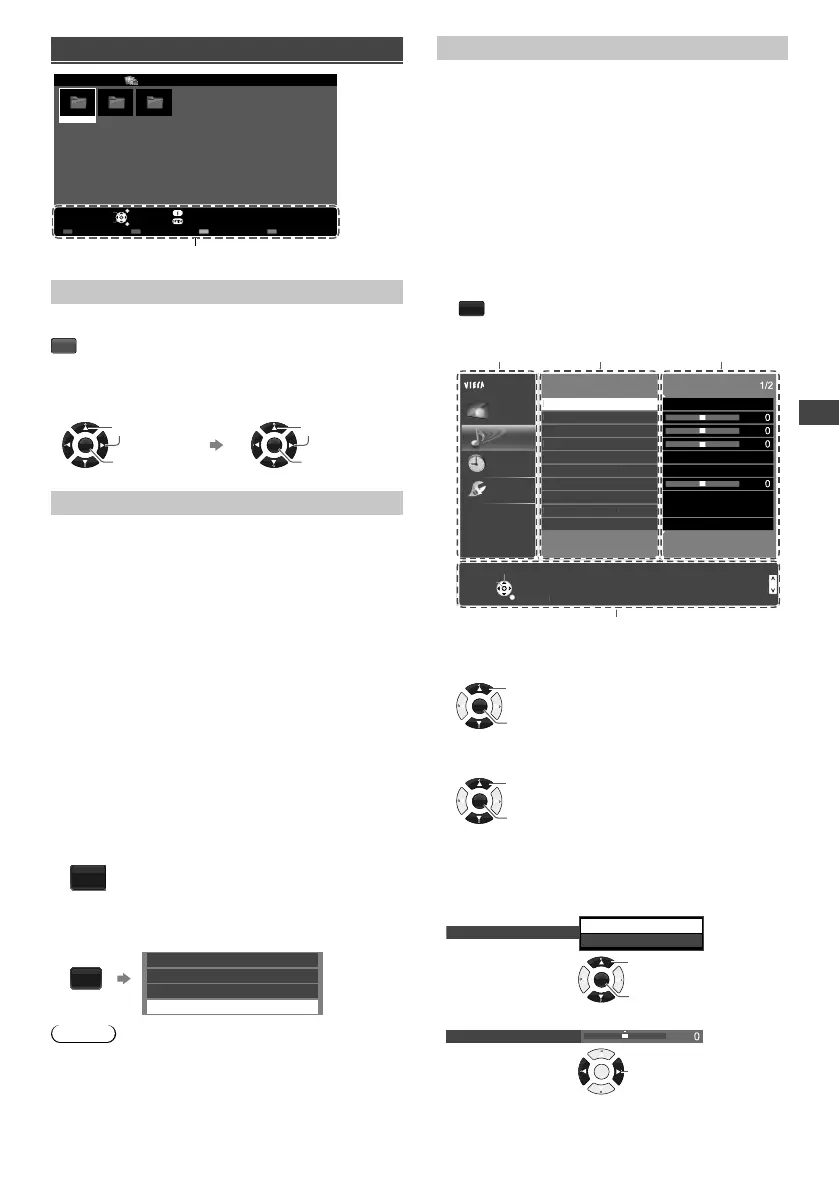
Movie mode
My Movie_1
My Movie_2
My Movie_3
Media Player Movie Title view
USB
EXIT
Select
RETURN
Play Folder Contents Select
Info
Access
Option Menu
Drive Select
Operation guide
[Play Folder]
Playbacks all movies in the selected folder.
R
■ To playback the selected file only
Select the folder. Select the file.
OK
Access
Select
OK
Play
Select
[Option Menu]
■ [Video Setup Menu]
– [Multi Audio]: Selects the sound tracks (if available)
during video playback.
– [Subtitle]: Selects the subtitle (if available) during
video playback.
– [Aspect Change]: Selects the aspect mode during
video playback. [16:9] / [14:9] / [Just] / [4:3] / [4:3
Full] / [Zoom1] / [Zoom2] / [Zoom3]
• [4:3 Full] only available for HD videos.
• You can also change the aspect by pressing the
ASPECT button repeatedly.
– [Repeat]: Playback repeat options. [Off] / [On]
Using HEXABOOST
1 Display the HEXABOOST modes.
HEXA
BOOST
2 Select the HEXABOOST modes.
HEXA
BOOST
Example:
Sports
Animation
Drama
OFF
Note
●
Default setting for HEXABOOST mode is OFF.
●
Settings can be changed by pressing the
HEXABOOST button.
●
Cursor cannot be used for selections.
●
In Media Player, HEXABOOST only valid in full screen
Video.
[HEXABOOST modes]
– [Sports]: Expression of fresh lawn with clear image.
– [Drama]: Vivid yet natural skin tone.
– [Animation]: Clear and vivid animation picture.
Using the Menu
Functions
1 Display the menu.
MENU
Example:
Menu Item Setting
Mode
Music
Bass
Sound Menu
Treble
Balance
Volume Correction
Auto Gain Control
Speaker Distance to Wall
Preferred Audio 1
SPDIF Selection
Off
Off
PCM
Main Menu
Picture
Sound
Timer
Setup
Select
Page up
Change
RETURN
Page down
Operation guide
elec
Pa
e u
Pa
e dow
ictur
Sound
Setu
Sound Menu
B
l
Volume
orrectio
peaker Distance to Wall
PDIF
electio
i
Surround
English
Over 30cm
2 Select the menu.
OK
Access
Select
3 Select the item.
OK
Change / Adjust / Access / Reset
Select
4 Change the setting.
Example:
●
Change the setting option
Surround
On
Off
OK
Access
Select
●
Adjust the intensity bar
Bass
OK
Adjust
TH-32F400AZ_EN-1.indd 13TH-32F400AZ_EN-1.indd 13 2/1/2018 1:21:02 PM2/1/2018 1:21:02 PM




 To Next Page