Setting Up the TV
5
Setting Up the TV
Supplied accessories
Accessories may not be placed all together. Take care
not to throw them away unintentionally.
Operating Instructions with Warranty
statement
Remote Control
●
N2QAYB001116
(p. 9)
Batteries (R6) × 2
(p. 10)
Mains Lead
(p. 7)
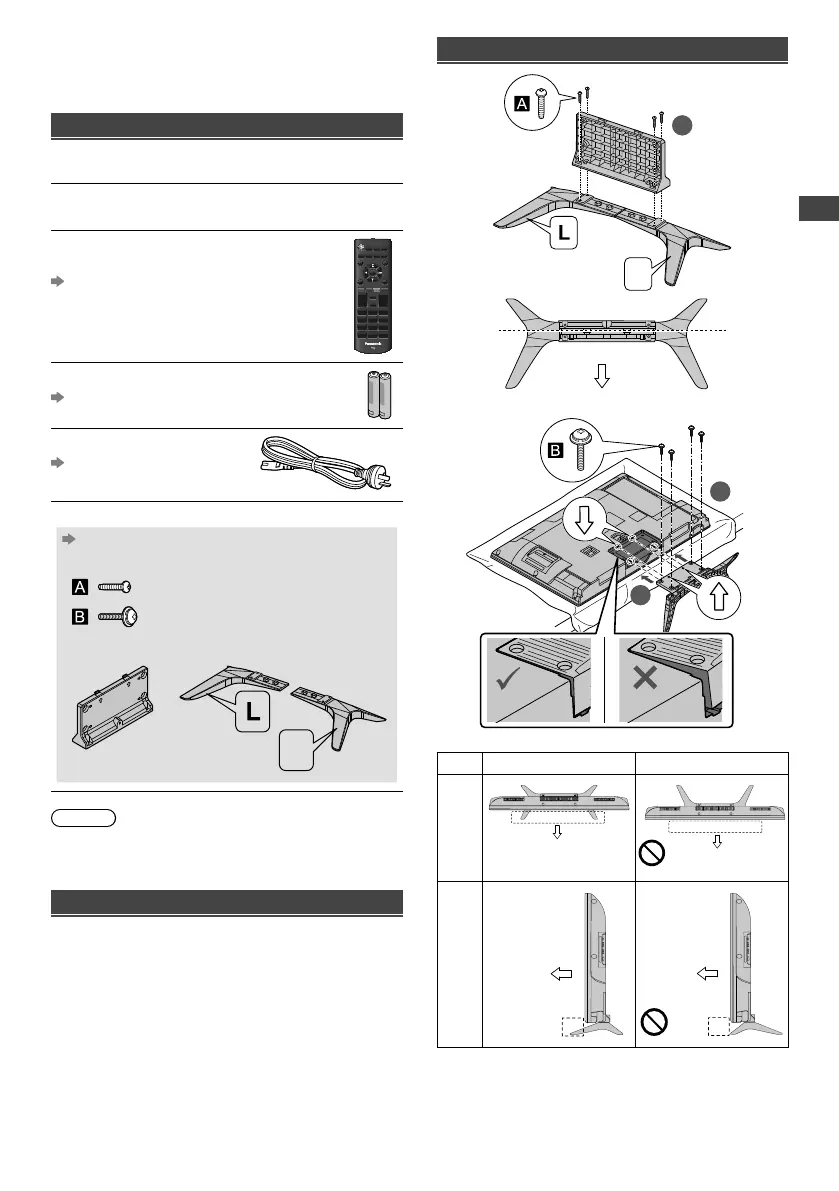
Pedestal
(p. 6)
●
Assembly screws
(M4 x 18 mm) × 4
(M4 × 15 mm) × 4
●
Bracket
●
Base
R
Note
●
Illustrations shown may be different between models
and countries.
Preparation
Take out the pedestal and the TV from the packing case
and put the TV onto a work table with the screen panel
down on the clean and soft cloth (blanket, etc.)
●
Use a flat and firm table bigger than the TV.
●
Do not hold the screen panel part.
●
Make sure not to scratch or break the TV.
Attaching the pedestal
1
R
Front
3
2
Correct Wrong
Top
View
Front (Display)
Front (Display)
Side
View
Front
(Display)
Front
(Display)
TH-32F400AZ_EN-1.indd 5TH-32F400AZ_EN-1.indd 5 2/1/2018 1:20:19 PM2/1/2018 1:20:19 PM




 To Next Page