Operating the TV
9
Operating the TV
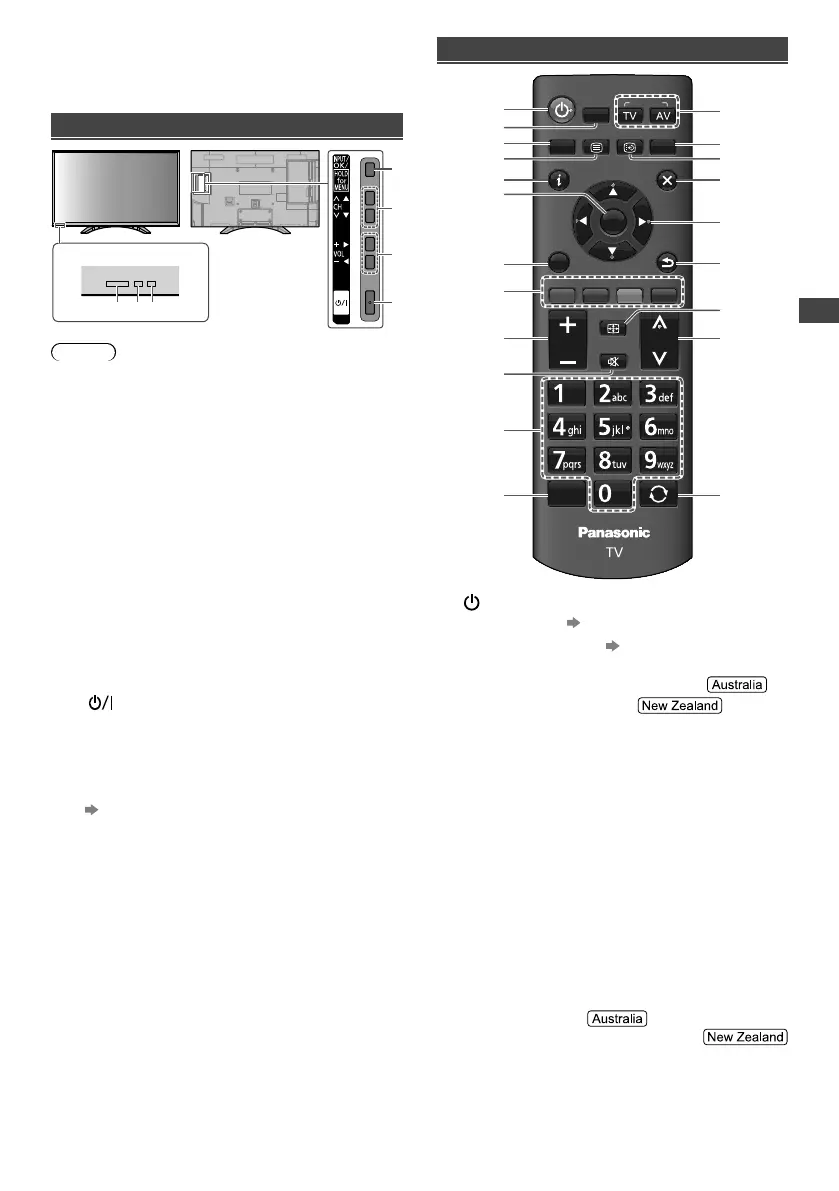
Using the TV controls
Indicators on the TV
56 7
1
3
2
4
Note
●
Location of indicators may vary depending on the
models.
1 Changes the input mode
Displays [Main Menu] when press and hold for
3 seconds
●
Press again and hold for 3 seconds to return to the
previous screen from submenus / exit from main
menu page.
2 Channel Up / Down
Cursor Up / Down
●
Makes selections in the menu system.
3 Volume Up / Down
Cursor Left / Right
●
Makes selections and / or adjustments when in the
menu system.
4 Mains power On / Off switch
●
Use to switch the mains power.
●
To turn Off the apparatus completely, you must pull
the mains plug out of the mains socket.
●
[ ]: Standby / On
5 Remote control signal receiver
6 C.A.T.S. (Contrast Automatic Tracking System)
sensor
●
Senses brightness to adjust picture quality when
[Eco Mode] in the [Picture] menu is set to [On].
(p. 14)
7 Power LED
●
Red: Standby
Green: On
●
The LED blinks when the TV receives a command
from the remote control.
Using the remote control
MENU
MEDIA
PLAYER
TEXT
STTL/AD
GUIDE
CH
EXIT
POWER
INFO
RETURN
OPTION
INPUT
RGY B
ASPECT
MUTE
HEXA
BOOST
LAST VIEW
VOL
OK
1
13
14
15
16
17
18
19
20
21
3
2
4
5
6
7
8
9
10
11
12
1 [ ]: Switches TV On or Off (Standby)
2 MEDIA PLAYER (p. 11)
3 Displays [Main Menu] (p. 13)
4 Teletext button
●
This button is not used for this model.
●
Switches to teletext mode.
5 Displays Information banner
6 OK
●
Confirms selections.
●
Press after selecting channel positions to quickly
change channel.
●
Displays the [Channel List].
7 Displays [Option Menu]
●
Shortcut to subtitle language / sound settings.
●
Follow the operation guide to select / change the
settings.
8 Coloured buttons
●
Performs multiple operations which correspond to
the operation guide displayed on the menu screen.
9 Volume Up / Down
10 Sound Mute On / Off
11 Numeric buttons
●
Changes channel.
●
Changes channel and teletext pages.
●
Sets characters.
●
When in Standby mode, switches TV On.
12 Activate HEXABOOST function
TH-32F400AZ_EN-1.indd 9TH-32F400AZ_EN-1.indd 9 2/1/2018 1:20:45 PM2/1/2018 1:20:45 PM





 To Next Page