Using the Menu Functions
17
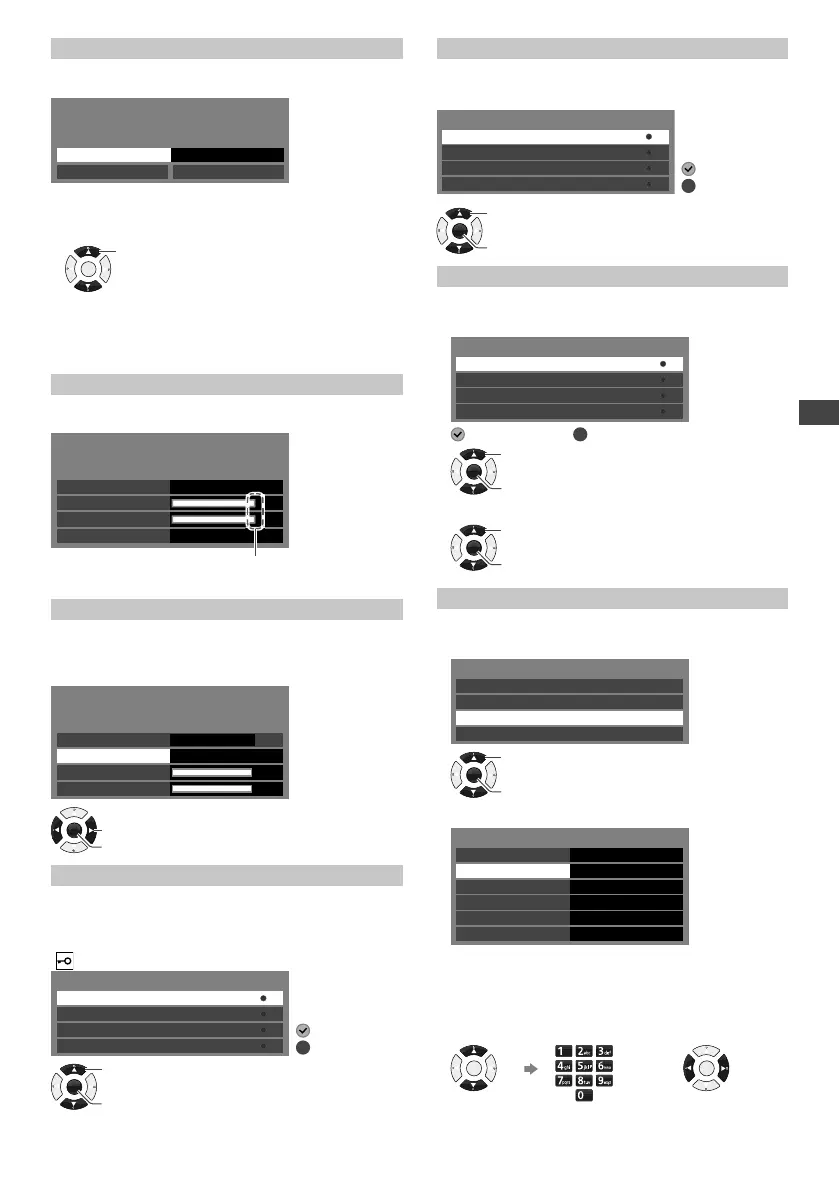
[Analogue Manual Tuning]
Sets analogue channel manually.
Example: Antenna
Analogue Manual Tuning
Searching Channels
Scan up
Scan down
Start Frequency (MHz) 48.00
1 Enter the frequency to start scanning.
2 Select the scanning method.
OK
Select
• [Scan up]: Scans ascendingly from the entered
frequency to higher frequencies.
• [Scan down]: Scans descendingly from the entered
frequency to lower frequencies.
[DVB-T Signal Condition]
Shows the Digital TV signal condition.
Example:
DVB-T Signal Condition
Signal Level
Channel
Signal Condition
Bit Error Rate 0.00E-06
40
96
96
These bars show the maximum signal value of the
selected channel.
[DVB-T Manual Tuning]
Searches for the Digital TV channels manually.
All channels found will be added to the Channel List.
Select a channel position, then start tuning.
DVB-T Manual Tuning
Channel 40
Scan
Signal Condition
Signal Level
0%
96
96
Antenna
OK
Access
Change
[Favourites Edit]
Creates favourite channel lists from various
broadcasters.
Select a channel to add or remove from the list.
(
: Encrypted channel)
Favourites Edit
4
901
40
902
Digital
Analogue
Digital
Analogue
: Add
: Remove
OK
Add / Remove
Select
[Skip]
Skips or hides unwanted channels.
Select a channel, then reveal / hide.
Skip
4
901
40
902
Digital
Analogue
Digital
Analogue
: Hide (skip)
: Reveal
OK
Access
Select
[Sort]
Sorts channels.
1 Select a channel.
Sort
4
901
40
902
Digital
Analogue
Digital
Analogue
: Selected
: Unselected
OK
Access
Select
2 Swap the channel position (if available).
OK
Access
Select
[Channel List Edit]
Edits channel settings.
1 Select a channel.
Channel List Edit
4
901
40
902
Digital
Analogue
Digital
Analogue
OK
Access
Select
2 Edit the channel settings.
Channel List Edit
Network Name
Frequency (MHz)
Channel Name
Sound System B/G
Channel
Colour System
901
Auto
48.25
• You cannot change the [Network Name].
• [Frequency], [Colour System] and [Sound System]
edit are available for Analogue channels only.
Select an
item.
Enter the new
settings.
Change the
settings.
OK
or
OK
TH-32F400AZ_EN-1.indd 17TH-32F400AZ_EN-1.indd 17 2/1/2018 1:21:10 PM2/1/2018 1:21:10 PM





 To Next Page