First Ti etup
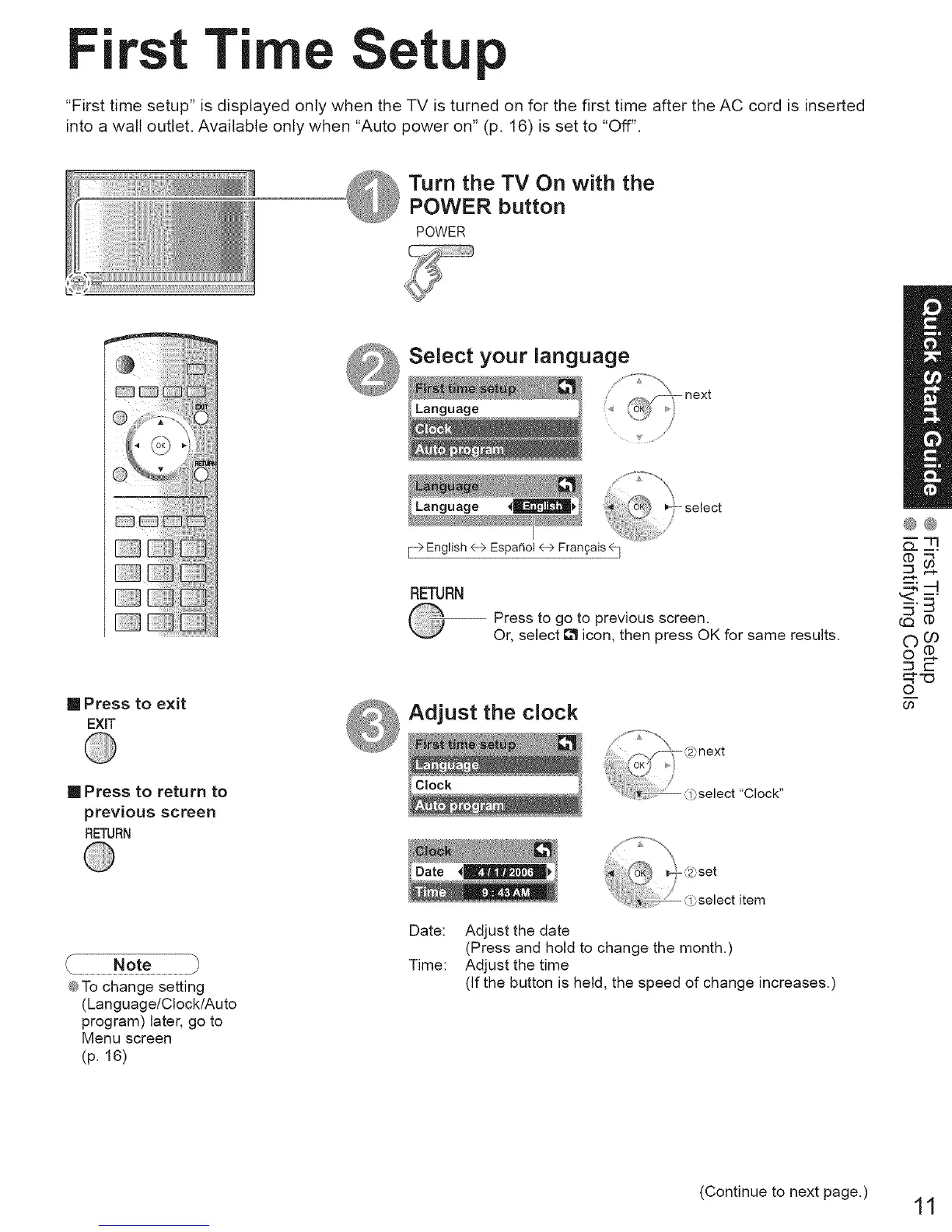
"First time setup" is displayed only when the TV is turned on for the first time after the AC cord is inserted
into a wall outlet. Available only when "Auto power on" (p. 16) is set to "Off".
Turn the TV On with the
POWER button
POWER
Select your language
/
,,¢
[] Press to exit
EXiT
F> English 4-->EspaAol 4-->Frangais _]
RETURN
Press to go to previous screen.
Or, select _ icon, then press OK for same results.
Adjust the clock
@@
:::3 ,-_
©(#
©
[] Press to return to
previous screen
RETURN
@To change setting
(Language/Clock/Auto
program) later, go to
Menu screen
(p. 16)
Date:
Time:
Adjust the date
(Press and hold to change the month.)
Adjust the time
(If the button is held, the speed of change increases.)
(Continue to next page.)
11





 To Next Page