EasyManua.ls Logo

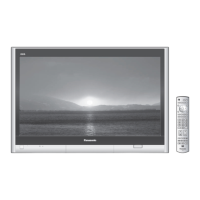
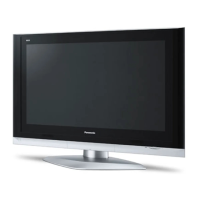
Panasonic TH-50PX50U - User Manual

Panasonic TH-50PX50U
48 pages
Print Icon
To Next Page IconTo Next Page
Loading...
Panasonic
Operating Instructions
Digital High Definition
Plasma Television
Model No.
TH-37PX50U
TH-42PX50U
TH-50PX50U
For assistance, please call : 1-888-VIEW-PTV (843-9788)
or visit us at www.panasonic.com/contactinfo (U.S.A.)
For assistance, please call : 787-750-4300
or visit us at www.panasonic.com (Puerto Rico)
For assistance, please call : 1-800-561-5505
or visit us at www.panasonic.ca (Canada)
Before connecting, operating or adjusting this product, please read these instructions completely.
Please keep this manual for future reference.
( English ] TQBC2003-1

Other manuals for Panasonic TH-50PX50U

Question and Answer IconNeed help?

Do you have a question about the Panasonic TH-50PX50U and is the answer not in the manual?

Summary

Important Safety Instructions

Safety Precautions

Setup and Placement Safety

Guidelines for safe operation, placement, ventilation, and avoiding instability.

Power Cord Handling

Guidelines for safe handling, connection, and care of the AC power cord to prevent hazards.

Troubleshooting Safety Measures

Actions to take during malfunctions, smoke, or liquid exposure to prevent further damage.

Cleaning and Maintenance

Display Panel Cleaning

Instructions for gently cleaning the treated display panel surface with specific methods.

Cabinet Cleaning

Procedure for cleaning the TV cabinet using appropriate cloths and solutions.

Infrared Interference Avoidance

Advice on positioning infrared sensors away from the TV's emissions to prevent disruption.

Installation Guide

Receiver Location

Guidance on optimal placement for comfortable viewing and adequate ventilation.

Optional External Equipment

Information on selecting and connecting external audio/video devices.

Remote Control Battery Installation

Step-by-step instructions for inserting batteries into the remote control.

Accessories List

Included Accessories Checklist

List of items that should be checked upon unpacking the television.

Optional Accessories for Purchase

Details on optional accessories like wall-hanging brackets available for purchase.

Cable Connection Procedures

General Cable Connections

Diagrams and notes for connecting various cables to the TV's input/output terminals.

Antenna and CableCARD Connection

Steps for connecting an antenna and setting up CableCARD for digital channels.

HDMI Connection Guide

Connecting devices via HDMI for digital high-definition A/V signals.

Component and Video Input Connections

Connecting DTV STB, DVD players, VCRs, and game consoles via component or video inputs.

Audio and Program Output Connections

Connecting external amplifiers and setting up program output for recording.

Power and Unit Controls

Power ON;OFF Operation

Steps for turning the television on and off using the remote control or main unit.

Main Unit Controls Overview

Overview of the physical buttons and indicators on the TV's main unit.

Remote Control Operation

Illuminated Remote Control Layout

Detailed diagram and description of the illuminated remote control buttons.

Remote Control Button Functions

Explanation of various buttons like SAP, Light, Mute, Aspect, and Recall.

Navigation and Selection Buttons

How to use VOL, CH, MENU, and RETURN buttons for menu navigation.

Initial Setup Wizard

Language Setup

Selecting the preferred language for on-screen displays and menus.

Clock and Date Configuration

Setting the current time and date, manually or automatically from broadcast.

Time Zone and Daylight Saving

Configuring time zone and daylight saving settings for accurate time display.

Automatic Channel Scanning

Steps for performing an auto program scan to find available channels.

Basic TV Viewing

Watching TV Programs

Basic steps for turning on the TV, selecting channels, and adjusting volume.

Aspect Ratio Controls

How to adjust the picture aspect ratio (4:3, Zoom, Full, Just) for different content.

Menu System Navigation

On-Screen Menu Overview

Guide to accessing and navigating through the TV's on-screen menus.

Picture Menu Navigation

Accessing and adjusting picture parameters like brightness, color, and mode.

Audio Menu Navigation

Navigating and adjusting audio parameters like bass, treble, and surround.

Timer and Setup Menus

Configuring sleep timers, setup options, and program channel management.

Input Labels and Closed Captioning

Customizing input labels and managing closed caption display settings.

Digital Closed Caption and CC Reset

Customizing digital caption appearance and resetting CC settings.

Other Setup and System Reset

Advanced settings like Auto Power On, Side Bar, and system reset procedures.

Lock and Parental Controls

Lock Mode and Channel Blocking

Setting up parental control modes, lock functions, and blocking specific channels.

Program Blocking and Ratings

Using V-Chip to block programs by rating and understanding rating charts.

Password Management and Caution

Changing the lock password and important customer cautions regarding blocking.

Operating Peripheral Equipment

Remote Control Programming

Steps to program the TV remote to control other brands' equipment.

Infrared Code Index

List of infrared codes for various VCR, DVD, Receiver, and other components.

Component Code Lists

Specific codes for controlling DVD, CD, VCR, Cassette, Receiver, DBS, and Cable Box devices.

Remote Control Key Charts

Mapping of remote control keys for various operational modes like DTV, Cable, and VCR.

Specifications

Troubleshooting and Support

Troubleshooting Common Issues

Solutions for common video, audio, display, and sound problems.

Customer Support Information

Contact information for product assistance, accessory purchases, and service.

Customer Record Keeping

Summary

Important Safety Instructions

Safety Precautions

Setup and Placement Safety

Guidelines for safe operation, placement, ventilation, and avoiding instability.

Power Cord Handling

Guidelines for safe handling, connection, and care of the AC power cord to prevent hazards.

Troubleshooting Safety Measures

Actions to take during malfunctions, smoke, or liquid exposure to prevent further damage.

Cleaning and Maintenance

Display Panel Cleaning

Instructions for gently cleaning the treated display panel surface with specific methods.

Cabinet Cleaning

Procedure for cleaning the TV cabinet using appropriate cloths and solutions.

Infrared Interference Avoidance

Advice on positioning infrared sensors away from the TV's emissions to prevent disruption.

Installation Guide

Receiver Location

Guidance on optimal placement for comfortable viewing and adequate ventilation.

Optional External Equipment

Information on selecting and connecting external audio/video devices.

Remote Control Battery Installation

Step-by-step instructions for inserting batteries into the remote control.

Accessories List

Included Accessories Checklist

List of items that should be checked upon unpacking the television.

Optional Accessories for Purchase

Details on optional accessories like wall-hanging brackets available for purchase.

Cable Connection Procedures

General Cable Connections

Diagrams and notes for connecting various cables to the TV's input/output terminals.

Antenna and CableCARD Connection

Steps for connecting an antenna and setting up CableCARD for digital channels.

HDMI Connection Guide

Connecting devices via HDMI for digital high-definition A/V signals.

Component and Video Input Connections

Connecting DTV STB, DVD players, VCRs, and game consoles via component or video inputs.

Audio and Program Output Connections

Connecting external amplifiers and setting up program output for recording.

Power and Unit Controls

Power ON;OFF Operation

Steps for turning the television on and off using the remote control or main unit.

Main Unit Controls Overview

Overview of the physical buttons and indicators on the TV's main unit.

Remote Control Operation

Illuminated Remote Control Layout

Detailed diagram and description of the illuminated remote control buttons.

Remote Control Button Functions

Explanation of various buttons like SAP, Light, Mute, Aspect, and Recall.

Navigation and Selection Buttons

How to use VOL, CH, MENU, and RETURN buttons for menu navigation.

Initial Setup Wizard

Language Setup

Selecting the preferred language for on-screen displays and menus.

Clock and Date Configuration

Setting the current time and date, manually or automatically from broadcast.

Time Zone and Daylight Saving

Configuring time zone and daylight saving settings for accurate time display.

Automatic Channel Scanning

Steps for performing an auto program scan to find available channels.

Basic TV Viewing

Watching TV Programs

Basic steps for turning on the TV, selecting channels, and adjusting volume.

Aspect Ratio Controls

How to adjust the picture aspect ratio (4:3, Zoom, Full, Just) for different content.

Menu System Navigation

On-Screen Menu Overview

Guide to accessing and navigating through the TV's on-screen menus.

Picture Menu Navigation

Accessing and adjusting picture parameters like brightness, color, and mode.

Audio Menu Navigation

Navigating and adjusting audio parameters like bass, treble, and surround.

Timer and Setup Menus

Configuring sleep timers, setup options, and program channel management.

Input Labels and Closed Captioning

Customizing input labels and managing closed caption display settings.

Digital Closed Caption and CC Reset

Customizing digital caption appearance and resetting CC settings.

Other Setup and System Reset

Advanced settings like Auto Power On, Side Bar, and system reset procedures.

Lock and Parental Controls

Lock Mode and Channel Blocking

Setting up parental control modes, lock functions, and blocking specific channels.

Program Blocking and Ratings

Using V-Chip to block programs by rating and understanding rating charts.

Password Management and Caution

Changing the lock password and important customer cautions regarding blocking.

Operating Peripheral Equipment

Remote Control Programming

Steps to program the TV remote to control other brands' equipment.

Infrared Code Index

List of infrared codes for various VCR, DVD, Receiver, and other components.

Component Code Lists

Specific codes for controlling DVD, CD, VCR, Cassette, Receiver, DBS, and Cable Box devices.

Remote Control Key Charts

Mapping of remote control keys for various operational modes like DTV, Cable, and VCR.

Specifications

Troubleshooting and Support

Troubleshooting Common Issues

Solutions for common video, audio, display, and sound problems.

Customer Support Information

Contact information for product assistance, accessory purchases, and service.

Customer Record Keeping

Panasonic TH-50PX50U Specifications

General IconGeneral
Screen Size50 inches
Display TypePlasma
Resolution1366 x 768
Aspect Ratio16:9
HDMI Ports2
Component Video Inputs2
S-Video Inputs1
Composite Video Inputs2
Viewing Angle160 degrees
Response Time0.001 ms
InputsHDMI, Component, S-Video, Composite
Speakers2 x 10W
HDTV Compatibility720p

Related product manuals