34
Picture Profi les
Note:
Make a note of the new password to remember it.
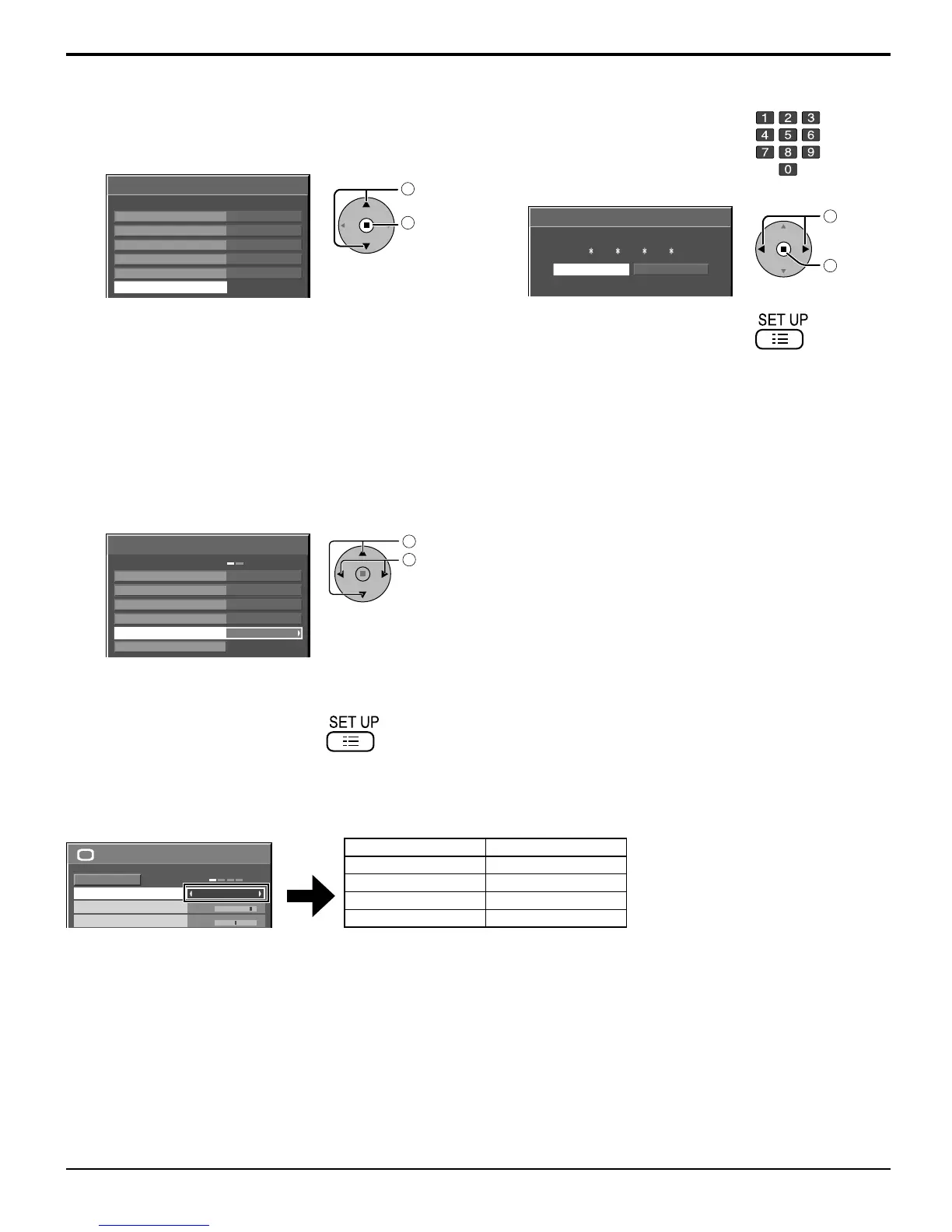
1
Follow steps 1–4 in the previous procedure,
<Locking and unlocking profi les>.
2
Select “Change password”.
Memory lock
Off
Change password
MEMORY3
Off
MEMORY4
Lock1
MEMORY1
Off
MEMORY2
isf Mode
Off
1
select
2
access
<Changing passwords>
3
Enter a new 4-digit password.
4
Select “Ok”.
Ok Cancel
Input new password
1
select
2
set
5
Exit the menu.
<isf Mode Setting>
Switches to “PICTURE MENU” mode display.
1
Follow steps 1–4 in the previous procedure,
<Locking and unlocking profi les>.
2
Select “isf Mode”.
Memory lock
Off
Change password
MEMORY3
Off
MEMORY4
Lock1
MEMORY1
Off
MEMORY2
isf Mode
Off
1
select
2
adjust
3
Specify “On” or “Off”.
4
Exit the menu.
Specifying “On” for isf Mode changes the “PICTURE MENU” mode display as follows.
“PICTURE MENU” mode display
25
0
PICTURE
NORMAL
NORMALIZE
STANDARD
BRIGHTNESS
PICTURE MENU
PICTURE
isf Mode: Off isf Mode: On
STANDARD STANDARD
DYNAMIC isf Mode DAY
CINEMA isf Mode NIGHT
MONITOR MONITOR









 To Next Page