18
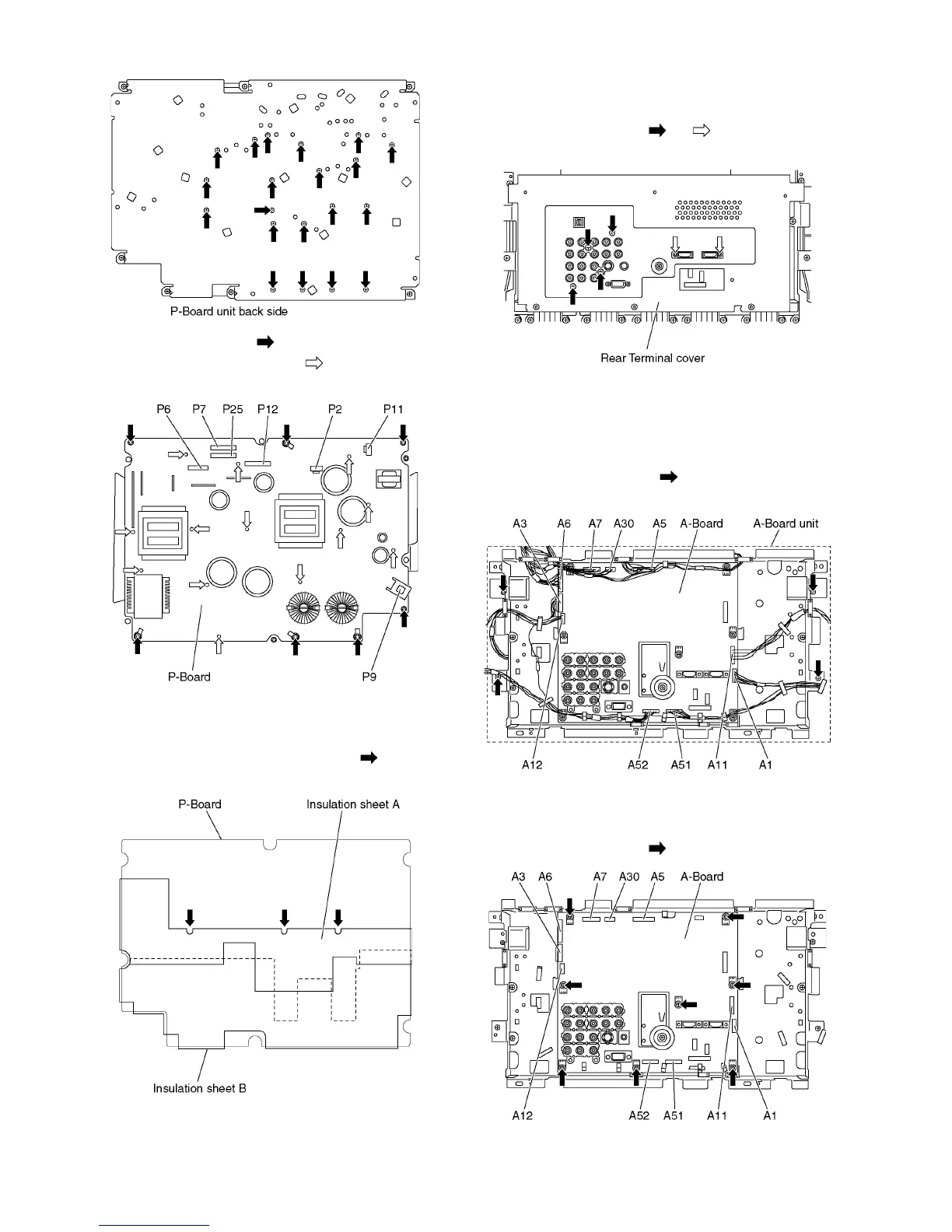
7. Remove the screws (×7 ).
8. Remove the molding props (×13 ).
9. Remove the P-Board.
Note:
When assembling the P-Board, the position of each hole of
the insulation sheets (A and B) is set to the position of each
hole of the P-Board, then assemble them. ( marks indi-
cate setting positions.)
7.5. Remove the Rear Terminal
cover
1. Remove the screws (×4 , ×2 ).
2. Remove the Rear Terminal cover.
7.6. Remove the A-Board unit
1. Unlock the cable clampers to free the cable.
2. Disconnect the connectors (A1, A3, A5, A6, A7, A11, A12,
A30, A51 and A52).
3. Remove the screws (×4 ) and remove the A-Board
unit.
7.7. Remove the A-Board
1. Remove the A-Board unit. (See section 7.6.)
2. Remove the screws (×8 ) and remove the A-Board.



 To Next Page