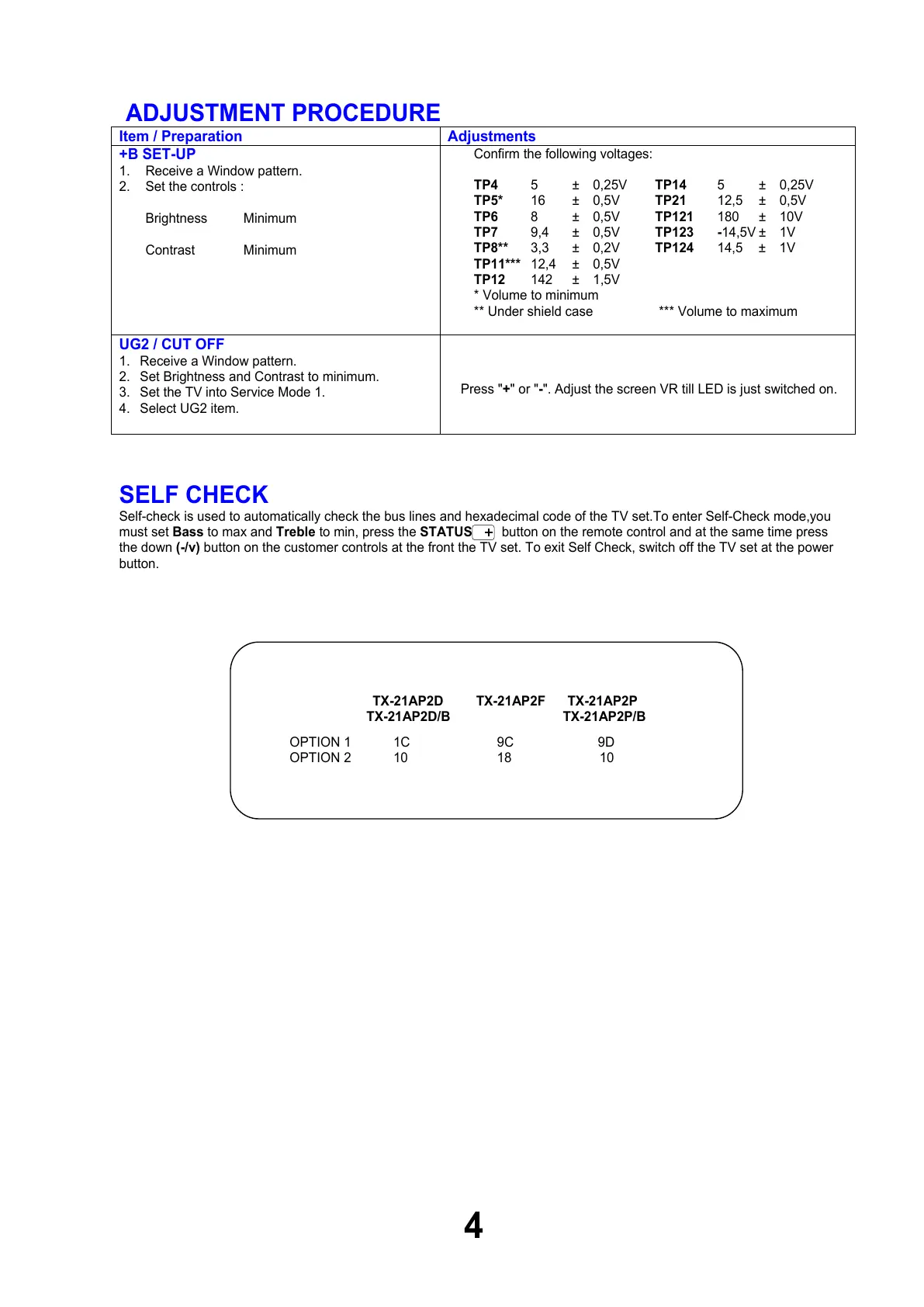
ADJUSTMENT PROCEDURE
Item / Preparation Adjustments
+B SET-UP
1. Receive a Window pattern.
2. Set the controls :
Brightness Minimum
Contrast Minimum
Confirm the following voltages:
TP4 5 ± 0,25V TP14 5 ± 0,25V
TP5* 16 ± 0,5V TP21 12,5 ± 0,5V
TP6 8 ± 0,5V TP121 180 ± 10V
TP7 9,4 ± 0,5V TP123 -14,5V ± 1V
TP8** 3,3 ± 0,2V TP124 14,5 ± 1V
TP11*** 12,4 ± 0,5V
TP12 142 ± 1,5V
* Volume to minimum
** Under shield case *** Volume to maximum
UG2 / CUT OFF
1. Receive a Window pattern.
2. Set Brightness and Contrast to minimum.
3. Set the TV into Service Mode 1.
4. Select UG2 item.
Press "+" or "-". Adjust the screen VR till LED is just switched on.
SELF CHECK
Self-check is used to automatically check the bus lines and hexadecimal code of the TV set.To enter Self-Check mode,you
must set Bass to max and Treble to min, press the STATUS button on the remote control and at the same time press
the down (-/v) button on the customer controls at the front the TV set. To exit Self Check, switch off the TV set at the power
button.
4
TX-21AP2D TX-21AP2F TX-21AP2P
TX-21AP2D/B TX-21AP2P/B
OPTION 1 1C 9C 9D
OPTION 2 10 18 10



 To Next Page