English
9
40-inch model
49-inch model
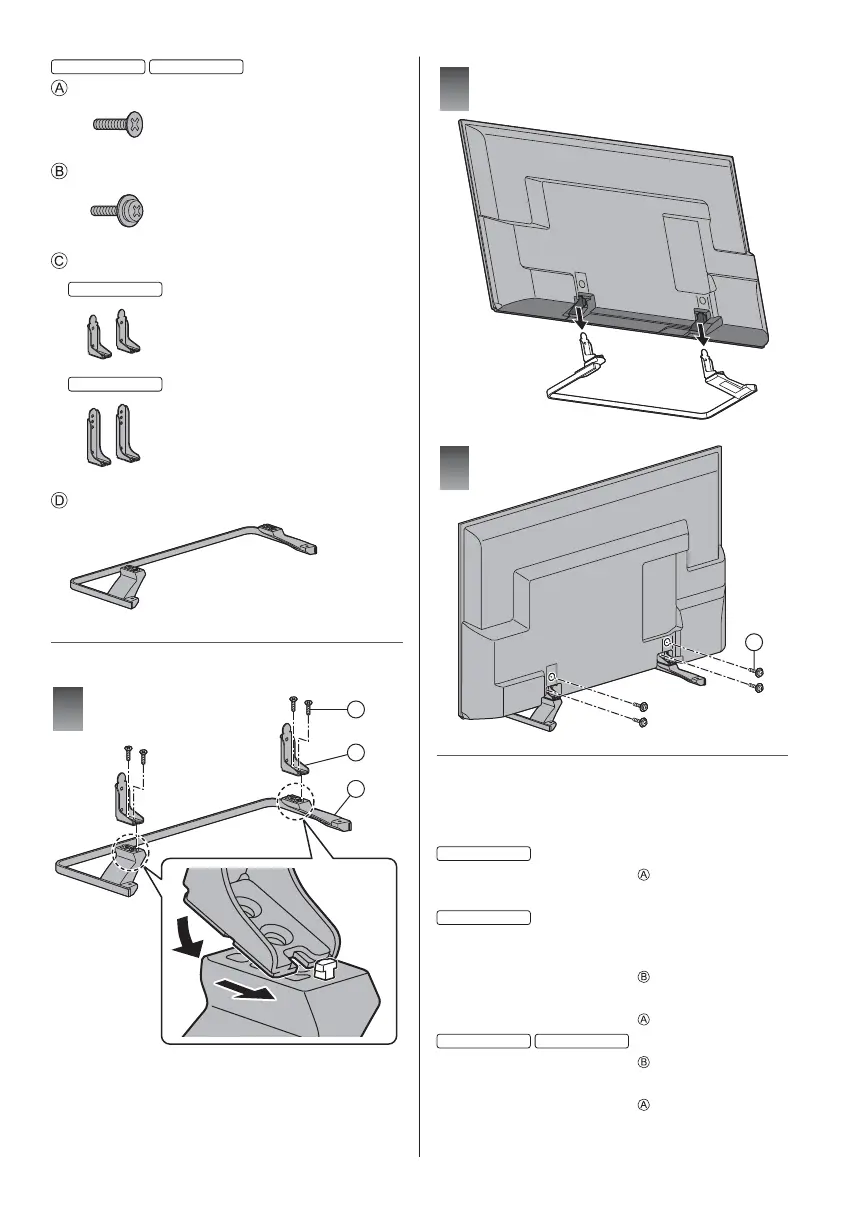
Assembly screw (4)
M5 × 15
Assembly screw (4)
M4 × 12
Bracket (2)
40-inch model
49-inch model
Base
Assembling the pedestal
A
C
D
1
2
3
B
Removing the pedestal from the TV
Be sure to remove the pedestal in the following way
when using the wall-hanging bracket or repacking the
TV.
24-inch model
1 Remove the assembly screws from the TV.
2 Pull out the pedestal from the TV.
32-inch model
1 Put the TV onto a work table with the screen panel
down on the clean and soft cloth.
2 Remove the assembly screws from the TV.
3 Pull out the pedestal from the TV.
4 Remove the assembly screws from the bracket.
40-inch model
49-inch model
1 Remove the assembly screws from the TV.
2 Pull out the pedestal from the TV.
3 Remove the assembly screws
from the bracket.







 To Next Page