~
~9FG50A'M-2833_E.fm Page 22 Tuesday, January 11,2005 5:13 PM
-t
t-
~~~~~
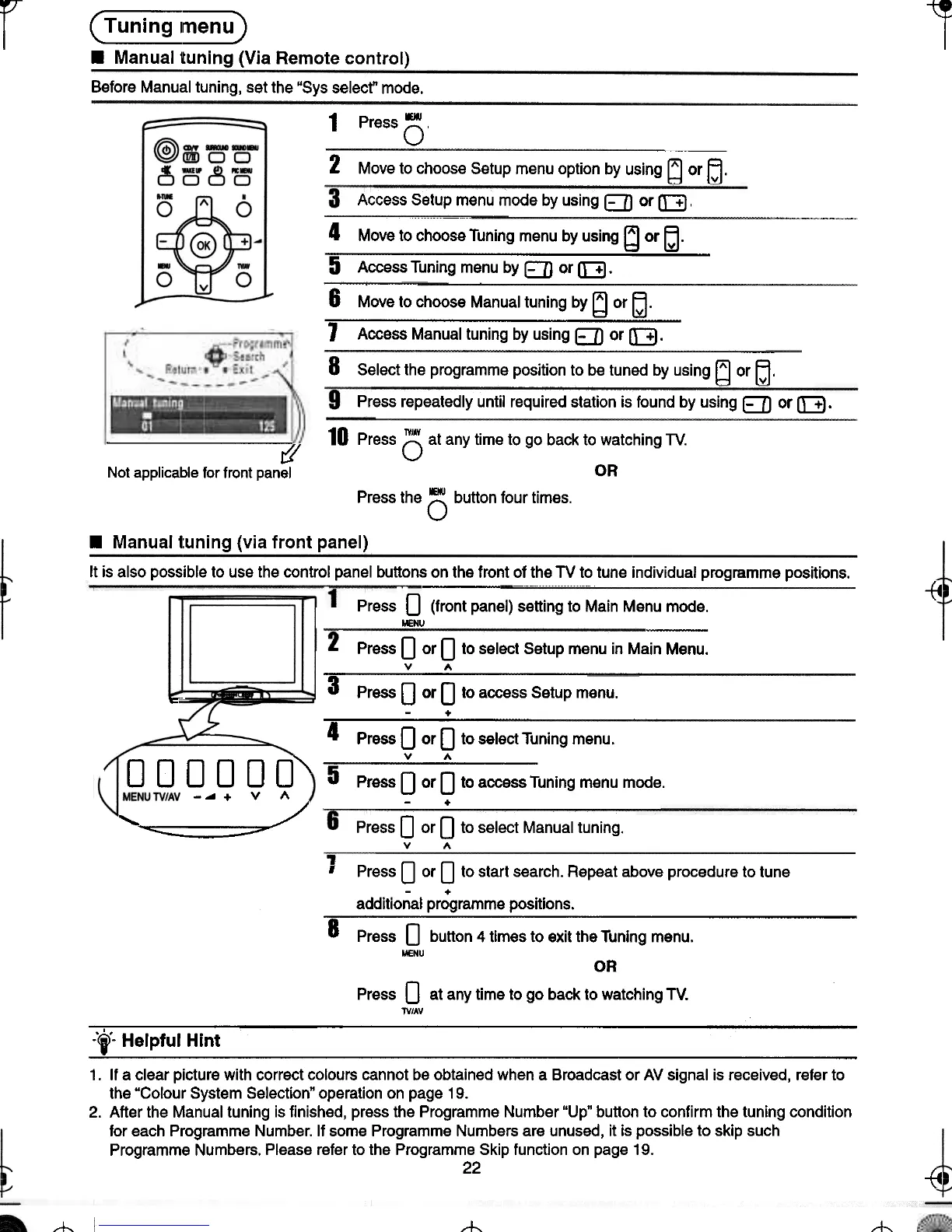
.Manual tuning (Via Remote control)
Before Manual tuning, set the "Sys select" mode.
-
1 Press 0
2 Move to choose Setup menu option by using bJ or~.
Access Setup menu mode by using E:] or [:B ,
4 Move to choose Tuning menu by using [d or ~.
5 Access Tuning menu by ED or [:B.
--
6 Move to choose Manual tuning by ~ or~.
1 Access Manual tuning by using EJJ or [3.
8 Select the programme position to be tuned by using !d or ~.
Press repeatedly until required station is found by using E] or [::3.
10 Press (5 at any time to go back to watching TV.
OR
i:'l'
Not applicable for front panel
Press the () button four times.
.Manuall:uning (via front panel)
~ -t4
c-
It is also possible to use the control panel buttons on the front of the TV to tune individual programme positions.
Press 0 (front panel) setting to Main Menu mode.
!ENU
Press 0 or 0 to select Setup menu in Main Menu.
v A
3 Press 0 or 0 to access Setup menu.
-+
4 Press 0 or 0 to select Tuning menu.
I"" v A
0 0 0 0 0 0 5 Press 0 or 0 to access Tuning menu mode.
-~+ V '"
~/ -+-
~
Press 0 or 0 to select Manual tuning.
v A
, Press 0 or 0 to start search. Repeat above procedure to tune
additio~al pr;gramme positions.
8 Press 0 button 4 times to exit the Tuning menu.
MENU
OR
Press 0 at any time to go back to watching TV.
TV/AV
.'.
-j- Helpful Hint
1. If a clear picture with correct colours cannot be obtained when a Broadcast or AV signal is received, refer to
the "Colour System Selection" operation on page 19.
2. After the Manual tuning is finished, press the Programme Number "Up" button to confirm the tuning condition
for each Programme Number. If some Programme Numbers are unused, it is possible to skip such
Programme Numbers. Please refer to the Programme Skip function on page 19.
22
~ -t4
~
--t-
-t






 To Next Page