English
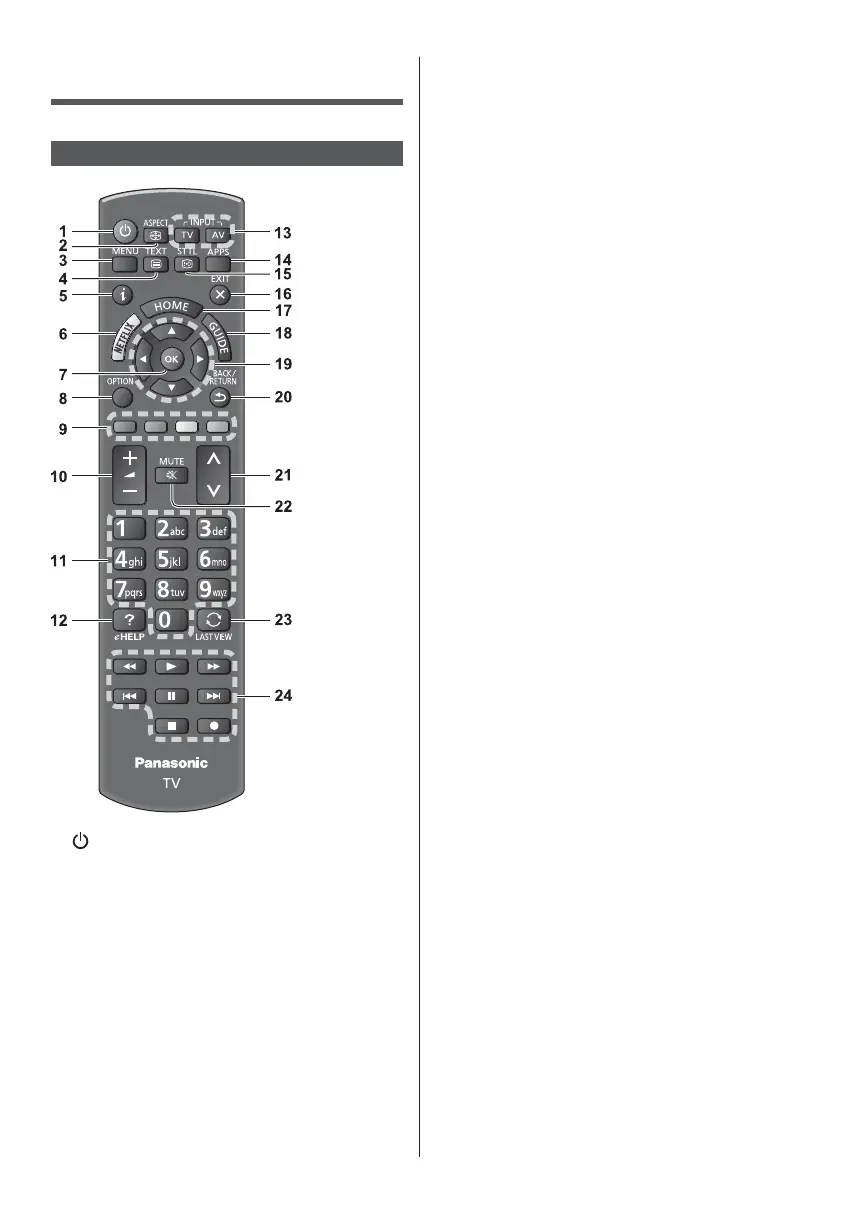
Changes aspect ratio.
Press to access Picture, Sound, Network, Timer,
Setup and Help Menus, etc.
Displays channel and programme information.
Accesses NETFLIX service directly.
A broadband network environment is required in
order to fully use this function.
This service may be stopped or changed without
notice.
Confirms selections and choices.
Press after selecting channel positions to quickly
change channel.
Displays channel list.
Easy optional setting for viewing, sound, etc.
Used for the selection, navigation and operation of
various functions.
Changes channel and teletext pages.
Sets characters.
When in Standby mode, switches TV on.
Displays [eHELP] (Built-in Operating Instructions).
TV - switches to DVB-S / DVB-C / DVB-T /
DVB-via-IP / Analogue.
AV - switches to AV input mode from Input
Selection list.
Displays [APPS List] (applications list).
Displays subtitles.
Returns to [Home Screen].
Displays [Home Screen].
For details, refer to [eHELP] (Search by Purpose >
Read first > Features).
Displays Electronic Programme Guide.
Makes selections and adjustments.
20
Returns to the previous menu / page.
22
23
Switches to previously viewed channel or input
mode.
24













 To Next Page