EasyManua.ls Logo

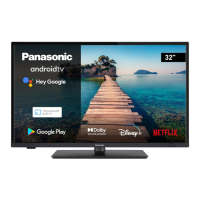
Panasonic TX-32MS490E - User Manual

Panasonic TX-32MS490E
84 pages
Go to English
Print Icon
To Next Page IconTo Next Page
Loading...
Besoin d’un conseil ? Une question sur ce produit ?
RDV sur la communauté SAV Darty : https://sav.darty.com
Déjà 1/2 million de solutions grâce à l’avis des utilisateurs.
PANASONIC
TELEVISEUR
TX-32MS490E
EXCLUSIVITÉ
FNAC/DARTY
NOTICE D’UTILISATION

Table of Contents

Question and Answer IconNeed help?

Do you have a question about the Panasonic TX-32MS490E and is the answer not in the manual?

Summary

Safety Information

IMPORTANT - Please read these instructions fully before installing or operating

Crucial safety instructions for TV installation and operation.

Warning Stability Hazard

WALL MOUNTING WARNINGS

Safety guidelines for mounting the TV on a wall.

Maintenance

Assembling; Removing the pedestal

Other Connections

Turning On;Off the TV

Power Connection and Standby Modes

Instructions for connecting power and managing standby states.

TV Control & Operation

Remote Control

Initial Setup Wizard

Setup Process Overview

Covers language, region, network, and Google account setup.

Initial Setup Wizard (Continued)

Tuner Mode Configuration (Aerial, Cable, Satellite)

Detailed steps for channel scanning based on tuner type.

Home Screen

Live TV Mode Menu Content

Settings Menu Overview

Network and Internet Configuration

Configuring Wi-Fi and wired network connections.

Channel Management

Channel Management (Continued)

Accounts & Sign In

Device Preferences

System Information and Factory Reset

Accessing system details and resetting TV to defaults.

Timer and Picture Settings

Configuring power timers and picture adjustments.

Device Preferences (Continued)

Sound Settings and Dolby Processing

Configuring audio styles, volume, and Dolby enhancements.

Home Screen, Store Mode, and Assistant

Customizing Home Screen, Store Mode, and Google Assistant.

Channel List Management

Programme Guide

Connecting to the Internet

Wired and Wireless Network Setup

Connecting the TV to the internet via Ethernet or Wi-Fi.

Multi Media Player

Multi Media Player (Continued)

Google Cast Functionality

Software Update

Troubleshooting & Tips

Power and Remote Control Issues

Steps to resolve power-on and remote control problems.

Channel and Picture;Sound Problems

Resolving issues with no channels, picture, or sound.

Input Source Selection Issues

Resolving problems with selecting input sources.

Summary

Safety Information

IMPORTANT - Please read these instructions fully before installing or operating

Crucial safety instructions for TV installation and operation.

Warning Stability Hazard

WALL MOUNTING WARNINGS

Safety guidelines for mounting the TV on a wall.

Maintenance

Assembling; Removing the pedestal

Other Connections

Turning On;Off the TV

Power Connection and Standby Modes

Instructions for connecting power and managing standby states.

TV Control & Operation

Remote Control

Initial Setup Wizard

Setup Process Overview

Covers language, region, network, and Google account setup.

Initial Setup Wizard (Continued)

Tuner Mode Configuration (Aerial, Cable, Satellite)

Detailed steps for channel scanning based on tuner type.

Home Screen

Live TV Mode Menu Content

Settings Menu Overview

Network and Internet Configuration

Configuring Wi-Fi and wired network connections.

Channel Management

Channel Management (Continued)

Accounts & Sign In

Device Preferences

System Information and Factory Reset

Accessing system details and resetting TV to defaults.

Timer and Picture Settings

Configuring power timers and picture adjustments.

Device Preferences (Continued)

Sound Settings and Dolby Processing

Configuring audio styles, volume, and Dolby enhancements.

Home Screen, Store Mode, and Assistant

Customizing Home Screen, Store Mode, and Google Assistant.

Channel List Management

Programme Guide

Connecting to the Internet

Wired and Wireless Network Setup

Connecting the TV to the internet via Ethernet or Wi-Fi.

Multi Media Player

Multi Media Player (Continued)

Google Cast Functionality

Software Update

Troubleshooting & Tips

Power and Remote Control Issues

Steps to resolve power-on and remote control problems.

Channel and Picture;Sound Problems

Resolving issues with no channels, picture, or sound.

Input Source Selection Issues

Resolving problems with selecting input sources.

Panasonic TX-32MS490E Specifications

General IconGeneral
Screen Size32 inches
Display TypeLED
Smart TVYes
HDMI Ports2
USB Ports1
Digital Audio OutputOptical
Built-in Wi-FiYes
BluetoothNo
Refresh Rate50 Hz
Audio Output10 W
Resolution1366 x 768 pixels
Dimensions (W x H x D)73.5 x 43.1 x 8.0 cm

Related product manuals