7
•
Identifying Controls
•
Accessories / Options
Identifying Controls
TV
PROGRAMME
ASPECT
INPUT
RETURN
EXIT
MENU
OK
OPTION
DIRECT TV REC
VCR
132
465
798
0
REC
VCR DVD
TEXT F.P. INDEX HOLD
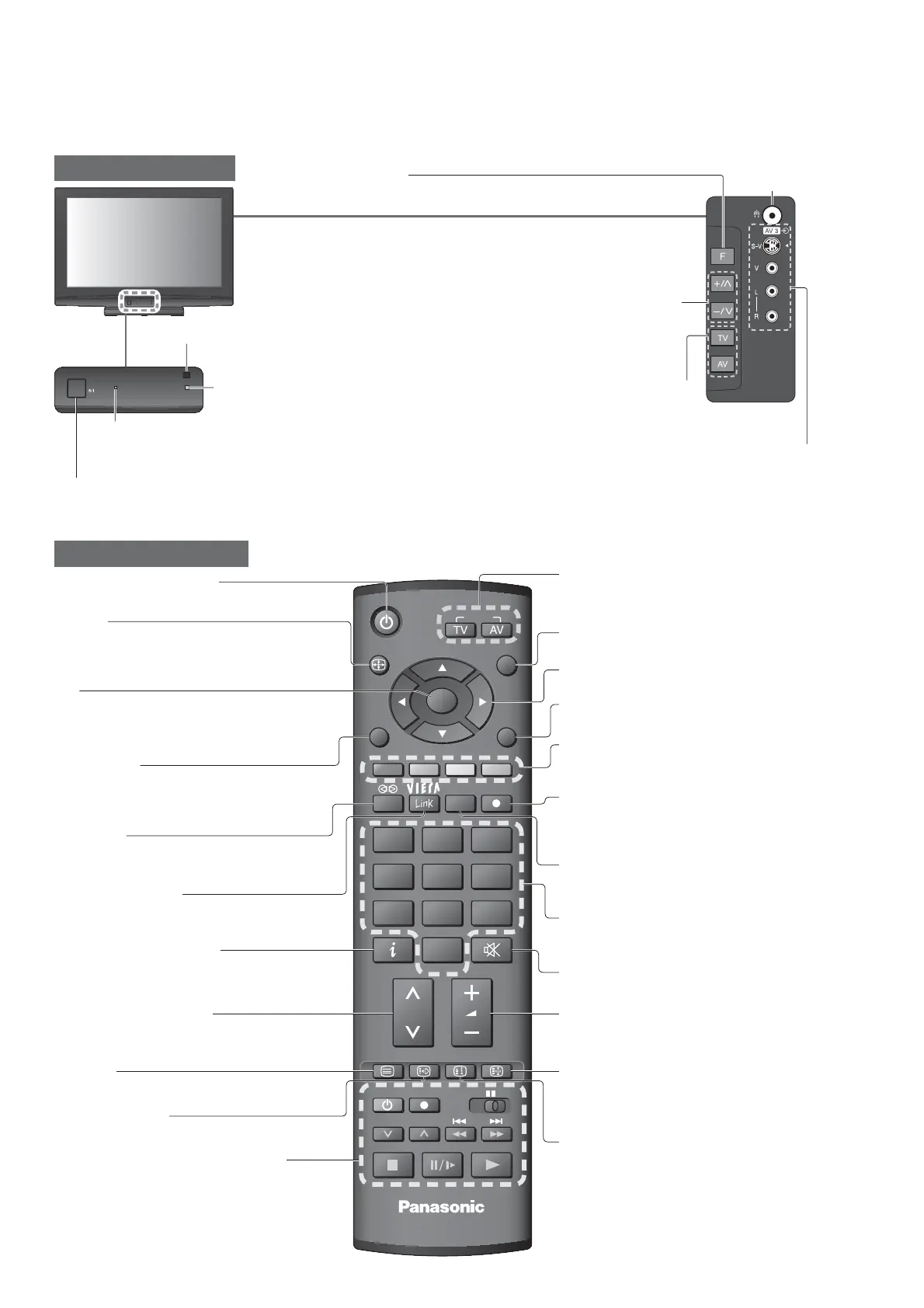
Remote Control
Cursor buttons
•
Makes selections and adjustments
Standby On / Off switch
•
Switches TV On or Off standby
Sound Mute
•
Switches sound mute On or Off
Surround
•
Switches Surround On or Off
Programme Up / Down
•
Selects programme in sequence
Teletext
•
Switches to teletext mode
OK
•
Con rms selections and choices
•
Press after selecting programme positions to
quickly change programme
VCR / DVD Panasonic equipment
operations
Volume Up / Down
Programme Information
•
Displays programme information
Index
•
Returns to the teletext index page
(teletext mode)
Exit
•
Returns to the normal viewing screen
VIERA Link Menu
•
Press to access VIERA Link Menu directly
Aspect
•
Changes aspect ratio from Aspect Selection list
•
Also possible by pressing this button
repeatedly until you reach the desired aspect
Option Menu
•
Easy setting for viewing and sound
options
Main Menu
•
Press to access VIERA Link, Picture,
Sound and Setup Menus
Favourite Page
•
Calls up the teletext page stored in blue button
Input mode selection
•
TV - switches to TV mode
•
AV - switches to AV input mode from Input
Selection list
Direct TV Recording
•
Records programme immediately in
DVD Recorder / VCR with Q-Link or
VIERA Link connection
Hold
•
Freeze / unfreeze picture
•
Holds the current teletext page (teletext
mode)
Return
•
Returns to the previous menu
Numeric buttons
•
Changes programme and teletext pages
•
When in Standby mode, switches TV On
Coloured buttons
•
Used for the selection, navigation and
operation of various functions
TV
C.A.T.S. (Contrast Automatic Tracking System) sensor
•
Senses brightness to adjust picture quality in “Eco” mode
in Picture Menu (p. 14)
Mains power On / Off switch
•
Switch On to turn on the TV or turn the TV to standby mode by the remote control
Changes the
input mode
Increases or decreases the programme
position by one. When a function is
already displayed, press to increase or
decrease the selected function. When
in Standby mode, switches TV On.
Function select
•
Volume / Contrast / Brightness / Colour / Sharpness /
Tint (NTSC mode) / Bass / Treble / Balance / Auto Setup
Headphones
jack
Power LED
•
Standby: red
On: green
•
When using the remote control, indicates the TV has received a command.
AV3 terminals
Remote control signal receiver









 To Next Page