12
English
●
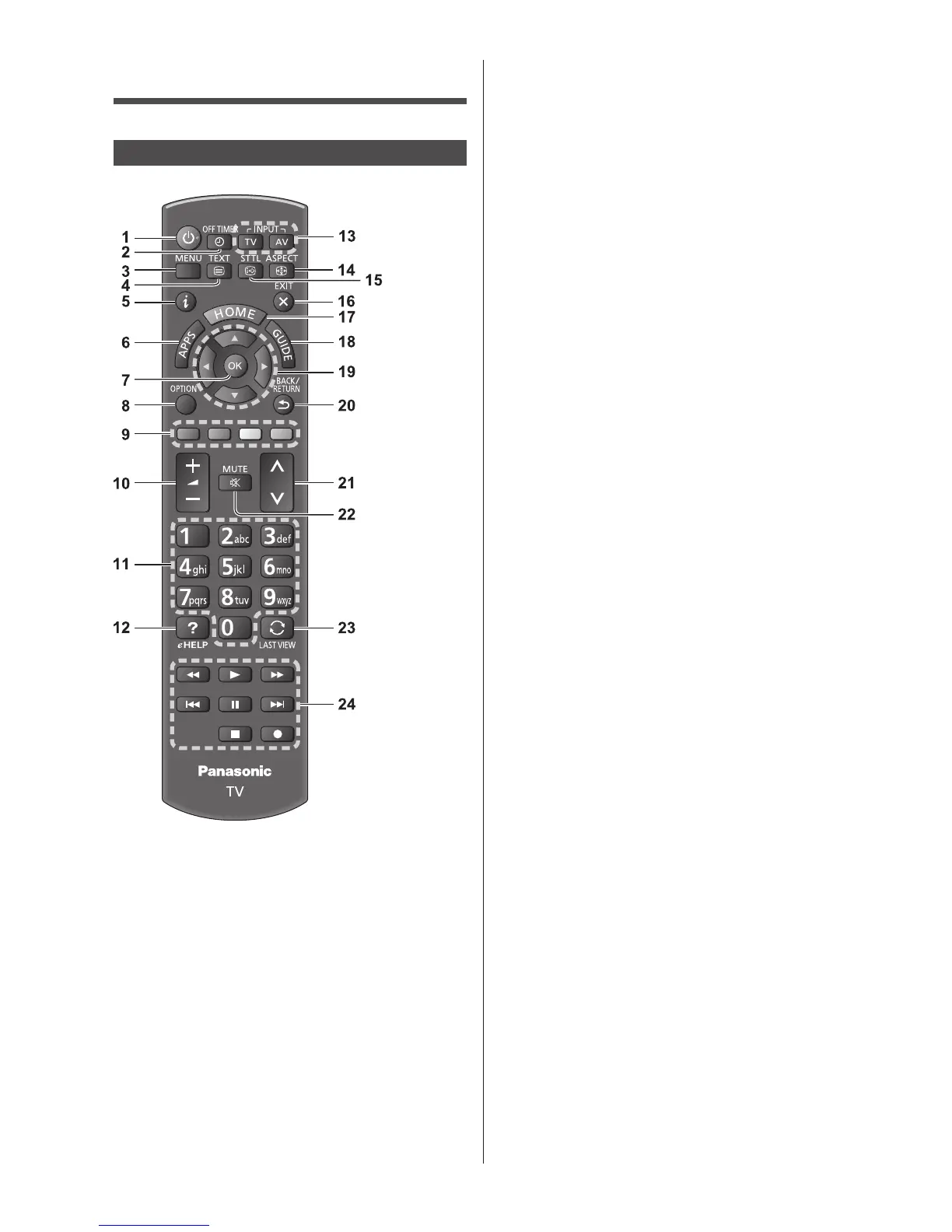
Displays channel list.
8 [Option Menu]
●
Easy optional setting for viewing, sound, etc.
9 Coloured buttons
(red-green-yellow-blue)
●
Used for the selection, navigation and operation of
various functions.
10
Volume Up / Down
11
Numeric buttons
●
Changes channel and teletext pages.
●
Sets characters.
●
When in Standby mode, switches TV on.
12
[eHELP]
●
Displays [eHELP] (Built-in Operating Instructions).
13
Input mode selection
●
TV - switches to DVB-C / DVB-T / Analogue.
●
AV - switches to AV input mode from Input
Selection list.
14
Aspect
●
Changes aspect ratio.
15
Subtitles
●
Displays subtitles.
16
Exit
●
Returns to [Home Screen].
17
HOME
●
Displays [Home Screen].
18
TV Guide
●
Displays Electronic Programme Guide.
19
Cursor buttons
●
Makes selections and adjustments.
20
Return
●
Returns to the previous menu / page.
21
Channel Up / Down
22
Sound Mute On / Off
23
Last view
●
Switches to previously viewed channel or input
mode.
24
Operations for contents, connected equipment,
etc.
Identifying Controls
Remote Control
1 Standby On / Off switch
2 Off Timer
●
Sets the time for the TV to automatically turn off.
3 [Main Menu]
●
Press to access Picture, Sound, Network, Timer,
Setup and Help Menus.
4 Teletext button
5 Information
●
Displays channel and programme information.
6 APPS
●
Displays [APPS List] (applications list).
7 OK
●
Confirms selections and choices.
●
Press after selecting channel positions to quickly
change channel.




 To Next Page