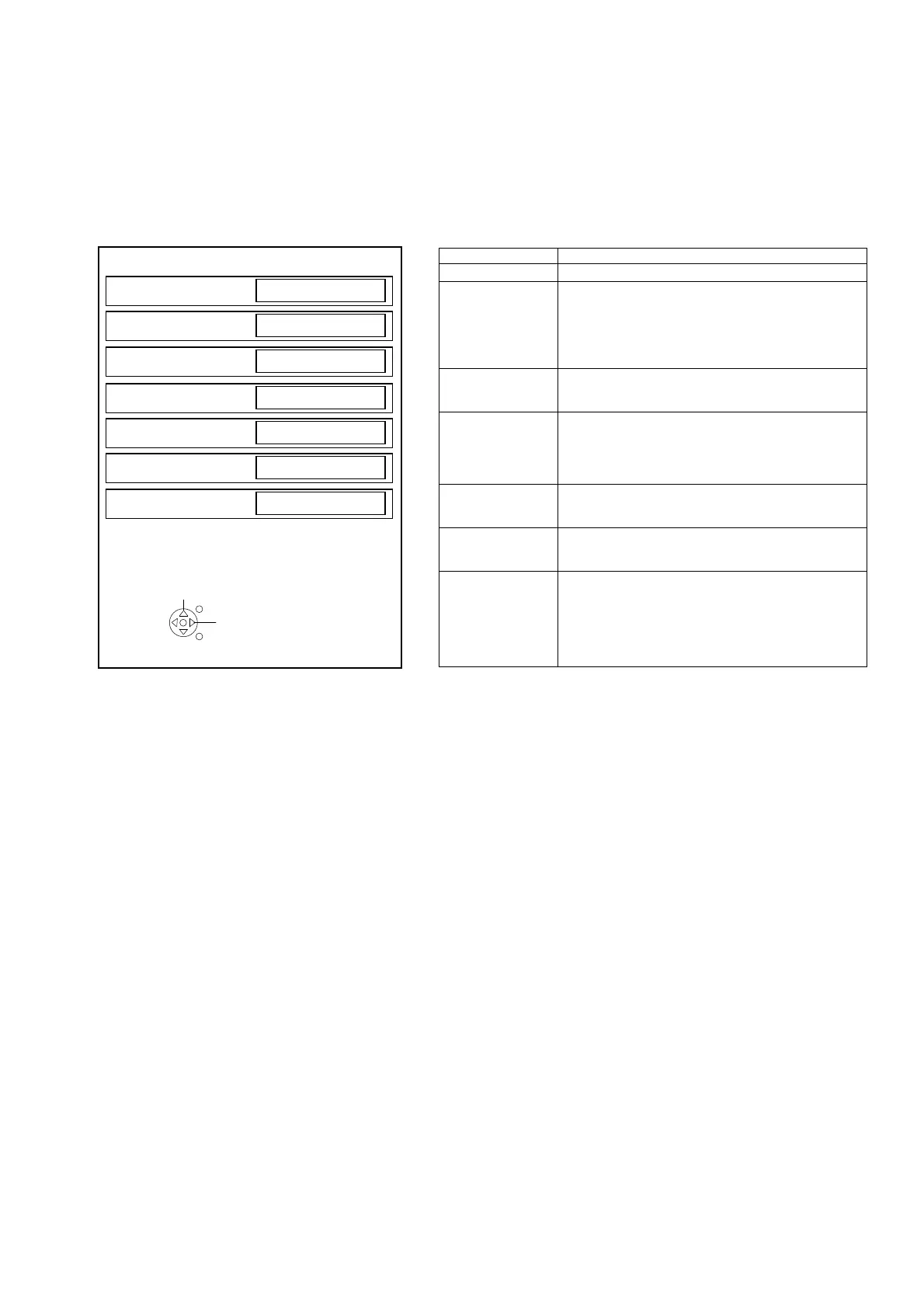
Hotel Mode
1. Purpose
Restrict a function for hotels.
2. Access command to the Hotel mode setup menu.
In order to display the Hotel mode setup menu,
please enter the following command (within 2 second).
[TV] : Vol.[Down] + [REMOTE] : AV (3 times)
Then, the Hotel mode setup menu is displayed.
3. To exit the “Hotel mode”:
Switch off the power with the [POWER] button
on the main unit or the [POWER] button
on the remote control or pressing the [EXIT] button
on the remote control.
4. Explain the Hotel mode setup menu.
ITEM Function
Hotel Mode Select hotel mode ON/OFF
Initial INPUT Select input signal modes.
Set the input, when each time power is switched on.
Selection:
Off/TV/AV1/AV2/HDMI1/HDMI2
*Off: give priority to the last memory. However, Euro
Model is compulsorily set to TV.
Initial POS Select programme number.
Selection: 0
Initial VOL Level Adjust the volume when each time power is
switched on.
Selection/Range:
Off/0 to 100
*Off: give priority to the last memory
Maximum VOL
Level
Adjust maximum volume.
Range:
0 to 100
Button Lock Select local key conditions.
Selection:
Off/MENU/ALL
Remote Lock Select remote control key conditions.
Selected”
Off/SETUP/MENU
*Off: altogether valid
*Setup: only Setup menu is invalid
*Menu: Picture/Sound/Setup menu are invalid
Hotel mode
Hotel mode
Off
Initial INPUT
Off
Initial POS
0
Initial VOL Level
Off
Maximum VOL Level
100
Button Lock
Off
Remote Lock
Off
Select
EXIT
Change
EXIT





 To Next Page