31
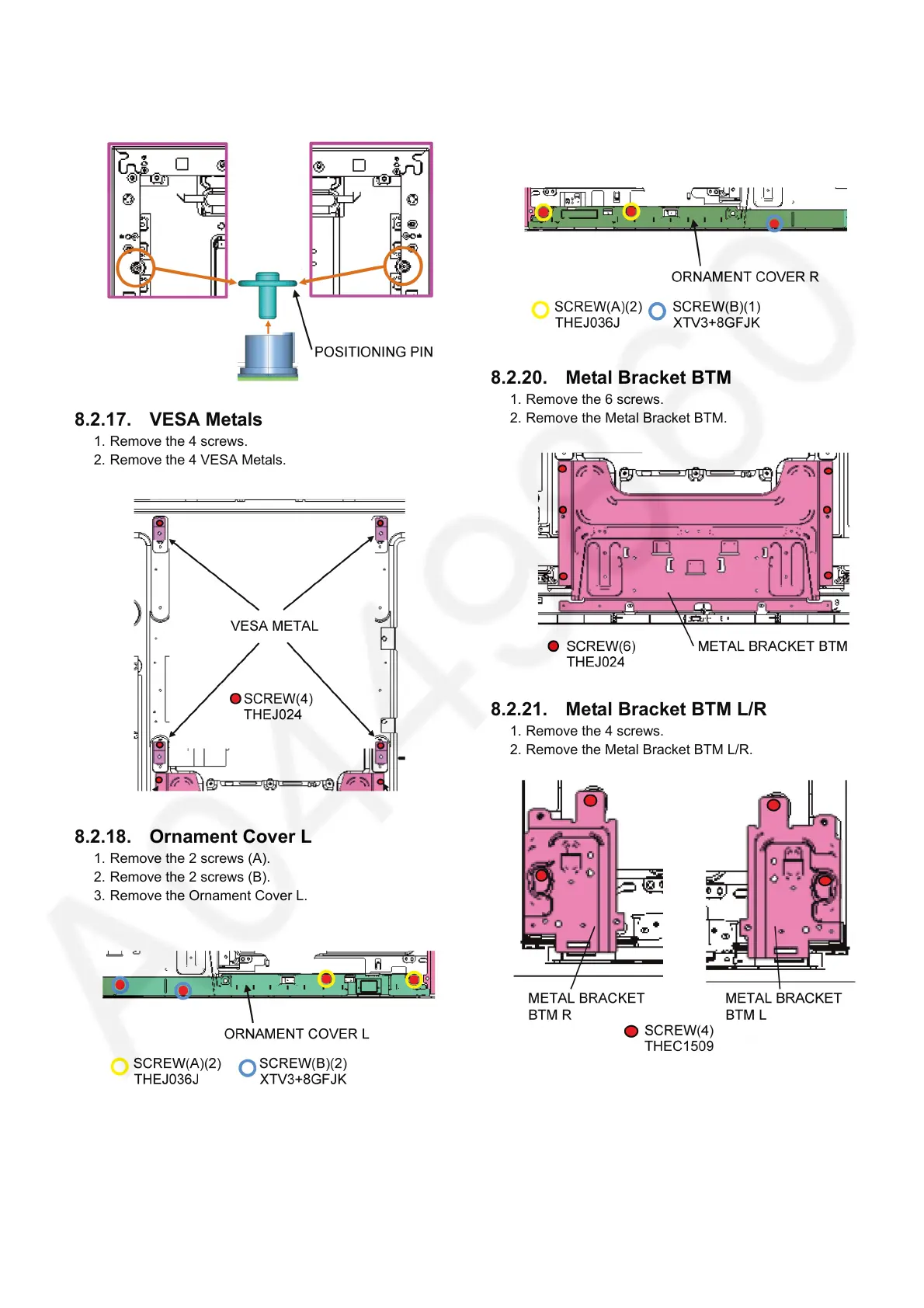
8.2.16. Positioning Pins
1. Remove the 2 Positioning Pins.
8.2.17. VESA Metals
1. Remove the 4 screws.
2. Remove the 4 VESA Metals.
8.2.18. Ornament Cover L
1. Remove the 2 screws (A).
2. Remove the 2 screws (B).
3. Remove the Ornament Cover L.
8.2.19. Ornament Cover R
1. Remove the 2 screws (A).
2. Remove the 1 screw (B).
3. Remove the Ornament Cover R.
8.2.20. Metal Bracket BTM
1. Remove the 6 screws.
2. Remove the Metal Bracket BTM.
8.2.21. Metal Bracket BTM L/R
1. Remove the 4 screws.
2. Remove the Metal Bracket BTM L/R.





 To Next Page