English
10
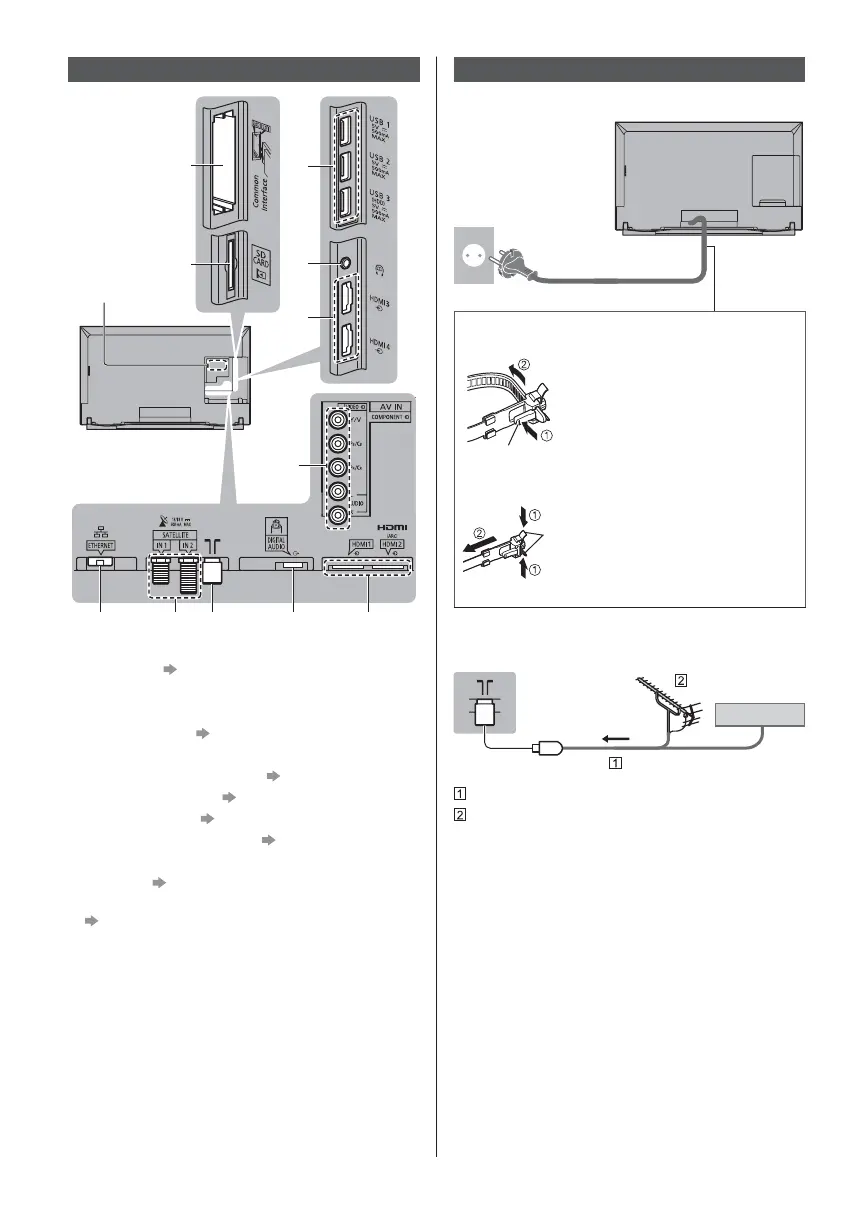
Terminals
1
4
5
6
2
3
8 9 10 11 12
7
1 Model name plate
2 CI slot 1 - 2
(p. 14)
3 SD Card slot
4 USB 1 - 3 port
5 Headphone jack
(p. 13)
6 HDMI3 - 4
7 AV (COMPONENT / VIDEO) (p. 13)
8 ETHERNET terminal
(p. 12)
9 Satellite terminal (p. 11)
10
Terrestrial / cable terminal (p. 10)
11
DIGITAL AUDIO
12
HDMI1 - 2 (p. 12, 13)
To watch content in 4K format, use HDMI terminal.
(p. 13)
Basic connections
Mains lead
AC 220-240 V
50 / 60 Hz
Mains lead
Cable tie (Bundled the mains lead)
To loosen:
Knob
Keep pushing the knob
To remove from the TV:
Keep pushing both side snaps
Snaps
Aerial
TV
Cable
RF cable
Terrestrial aerial
For DVB-C, DVB-T, Analogue



 To Next Page