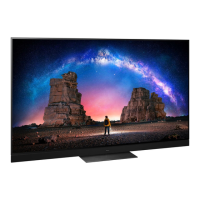
This document provides operating instructions for the Panasonic OLED TV, Model No. TX-77LZ2000B.
Function Description
The Panasonic OLED TV TX-77LZ2000B is a smart television designed for high-quality visual and audio experiences. It features a "Space Tune" function that automatically adjusts sound quality based on the TV and viewer's position, utilizing upward-firing, line array, and left/right speakers for a three-dimensional acoustic space. This adjustment can be done automatically via [Space Tune Auto] using a voice control microphone to analyze a test tone, or manually via [Preset Adjustment].
The TV supports various digital services including DVB, data broadcasting, and IPTV functions, though availability and features may vary by country, area, broadcaster, service provider, and network environment. Internet apps and voice control functions are provided by respective service providers and are subject to change or discontinuation.
It includes built-in wireless LAN and Bluetooth® wireless technology for connectivity. The built-in wireless LAN supports 2.4 GHz and 5 GHz frequency bands, while Bluetooth® operates on the 2.4 GHz radio frequency ISM band. The TV is compatible with Bluetooth® audio devices supporting A2DP, allowing up to two devices to be used simultaneously.
The TV features HDMI Auto Setting for enhanced image precision with expanded color gamut and high frame rates when connected to 4K compatible equipment. It also supports VRR/AMD FreeSync™ Premium for smoother gaming with low latency and reduced image stuttering/tearing.
For recording, the TV can be connected to a USB HDD via the USB 1 port. It also supports VIERA Link (HDAVI Control™) for integrated operation with compatible Panasonic equipment connected via HDMI. A Common Interface slot is available for encrypted channels, requiring a CI module and smart card.
Voice control allows users to change channels, adjust volume, search for programs, and perform internet searches by speaking into the remote control's microphone. The TV also includes an ambient sensor to adjust picture settings based on lighting conditions.
Important Technical Specifications
Model No.: TX-77LZ2000B
Dimensions (W × H × D):
- With Pedestal: 1723 mm × 1073 mm × 350 mm
- TV only: 1723 mm × 1050 mm × 78 mm
Mass:
- Net (With Pedestal): 50.0 kg
- Net (TV only): 43.0 kg
Power source: AC 220-240 V, 50 / 60 Hz
Panel: OLED panel
Sound:
- Speaker output: 170 W (90 W + 15 W x 2 + 15 W × 2 + 20 W)
- Headphones / Subwoofer: 3.5 mm stereo mini jack × 1
Connection terminals:
- AV input:
- VIDEO: 1.0 V[p-p] (75 Ω)
- AUDIO L - R: 0.5 V[rms]
- HDMI 1/2/3/4 input (TYPE A Connectors):
- HDMI 1: 4K120Hz, VRR, AMD FreeSync™ Premium, Content Type, Deep Colour, x.v.Colour™
- HDMI 2: 4K120Hz, VRR, AMD FreeSync™ Premium, Content Type, eARC/ARC, Deep Colour, x.v.Colour™
- HDMI 3/4: 4K, Content Type, Deep Colour, x.v.Colour™
- Supports "HDAVI Control 5" function.
- Card slot: Common Interface slot (complies with CI Plus) × 1
- ETHERNET: RJ45, IEEE802.3 10BASE-T/100BASE-TX
- USB 1/2/3:
- USB 1: DC 5 V, Max. 900 mA [SuperSpeed USB (USB 3.0)]
- USB 2/3: DC 5 V, Max. 500 mA [Hi-Speed USB (USB 2.0)]
- DIGITAL AUDIO output: PCM / Dolby Audio, Fibre optic
- Satellite dish input: Female F-type 75 Ω × 2
- Aerial input: Female F-type 75 Ω × 1 (UK: UHF, Ireland: VHF/UHF)
Receiving systems / Band name:
- Satellite: DVB-S/S2 (Receiver IF frequency range - 950 MHz to 2150 MHz, not available for DiSEqC control)
- Digital: DVB-T/T2 (Channel coverage: UHF / VHF / Cable)
- Analogue: PAL I (UK: UHF, Ireland: UHF/VHF/Cable), PAL 525/60 (VCR, DVD player and recorder), M.NTSC (VCR), NTSC (AV input only)
Operating conditions:
- Temperature: 0 °C - 35 °C
- Humidity: 20% - 80% RH (non-condensing)
Built-in wireless LAN:
- Standard compliance and Frequency band: IEEE802.11a/n/ac (5 GHz band), IEEE802.11b/g/n (2.4 GHz band)
- Security: WPA3-SAE (AES), WPA2-PSK (TKIP/AES), WPA-PSK (TKIP/AES), WEP (64 bit/128 bit)
Bluetooth® wireless technology:
- Standard Compliance and Frequency band: Bluetooth® 5.0 (2.4 GHz band)
- Supports up to 5 devices simultaneously.
Usage Features
Installation and Setup:
- The TV comes with a pedestal for table-top use. Wall-hanging bracket installation is also supported (bracket not supplied).
- Initial setup includes "Space Tune" adjustment, network connection setup, and automatic channel search.
- The remote control needs to be registered (paired) for full functionality, especially voice control.
Connectivity:
- Multiple HDMI ports for various AV devices, with specific modes (Mode1, Mode2, Mode3) for 4K compatible equipment to optimize image quality.
- USB ports for connecting USB HDDs for recording and other devices.
- Ethernet port for wired network connection.
- Built-in wireless LAN for wireless network connection.
- Bluetooth® for connecting remote control and other compatible devices.
Remote Control:
- Features dedicated buttons for popular streaming services (Netflix, Prime Video, YouTube, Rakuten TV, Disney+, Freeview Play).
- Voice control button for activating voice commands.
- Numeric buttons, channel up/down, volume up/down, cursor buttons, and menu navigation.
- Remote control mode setting to avoid interference with other Panasonic TVs.
Display and Audio:
- OLED panel for superior picture quality.
- "Space Tune" function for optimized sound based on environment.
- Support for Dolby Atmos and Dolby Vision IQ.
- Headphone/subwoofer jack for external audio output.
Safety and Precautions:
- Avoid displaying still images for long periods to prevent "image retention."
- Ensure proper ventilation (at least 10 cm clearance around the TV).
- Handle the TV with care, especially the display panel, to prevent damage.
- Use only approved pedestals/mounting equipment and ensure secure installation.
- Keep batteries out of reach of children and dispose of them correctly.
- Do not expose the TV to rain, excessive moisture, direct sunlight, or heat sources.
- Do not use the TV or remote control near medical equipment or automatic control equipment due to potential radio wave interference.
Maintenance Features
Display Panel, Cabinet, Pedestal:
- Regular care: Gently wipe surfaces with a soft cloth to remove dirt or fingerprints.
- Stubborn dirt:
- Clean dust from the surface.
- Dampen a soft cloth with clean water or diluted neutral detergent (1 part detergent to 100 parts water).
- Wring out the cloth firmly to prevent liquid from entering the TV.
- Carefully wipe the moistened cloth over stubborn dirt.
- Wipe away all moisture.
- Cautions: Do not use hard cloths, rub too hard, or use insect repellent, solvent, thinner, or other volatile substances as they may degrade surface quality or paint. Avoid tapping or scratching the display panel with fingernails. Prevent rubber or PVC substances from prolonged contact with the cabinet and pedestal.
Mains Plug:
- Wipe the mains plug with a dry cloth at regular intervals to prevent fire or electrical shock from moisture and dust.
Panel Maintenance:
- The TV performs automatic panel maintenance when turned off via the remote control. This process takes approximately 10 minutes, during which the LED turns orange.
- During panel maintenance, avoid touching or exerting pressure on the screen.
- Information on panel maintenance can be found in [eHELP] (Search by Purpose > Watching > For best picture > Screen Settings).

 Need help?

 To Next Page
 General