- 36 -
Speech:
Improves sound quality for watching news, drama, etc.
User:
Adjusts the sounds manually using the equaliser to suit your favourite
sound quality.
●
For the User mode, Equaliser will be available in the Sound Menu instead
of Bass and Treble. Select Equaliser and adjust the frequency.
Settings Sound Basic settings
●
This function is not effective for the sound from headphones.
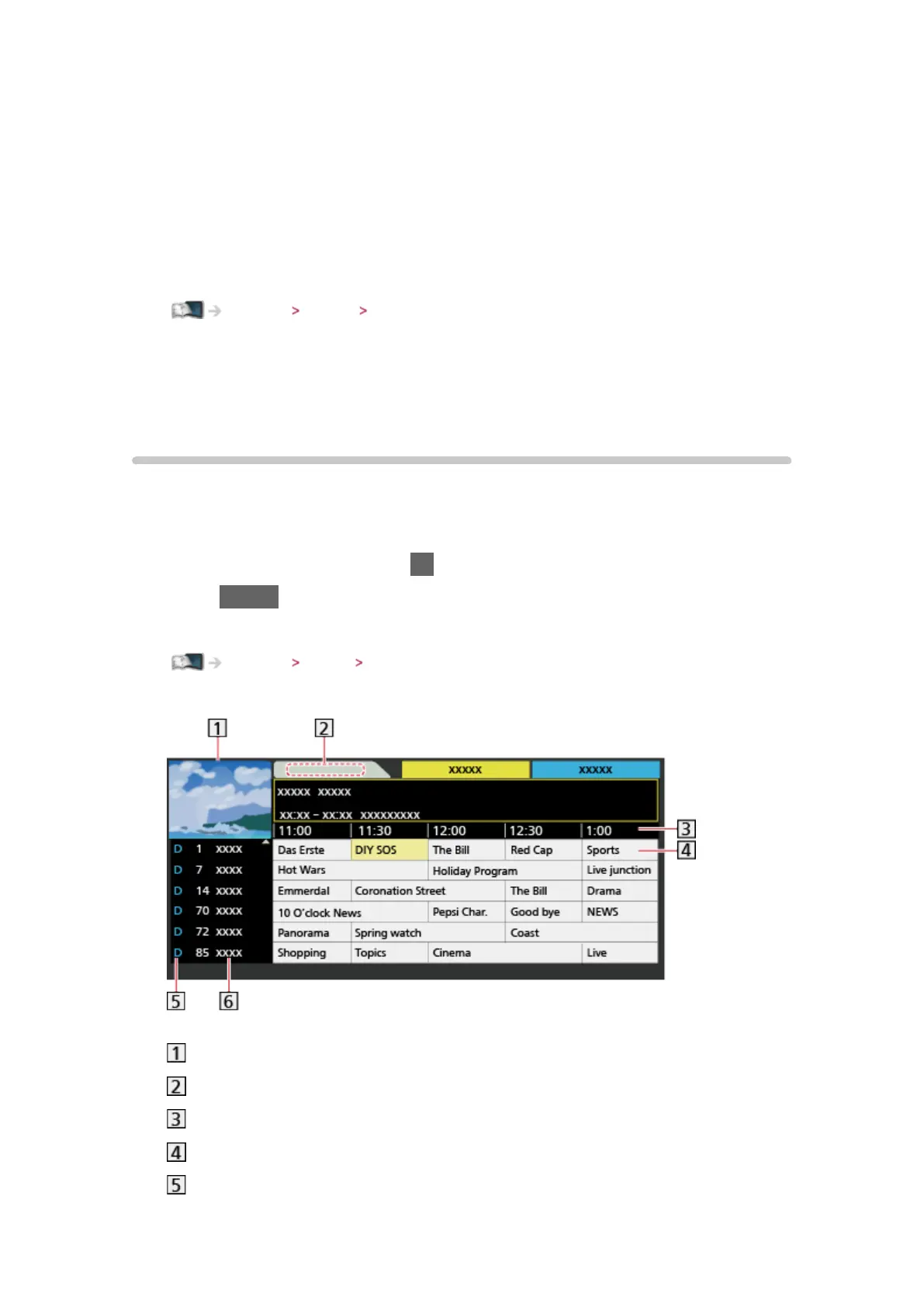
TV Guide
Using TV Guide
TV Guide - Electronic Programme Guide (EPG) provides an on-screen listing
of the programmes currently broadcast and the forthcoming broadcasts over
the next seven days (depending on the broadcasters).
1. Select DVB or Analogue with TV
2. Press GUIDE to view TV Guide
●
To change the layout of TV Guide, set TV Guide View.
Settings Setup TV Guide Settings
(Example)
TV screen
TV Guide date
TV Guide time
Programme
D (DVB) / A (Analogue)












 To Next Page