EasyManua.ls Logo

Pantech Breeze II - Page 59

Pantech Breeze II
182 pages
Print Icon
To Next Page IconTo Next Page
To Previous Page IconTo Previous Page
Loading...
Breeze Mode - Multimedia
01
59
02
05
06
01
02
03
04
05
06
07
03
04
59
Setting camera settings
1. Press
Q
in standby mode or press
Menu > Camera > Take a Picture.
2. Press Options to change settings prior
to taking a picture.
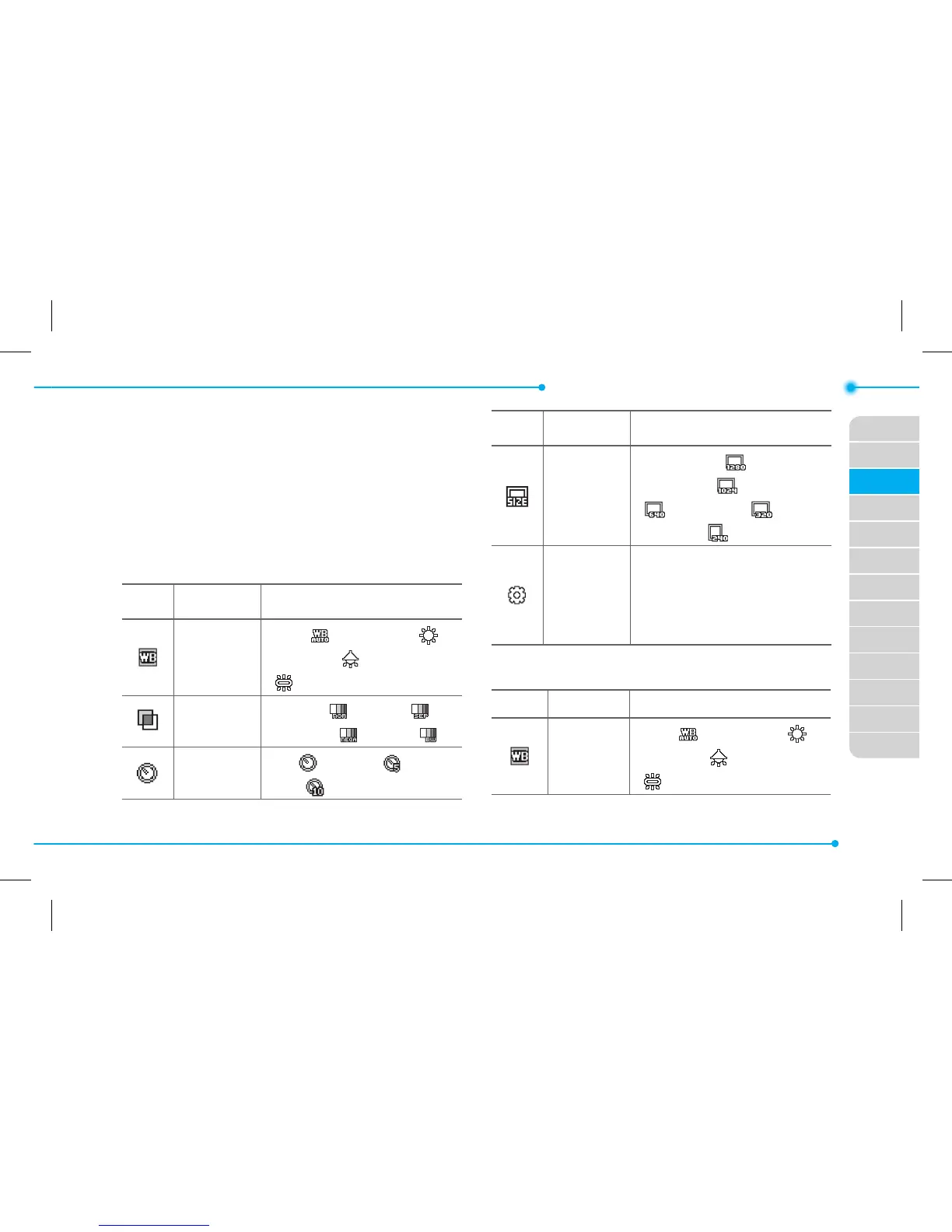
Camera options
Icon Name Descriptions
White
Balance
Auto (
), Day Light ( ),
Tungsten (
), Fluorescent
(
)
Eect
Normal (
), Sepia ( ),
Negative (
), B&W ( )
Self Timer
O (
), 5 secs ( ), 10
secs (
)
Icon Name Descriptions
Size
1280x1024 (
),
1024x768 (
), 640x480
(
), 320x240 ( ),
240x320 (
)
Advanced
Picture Quality, Save
Location, Shutter Sound,
Timer Sound, Default File
Name
Video camera options
Icon Name Descriptions
White
Balance
Auto (
), Day Light ( ),
Tungsten (
), Fluorescent
(
)

Table of Contents

Related product manuals