X-Rite eXact 2
16
USER INTERFACE
This section describes the eXact 2 menu, the basic use of the touch screen, setup wizard procedure, and
measurement techniques.
eXact 2 Menu
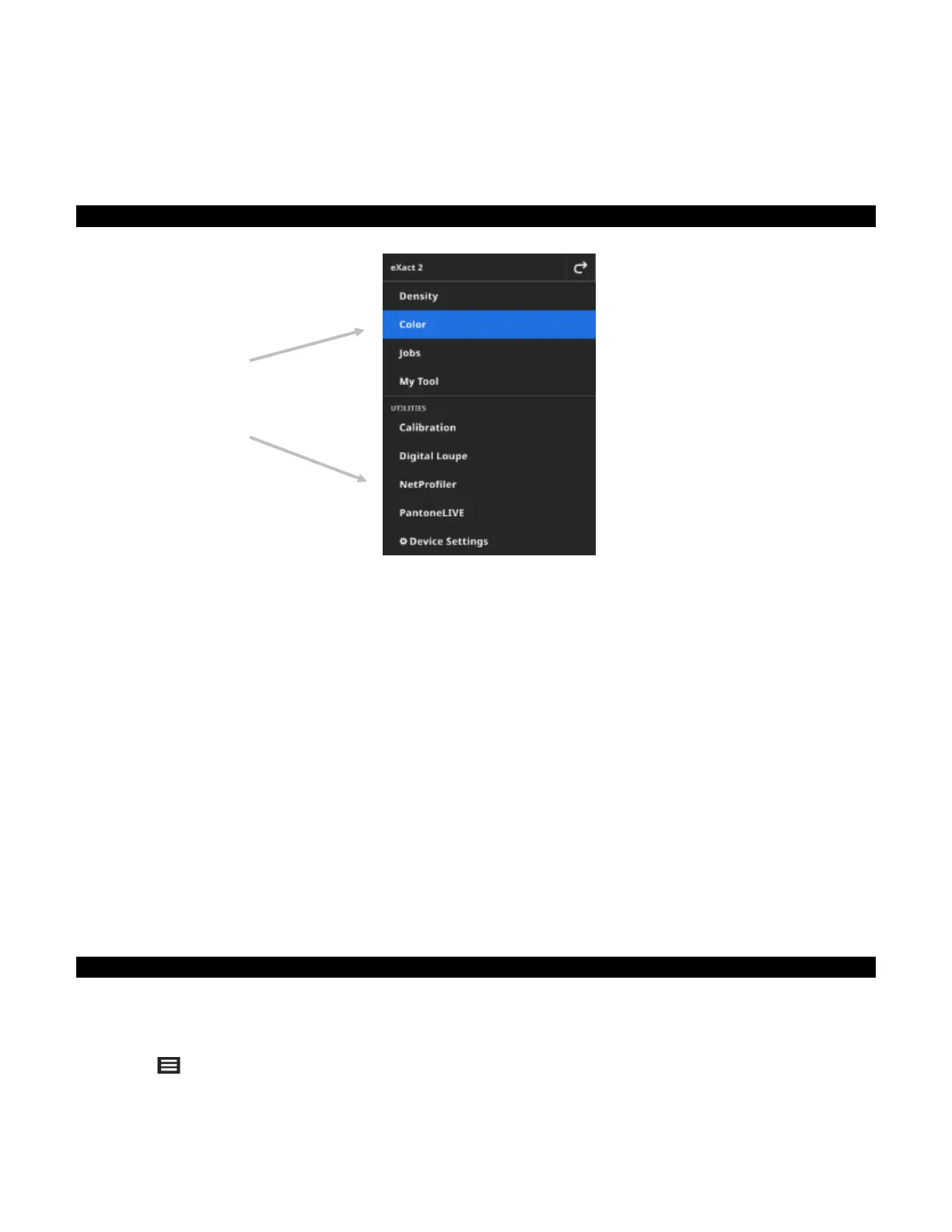
The eXact 2 menu contains a list of tools (1) and utilities (2).
(1) Tools
Density: Measure patches and access density functions (Density, Tone Value, Tone Value Increase,
Trapping, etc.)
Color: Measure solid patches to make comparisons and do searches in color libraries.
Jobs: Measure custom jobs with different patch types (Paper, Solids, Tints, Overprints, Gray Balance)
or industry standard processes (G7, PSO, JapanColor etc.)
NOTE: The device comes pre-loaded with a variety of built in jobs. Users can also use eXact 2 Suite to
create custom jobs to load here.
My Tool: Create custom versions of the Color tool to use multiple configurations or fixed color libraries.
NOTE: My Tool is a custom version of Color tool and can be created on the instrument or with eXact 2
Suite.
(2) Utilities
Calibration: Display information about the device calibration status
Digital Loupe: Open the Digital Loupe Manager to view images you captured of your live targeting area
NetProfiler: Display information about your current NetProfiler profile, for example Version, Status etc.
PantoneLIVE: Connect to your PantoneLIVE account
Device Settings: Set the global settings of the device, for example Wi-Fi, Display, Language etc.
See the corresponding sections of this manual for additional information on Tools and Utilities.
Navigating the Screen
The X-Rite eXact 2 device contains a graphical touch screen display. All functionality is accessed directly
through the screen.
Opening Tools
Tap the icon in the upper right corner of the screen to open the eXact 2 menu. For this example, Color was
tapped.
(1)
(2)


 To Next Page