X-Rite eXact 2
24
Polarizer: Displays the device filter status. Options are Standard or Xp.
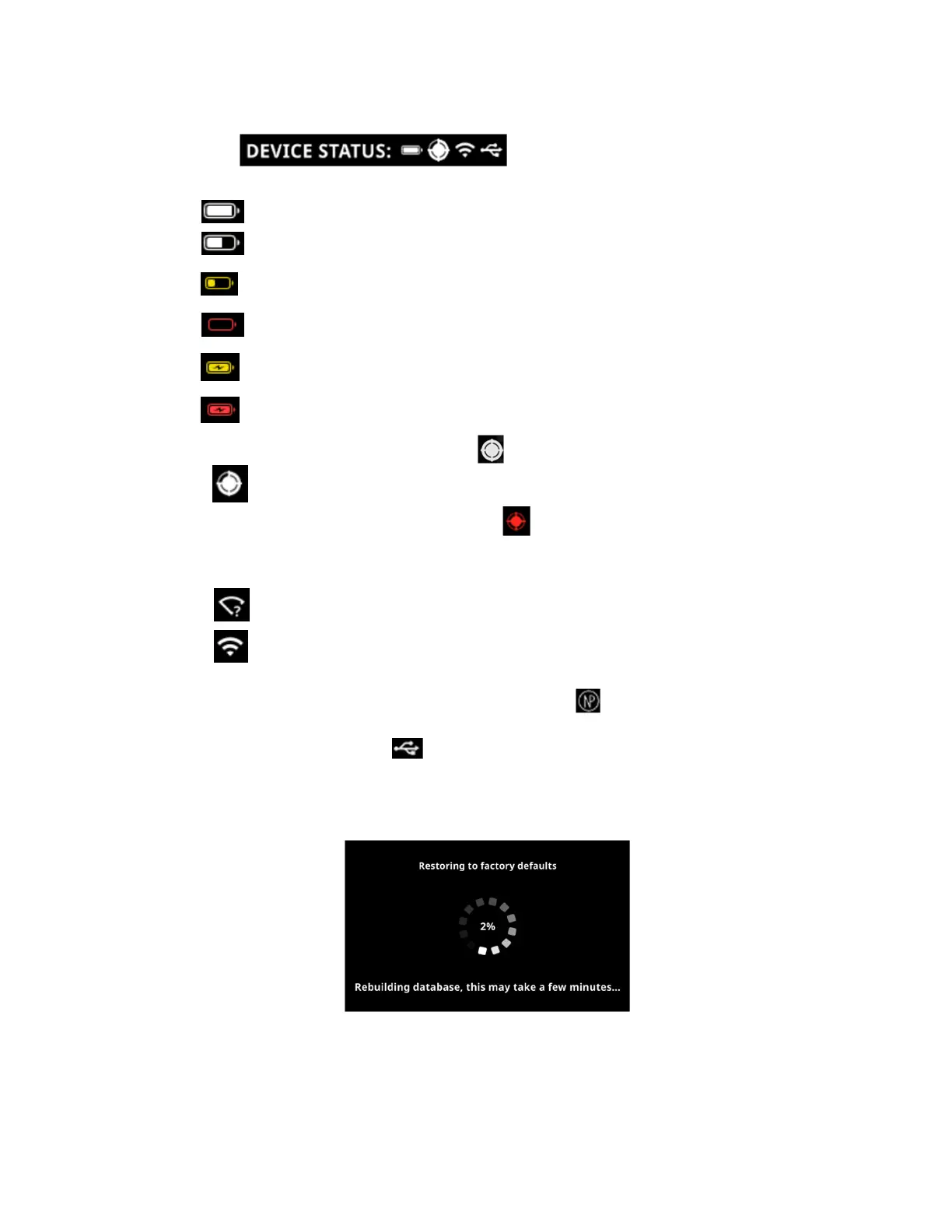
Device Status:
o Battery Gauge: Depicts the current condition of the battery pack.
Indicates the battery pack is fully charged.
Indicates the battery pack has a sufficient charge for a substantial number of
measurements.
Warning state: Indicates the battery pack is low, but measurements are still possible.
Battery pack should be charged soon.
Alert state: Indicates the battery pack is very low and only a few measurements
remain. Battery pack should be charged immediately.
Indicates the AC adapter is plugged into the docking station and the battery pack is
charging after it was in warning state.
Indicates the AC adapter is plugged into the docking station and the battery pack is
charging after it was in alert state.
o Calibration icon: The calibration icon indicates the current calibration status. A white icon
indicate that the calibration is current, and the segments around the circle indicate when
the next calibration is required. A red icon indicates that a calibration is required.
o Wi-Fi Connection icon: The Wi-Fi icon appears when the option is activated in the Settings.
Refer to Setting Mode for information on activating.
Indicates Wi-Fi is on, but the device is not connected to the network.
Indicates Wi-Fi is on and connected to the network. The number of arches indicates
the signal strength.
No icon indicates Wi-Fi is off.
o NetProfiler icon (if applicable): The NetProfiler icon indicates if the profile is active, out of
date, etc.
o USB icon: The USB icon appears when the device is plugged into the USB port on the
computer.
Restore To Factory Defaults
This option is used to restore the device back to the default settings.
The restore process takes several minutes (approximately 5 minutes) while the device is rebuilding the
database. The display shows a message indicating progress and a scroll wheel.


 To Next Page