X-Rite eXact 2
17
Selecting a Tool
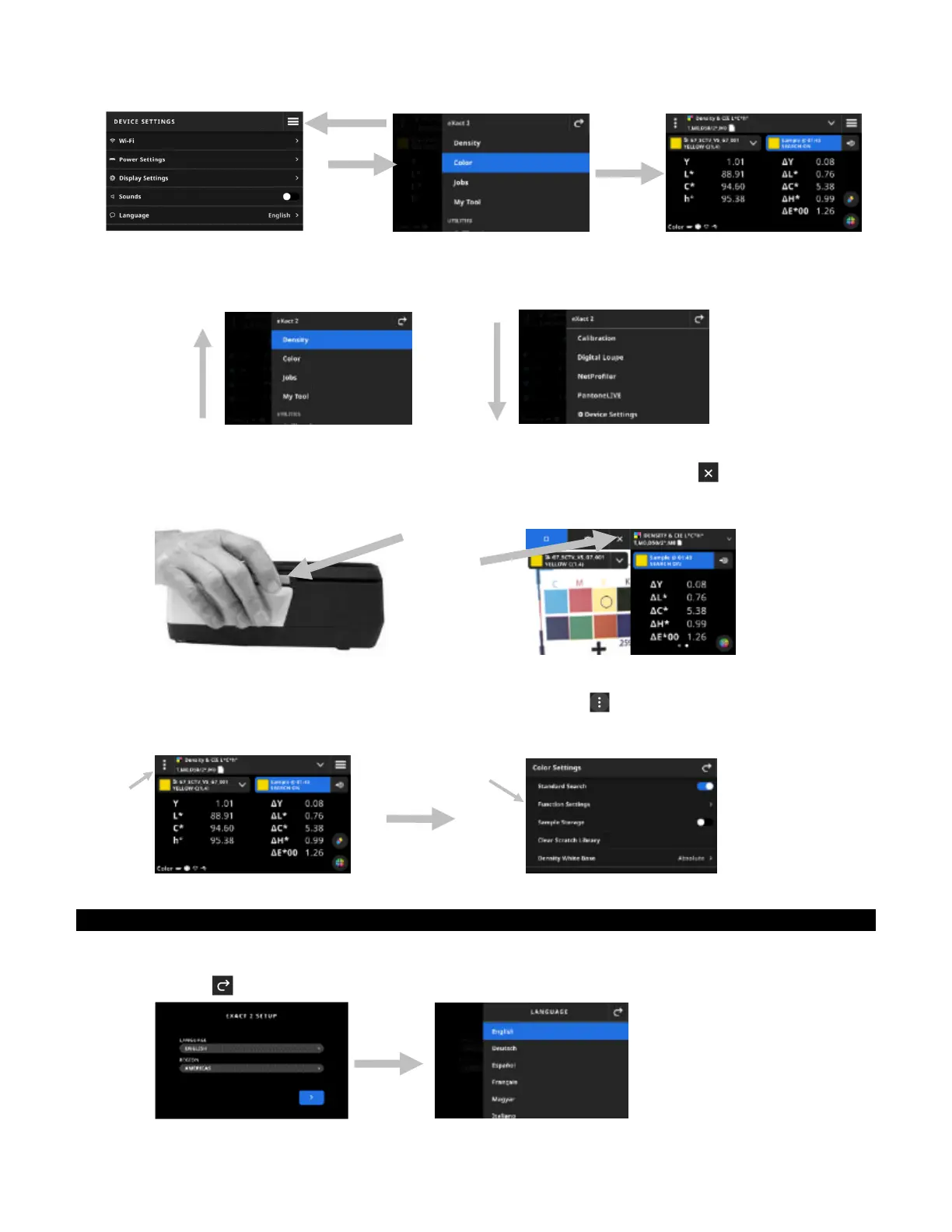
The eXact 2 menu shows a list of tools and utilities. Swipe the screen up to view entries at the end of the list and
swipe down to view entries at the top of the list.
Opening and Closing the Targeting Window
When using a tool, press the Measure button to activate the targeting window. Tap the icon to close the
targeting window. Additional measurement data is displayed. The targeting window times out after a certain
amount of time. See Device Settings section for additional details on setting a targeting timeout.
Opening Settings
Many tools have their own settings in the device. Tap the Settings icon (1) in the upper left corner of the
screen to open the Settings screen. Once open, tap the desired setting (2) you want to change. A description of
each available setting is listed in the corresponding section of each tool.
Initial Wizard Setup
Upon initially startup, the device requires you to specify some basic settings.
1. Tap Language and then select the desired language in the list that you want the device to operate in.
Tap the icon to return to the Setup screen and continue.
(1)
(2)


 To Next Page