X-Rite eXact 2
48
Create a Tool
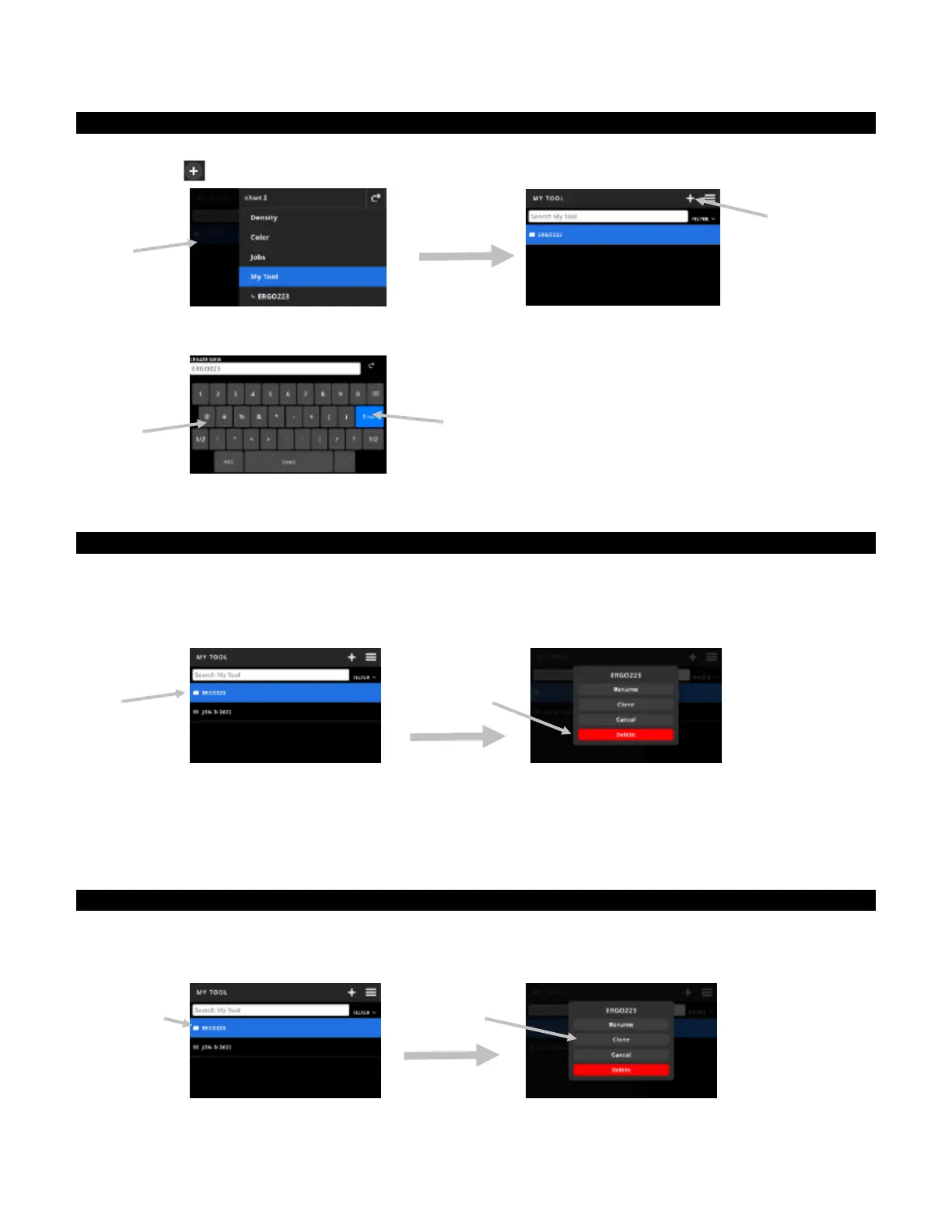
1. Select My Tool (1) from the eXact 2 menu.
2. Tap the icon (2).
3. Enter a new tool name using the virtual keyboard (3).
4. Tap Enter (4) to save the tool and open it in the Color tool.
Delete a Tool
The function is used to delete the selected tools from the device.
NOTE: Deleted tools cannot be restored to the device.
1. Select My Tool from the eXact 2 menu.
2. Tap and hold the tool (1) you want to delete.
3. A list with options to edit the tool opens.
4. Tap Delete (2) (highlighted in red) to delete the tool.
NOTE: Tap Cancel if you do not want to delete the tool anymore
5. A confirmation screen opens. Tap Delete again to confirm that you want to delete the tool.
Clone a Tool
The function is used to make a copy of an existing tool.
1. Select My Tool from the eXact 2 menu.
2. Tap and hold the tool (1) you want to clone.
(1)
(2)
(3)
(4)
(1)
(2)
(2)
(1)


 To Next Page