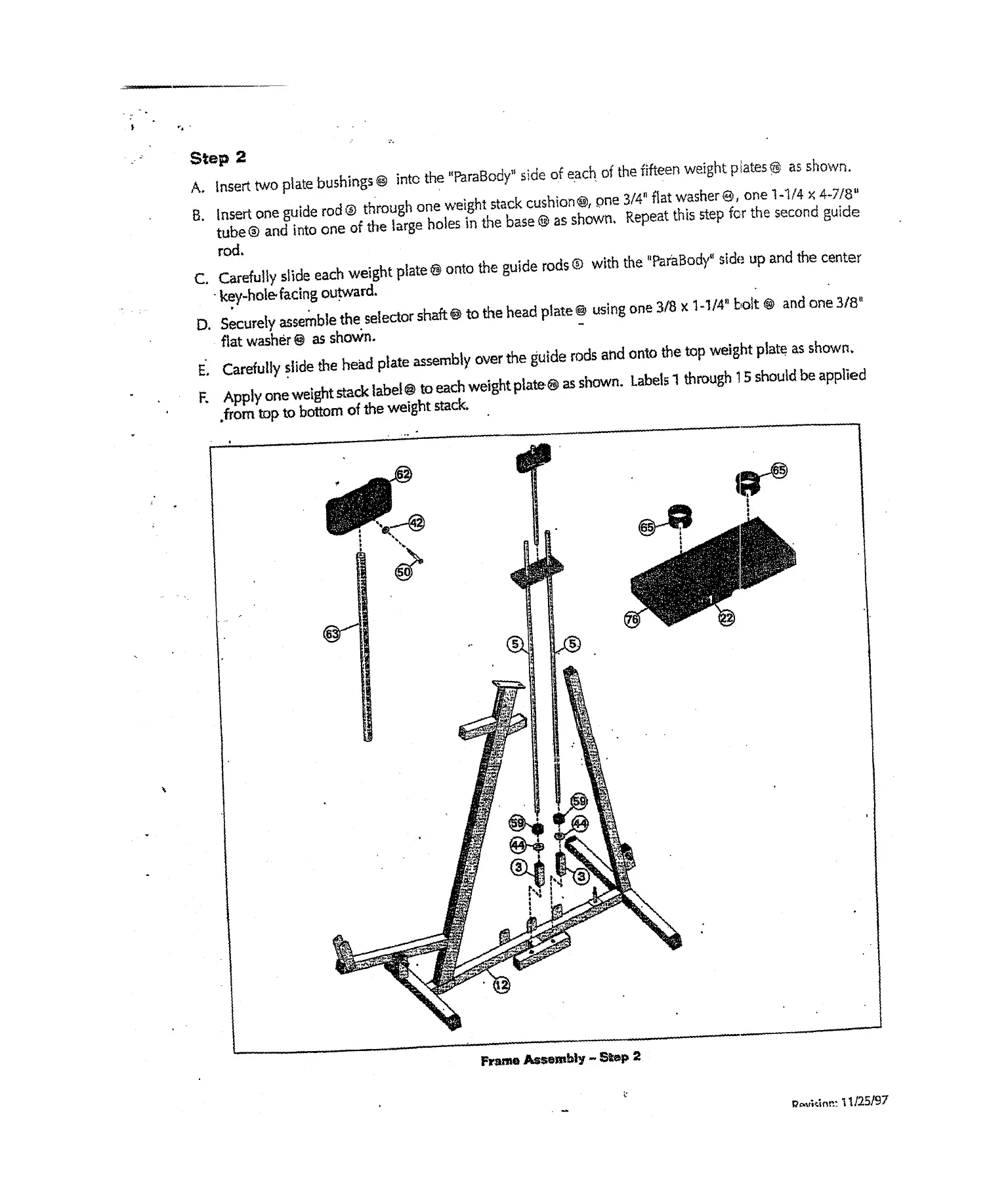
Step 2
A.
Insert two plate bushings @ into the "ParaBody" side of each of the fifteen weight plates ® as shown.
Insert one guicie rod @ t~rough one weight stack cushion@, ~ne 3/4" flat washer @, one 1-’1/4 x 4-7/8"
tube@ and into one of the large holes in the base @ as shown, Repeat this step for the second guide
rod,
C. Carefully slide each weight plate ~ onto the guide rods ® with the "PamBody" sic]~
~-
up and the center
-key-hol~ facing ou.tward.
D.
Securely assemble the.selector shaft@ to t~e head plate@ using one 3/8 x 1-1/4" bolt @ anc~ one 3/8"
flat washer@ as shown,
E. Carefully .slide the head plate assembly over the guide rods and onto the top weight plate, as shown,
K Apply one weight stack label @ to each weight plate.~ as shown. Labels 1 through 15 should be applied
,from top to bottom of the weight stack,
F~’ame Assembly- S=ep 2
1/25/97


 To Next Page