8
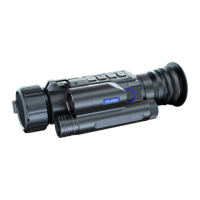
Key 1
Explanation:
1. Single press:
① Home screen mode: single press [Key 1] to to zoom in;
② Menu mode: single press [Key 1] to scroll up or adjust the values;
2.Press and Hold
① Home screen mode: After pressing and hold [Key 1], the video and picture files
stored on the micro SD card will be displayed.
Key 2
1. Single press:
① Home screen mode: single press [Key 2] to turn on the LRF.
② Menu mode: single press [Key 2] to confirm.
2.Press and Hold
Home screen mode: press and hold [Key 2] to record a video. press and hold [Key 2]
again to save the video.
3.Double Press
Home screen mode: press and hold [Key 2] to perform the shutter correction.
Press [Key 1]/[Key 3] to switch among files.
Press [Key 2] to play/pause the video.
When playing videos, press [Key 1] to fast forward at 2x/4x/8x times.
Single press the [Key 4] button to access the following settings:
② When the WiFi is on, press and hold the [Key 1] to turn off WiFi.
1)Delete:
Delete Current
Delete All
2)Protect:
Lock Current
Unlock Current
Lock All
Unlock All
3)Slide Show:
2 seconds
5 seconds
8 seconds
Note: Press [Key 1]/[Key 3] to move the cursor among “Delete”, “Protect” and “Slide
Show”; press [Key 2] to enter the sub-menu, press [Key 4] to return to the file. Long press
the [Key 4] button to return the home screen.



 To Next Page