- 15 -
1 How to Set Up Date and Time
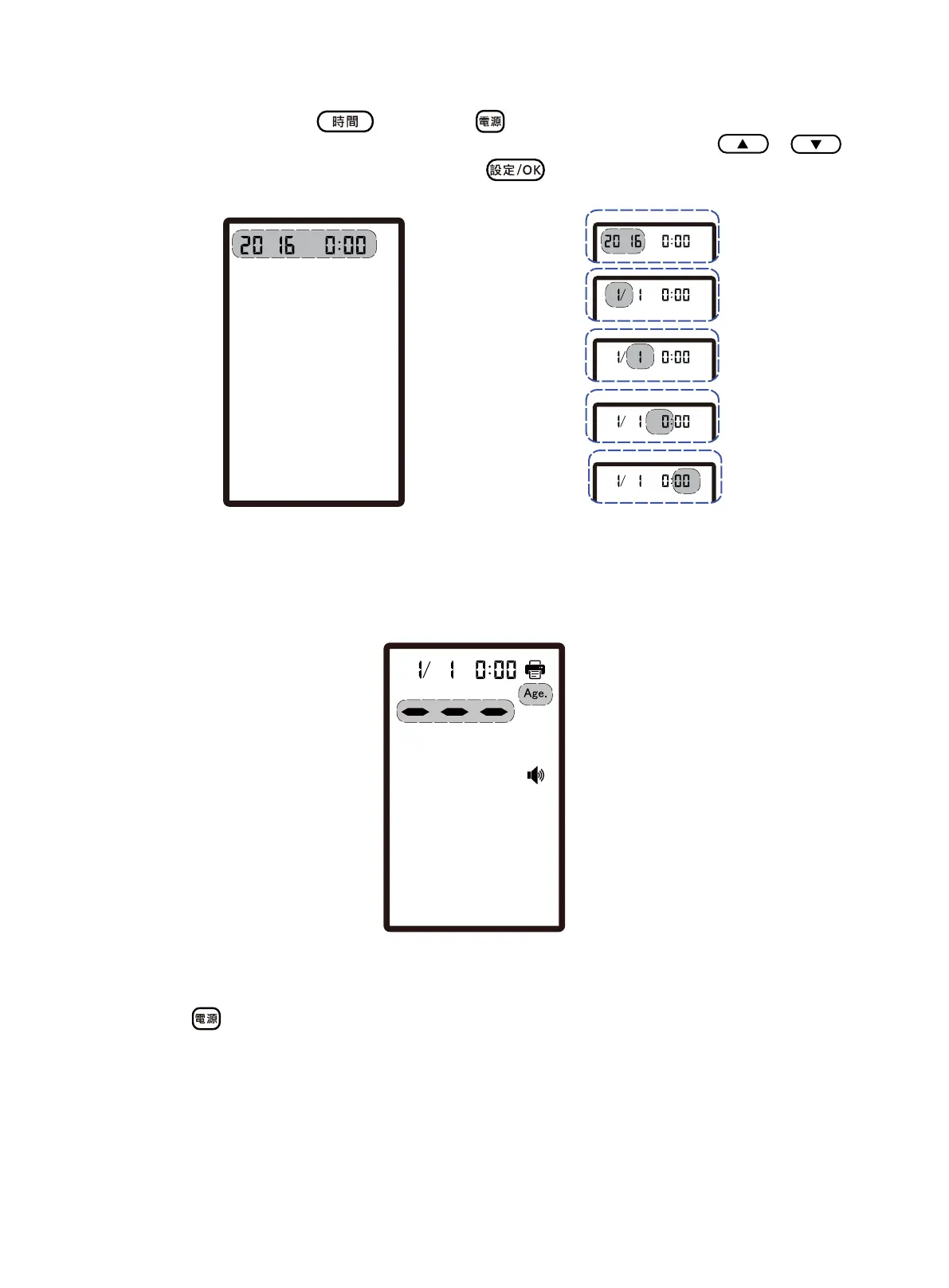
At power-off state, press the button and button simultaneously to enter the date and
time setup screen. While the indicator of the Year and Time is flashing, press the /
buttons to adjust「Year」first, and then press the
button to save the setting.
Fig. 1.1
Please sequentially set the「Month」/「Date」/「Hour」/「Minute」in the same way. After the
settings are completed, return back to the age input screen (Standby screen).
Fig. 1.2
※
Press the
button of the device, its power indicator light will be on. The numerical keypad
connected turns on automatically and lets out “beep” sound. Approximately 5 seconds later, the
device lets out the prompt tone and enters the age input screen.
※
Please set up the date and time correctly before performing measuring. Incorrect date and time
record may lead to deranged record of measurements and thus affect the correctness of the data of
mean values of various items outputted from the device.
「Year」
「Month」
「Day」
「Hour」
「Minute」


 To Next Page