PASMO
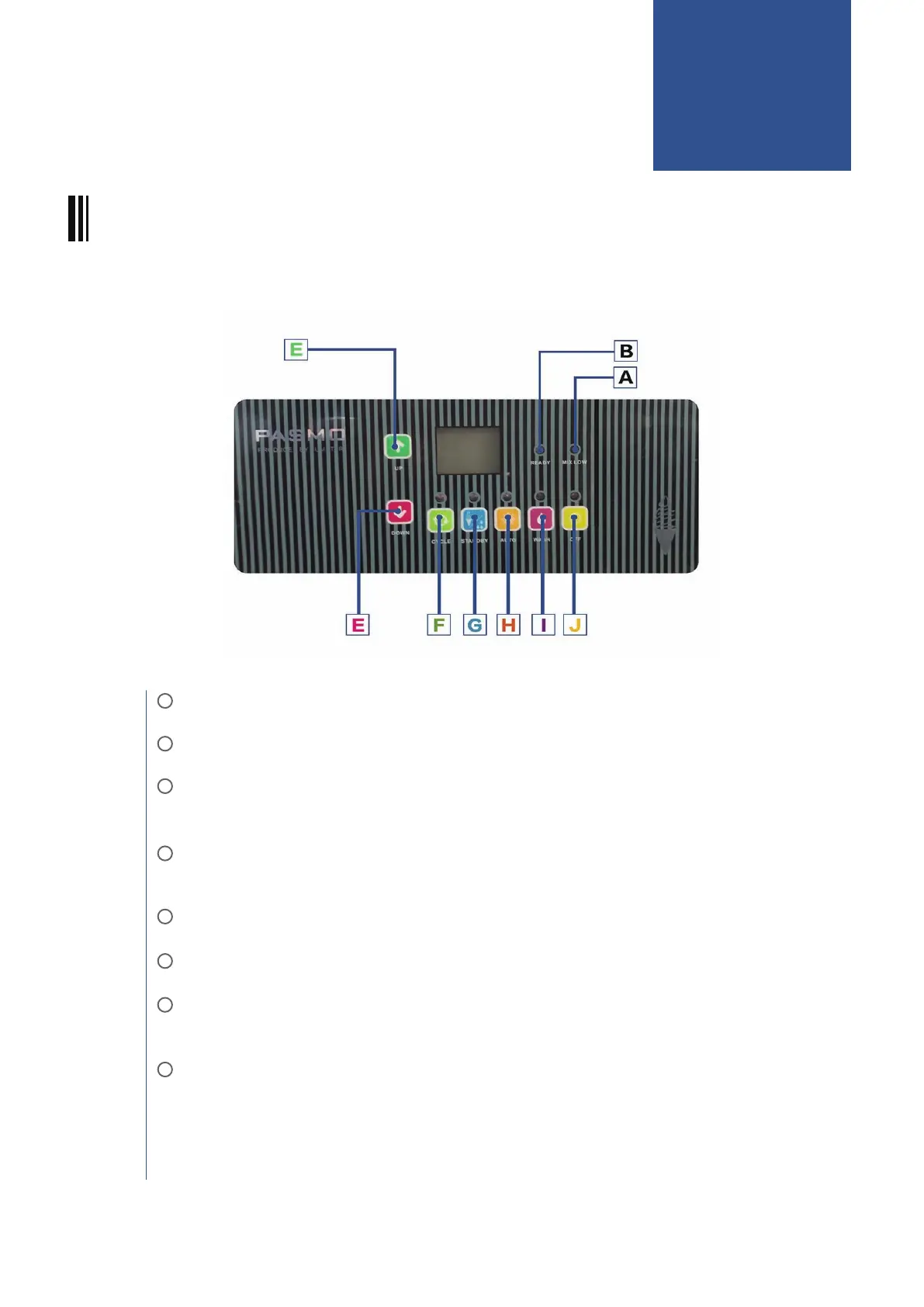
INTRODUCTION OF CONTROL PANEL:
A: MIX LOW: If MIX LOW LED flash, it means mix in hopper lower than sensor.
B: READY:If READY flash,it means ice cream is ready,can dispense ice cream.
E: UP BUTTON: Up button is for increase the hardness of ice cream,DOWN button is for
decrease the hardness of ice cream.
F: CYCLE: When making ice cream,if you find the ice cream is soft, please press CYCLE
button to restart refrigeration,making ice cream better.
G: STANDBY: Standby function can keep fresh of the ice cream mix during night.
H: AUTO: Start to make ice cream.
I: WASH: Beater in cylinder starts work when press WASH, only for clean machine, will
not refrigerate.
J: OFF:Press STOP for 5 seconds can stop any function.
(Other key indicator represents the above function is running; on a display screen ,the
left digital represents the current hardness of ice cream,the right digital represents the
target hardness of ice cream)
PASMO OPERATION
06



 To Next Page