6
DAG9300
Nota: in questa modalità viene utilizzato il messaggio 2; il messaggio
1 rimane quindi a disposizione.
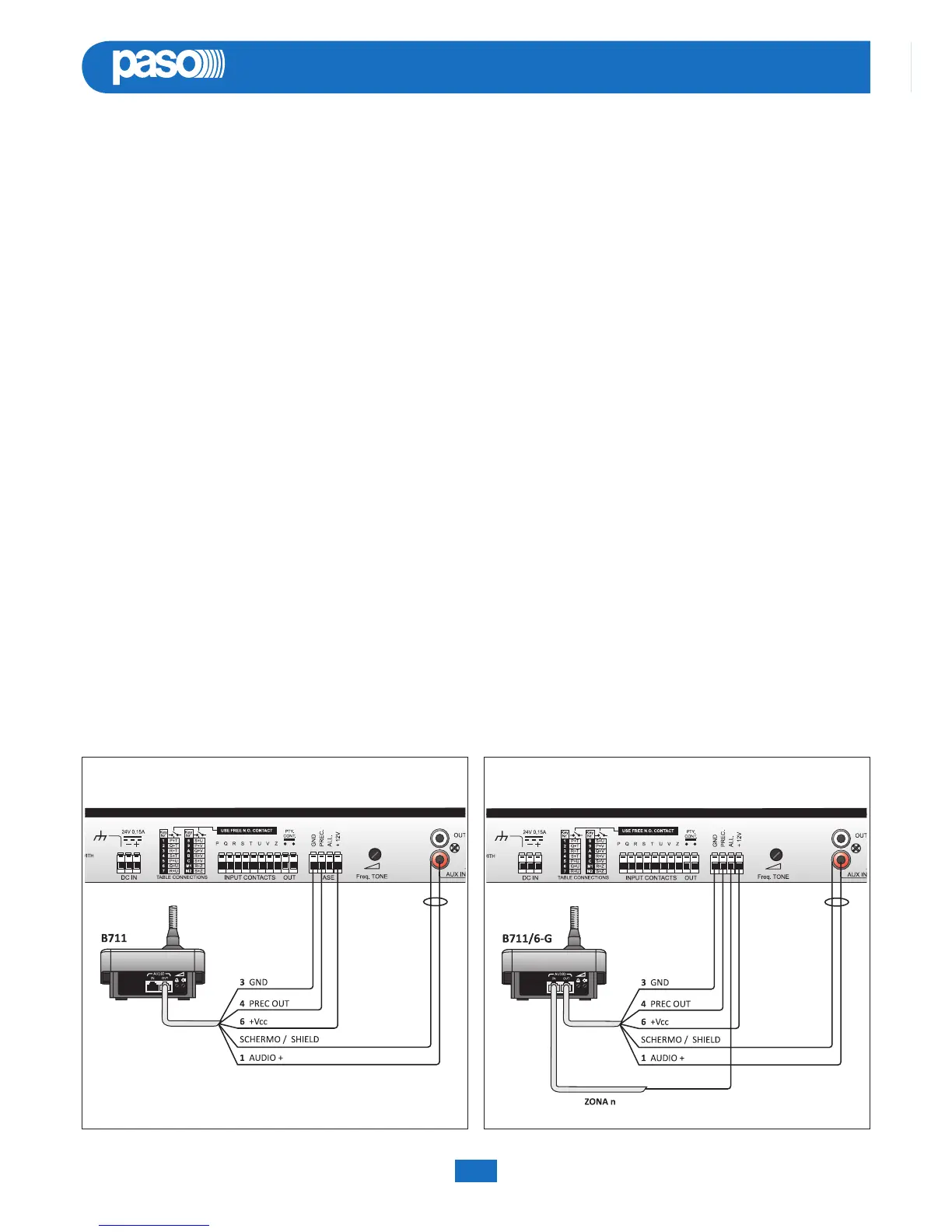
Fig. 3.9.1
“DELAY PLAY” “REC PLAY”
Fig. 3.10.1
3.7 Riproduzione tono
Per riprodurre un tono è sufficiente, a tasti abilitati, premere il relativo
tasto TONE 1÷TONE C oppure chiudere il relativo contatto. Il tasti
TONE 1÷TONE C corrispondono ai contatti 1÷C.
3.8 Contatto di priorità
Durante la riproduzione di un tono qualunque o di un messaggio viene
mantenuto chiuso il contatto pulito “PTY CONT” per eventuale priorità
verso apparecchiature esterne.
3.9 Modalità “DELAY PLAY”
La modalità “DELAY PLAY” è un’utile funzionalità che permette di
effettuare annunci vocali con diffusione ritardata nel tempo, in modo
da evitare l’innesco dell’Effetto Larsen* che si crea nei casi in cui il
microfono si trovi troppo vicino agli altoparlanti. L’apparecchio è
predisposto per un agevole funzionamento con le basi di chiamata
Serie B711, ma può essere utilizzato anche con altre apparecchiature,
ad esempio alcune interfacce telefoniche, purché queste ultime
dispongano di un’uscita audio a livello di linea e di un contatto pulito
che si chiuda in concomitanza con l’annuncio.
Per utilizzare questa modalità con una postazione B711, procedere
come segue:
1) collegare la base come illustrato in fig. 3.8.1;
2) impostare la modalità “DELAY PLAY” (vedi Par. 3.2, pag. 3);
3) premere il tasto PTT sulla postazione: partirà la registrazione,
parlare con un volume medio alto nel microfono.
Al rilascio del tasto PTT avverrà la riproduzione del messaggio
registrato in precedenza che, una volta riprodotto, verrà cancellato
per permettere una registrazione immediata quando verrà di nuovo
premuto.
*
fischio acuto.
3.7 Reproduction of a tone
To reproduce a tone, simply press the associated key TONE 1 to TONE
C (with the keys enabled) or close the appropriate contact. Keys TONE
1 to TONE C correspond to contacts 1 to C.
3.8 Priority contacts
While reproducing any tone or playing out any message, the clean
contact “PTY CONT” is kept closed, in order to be able to override
external equipment.
3.9 “DELAY PLAY” mode
The “DELAY PLAY” mode is a useful function for making voice
announcements to be broadcast at a later point in time, so as to avoid
triggering off acoustic feedback (the so-called Larsen effect*), which
is created when the microphone is too close to the loudspeakers. The
equipment has provisions for easy operation with the microphone
bases of the B711 range, although it can also be used with other
equipment, for instance some telephone interfaces, provided these
have an audio output at line level and a clean contact that closes at the
time of the announcement.
To use this mode with a B711 microphone station, proceed as follows:
1) Connect the base as illustrated in Fig. 3.8.1;
2) Set the “DELAY PLAY” mode (see point 3.2 on page 3);
3) Press the PTT key on the microphone station to start recording.
Speak into the microphone at a medium-to-high volume.
When the PTT key is released, the message that was recorded will
be played out, after which it will be deleted so as to enable immediate
recording of another message when the key is pressed again.
* screeching sound.
Note: In this mode, message 2 is used an message 1 remains on
stand-by.


 To Next Page