DIGITAL MUSIC AMPLIFIERS
INSTALLATION AND WIRING
PAGE 15
SPECIFICATIONS ARE SUBJECT TO CHANGE WITHOUT NOTICET3015/3030DMA
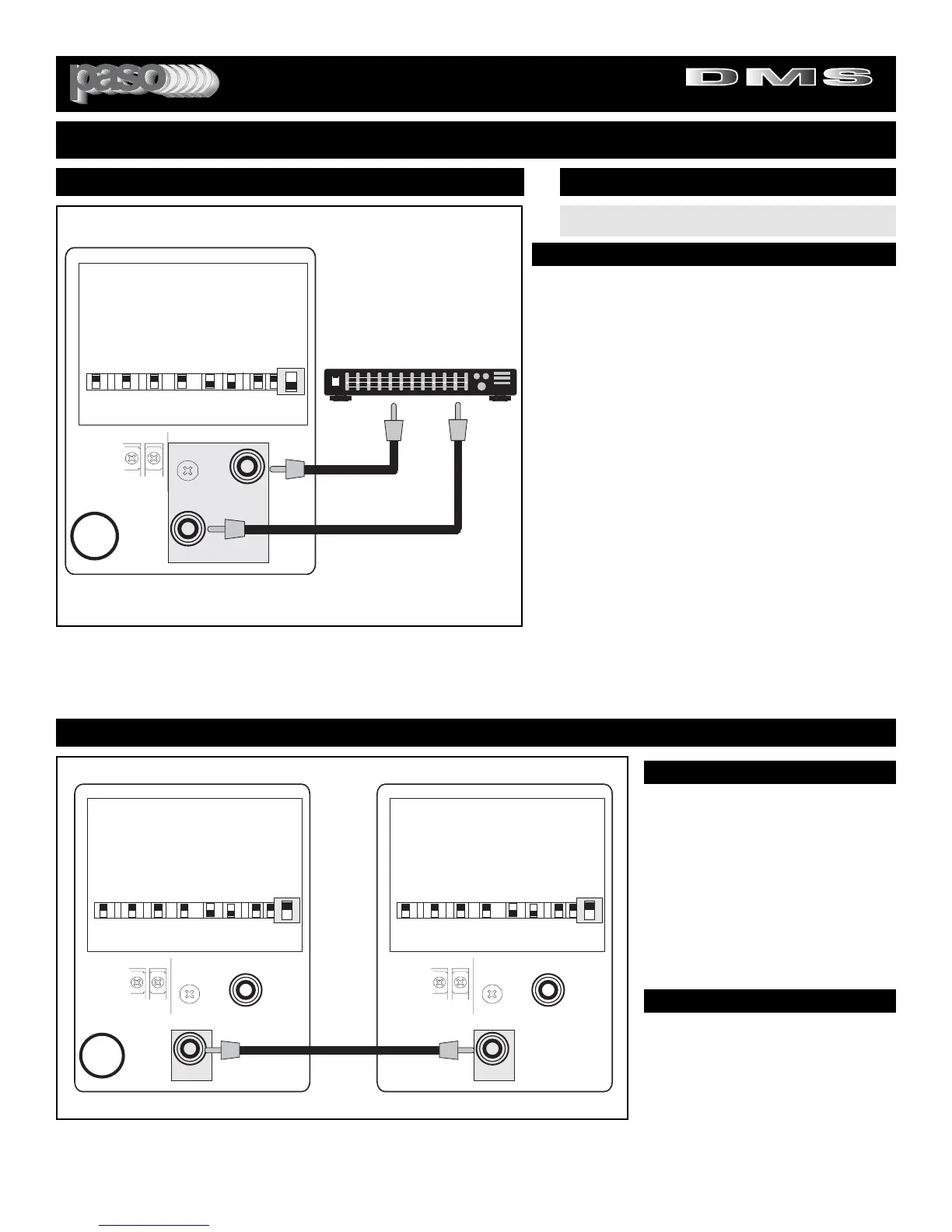
CONNECTING TO AN EXTERNAL EQUALIZER
The Amplifier is equipped with an External Equalizer Link
to allows the use of an External Equalizer for applications
requiring
Frequency Selective Acoustic Correction
. The
Amplifier is furnished with the two jacks of the Link bridged
by a SELECTOR SWITCH. When the EQ LINK Switch is
the ON position the internal Preamplifier to Amplifier Link
is broken allowing the insertion of an EQ. Connect
Equalizer as per Diagram in Fig. 15.
INSTALLATION TIPS
1) Use high quality, short length audio cables and position
the Equalizer in close proximity to the Amplifier. Avoid
mounting the EQ on top of the Amplifier unless is Rack
mounted.
2) Be sure that the Amplifier input controls and the EQ level
control are set at zero prior to turning the system On.
3) The Amplifier Bass and Treble controls should be set to
the middle detented position (0 = linear response position).
4) Carefully adjust the EQ Level Control to avoid distortion
caused by excessive signal boost.
5) Follow the instructions supplied with the Equalizer.
WIRING
To connect to an External Equalizer use two (2) single con-
ductor shielded audio cables terminated in a single prong
phono plug on both ends.
MIX BUSS BRIDGING
Fig. 15B - Rear Panel Mix Buss Bridging Diagram
BRIDGING TWO AMPLIFIERS
The MIX BUSS allows two
Amplifiers to be bridged and share
all inputs.
All signal sources connected to all
the inputs are common to the output
of both amplifiers. Muting and level
controls operate in exactly the same
way as if only one amplifier was
used.
MIX BUSS BRIDGING
WIRING
CABLE
To bridge two amplifiers or to con-
nect to an external Mixer use a sin-
gle conductor shielded audio cable
terminated in a single prong phono
plug on both ends.


 To Next Page