- 10 -
5.3 Wire Controller
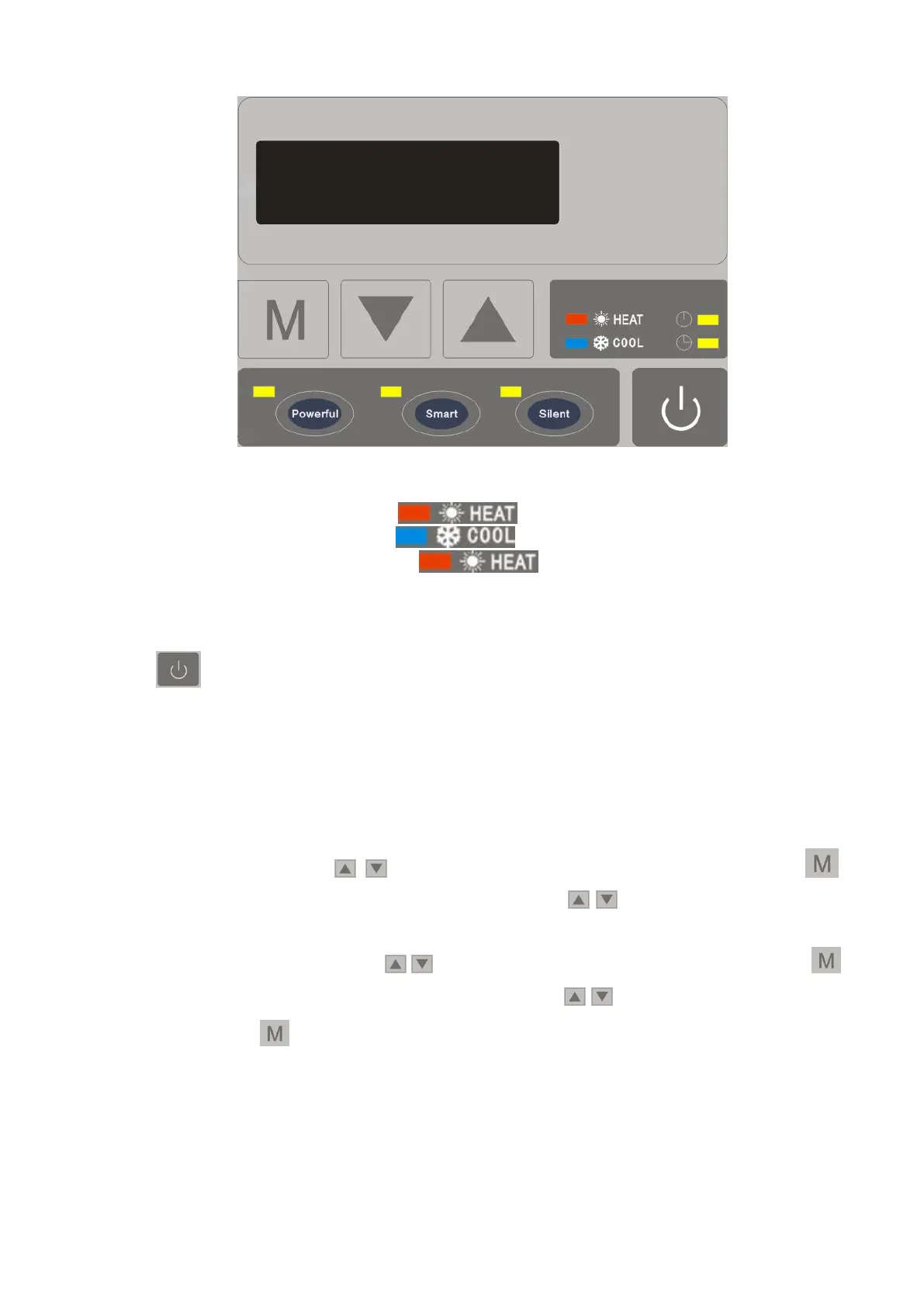
◎ Basic Icons
1. When it’s under heating mode, turns on
2. When it’s under cooling mode, turns on
3. When it’s under defrosting mode, turns on and twinkles
When it’s under off status, the display shows the current time
◎ Key Operating Instruction
1) " "Key On/Off
When it’s in other interface, press this button shortly, it will go back to the main
interface.
In the main interface, press this key to turn on/off.
In the main interface, press this key for 5 seconds to set the timer, when hour on
nixie tube flashes, you can set hour of "Timer on", the corresponding icon of "Timer
on" flashes, press " , " to set hour. When finishing setting, press key " "
shortly to go to set minute of "Timer on", press " , " to set minute. When finish
setting, press key "Mode"to go to set hour of "Timer off", the corresponding icon of
"Timer off" flashes, press " , " to set hour. After setting finished, press key " "
shortly to go to set minute of "Timer off", press " , " to set minute. After setting,
press key " " and return to the main interface, if the relative light is on, it means
that the corresponding timer is set successfully.
Timer Cancel
When the time on"Timer on"and "Timer off" is same, timer is canceled.


 To Next Page