Headphone
On the front panel (16), you can connect a headset with a 6.3 mm jack connection.
The headphone amplifier is equipped with three sound adjustment: Volume, Gain and Balance.
Volume:
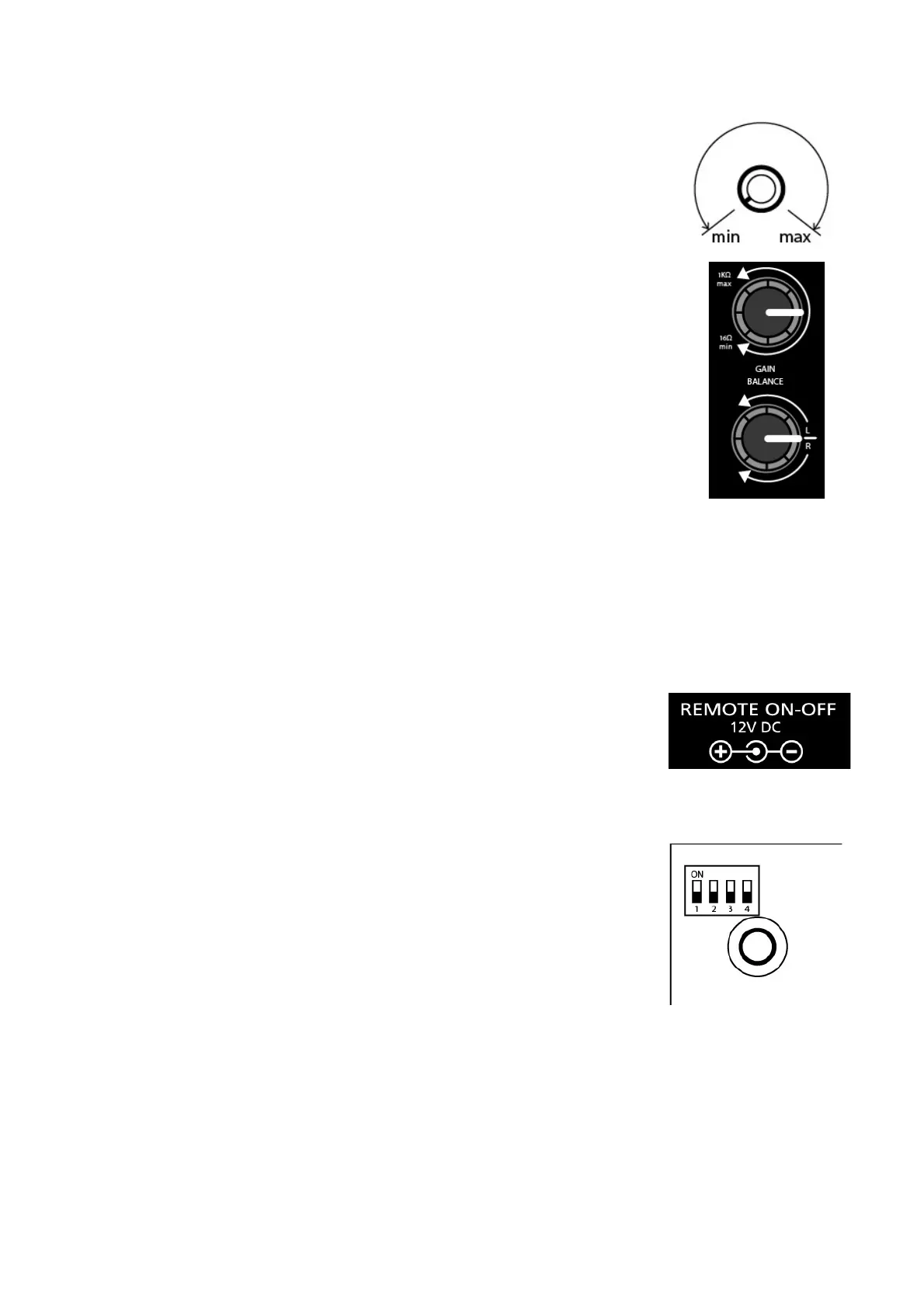
using the knob on the front panel (15) you can adjust the volume from the
minimum (mute) to the maximum.
The adjustment is made through the 270 ° rotation of the knob.
Gain:
using the knob on the rear panel (4) you can select the output gain in the headset.
Given the large difference in impedance and sensitivity of the headphones on the
market (from 16 to 1000 ohms) you need to adjust the gain to decrease if you use a
low-impedance headphones, or increase it if you use a headset at high impedance.
For the correct adjustment Volume / Gain Pathos recommend the following
procedure:
- Lower the gain to a minimum before connecting a headset
- Set the master volume at half scale
- Increase the gain in order to perceive a good listening volume.
By doing so you will have the perfect flexibility of using the volume knob on the front panel, preventing
excessive volume
Balance:
using the knob on the rear panel (3) it is possible to balance the output left / right to adapt to all possible
needs.
Remote ON/OFF
Aurium is provided with one connector for switching on/off via remote (2).
Remote ON/OFF OUT: when unit is on, 12VDC are on the connector to turn on
other machines provided with compatible remote.
Attenuators
On the bottom side of the amplifier, there is a component composed of 4
micro switches (21) that manages the attenuation of each input.
With these it is possible to activate a system of attenuation of 6dB within
dell'aurium to allow use of sources with high output.
Moving the lever to the "ON" to activate the front attenuation.
Respectively to the micro switch 1 corresponds to input 1, and so on.
The TAPE OUT output is not affected by this attenuation.


 To Next Page