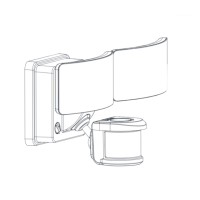
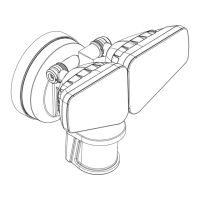
This document provides instructions for the Patriot Lighting 2-Light LED Security Light, model E9502-2, SKU 343-2408.
Function Description
The Patriot Lighting 2-Light LED Security Light is an outdoor lighting fixture designed to provide illumination and enhance security. It features two adjustable LED light heads and a solar panel for power generation, making it an energy-efficient solution. The device incorporates a motion sensor to activate the lights, offering customizable settings for duration, sensitivity, and lux (light level) to suit various needs. It also includes a rechargeable lithium-ion battery for storing solar energy, ensuring operation even after sunset. The light is designed for wall mounting and is weather-resistant, making it suitable for outdoor use in various climates.
Important Technical Specifications
- SKU Number: 343-2408
- Model Number: E9502-2
- Light Source: 2-Light LED
- Power Source: Solar panel with rechargeable lithium-ion battery. The battery type is C 1.5V X 3, and for replacement, it uses 2pcs of 3.7V 1500mAh Lithium ion batteries.
- Motion Sensor: Adjustable detection area (5° - 40° downward angle) and range (26ft to 50ft and a 120° angle).
- Lux Settings: Adjustable for day and night operation.
- Time Settings: Adjustable light duration from 10 seconds up to 60 seconds.
- Weather Resistance: Designed for outdoor use, resistant to moisture and varying temperatures.
- Mounting: Wall-mounted with included anchors and drywall screws.
- Wiring: Connects the solar panel to the light fixture via a 16ft (5M) cable.
Usage Features
Installation:
- Mounting the Light Fixture: The light fixture is mounted on a wall using two screws (AA) and two drywall screws (BB). The ideal mounting surface is straight on the wall, otherwise, the detection distance may be limited.
- Mounting the Solar Panel: The solar panel is mounted on a wall using two screws (VA) and two drywall screws (BB). The solar panel should be positioned in a location that receives maximum sunlight, ideally facing south, to ensure optimal charging. The cable connecting the solar panel to the light fixture is 16ft (5M) long, allowing flexibility in placement.
- Wiring Connection: Connect the cable from the solar panel (D) to the bottom of the light fixture (A). Ensure the connection is secure to avoid damage to the light fixture.
Adjusting the Sensor Head (C):
- Aiming the Sensor Head: The sensor head can be adjusted to a 5° - 40° downward angle to allow moisture to drain. Ensure the sensor head is positioned with controls facing toward the ground.
- Rotating the Sensor Head: The sensor head can be rotated up and down to change the coverage area.
- False Triggering: If the sensor triggers too frequently, adjust its position and settings.
Adjusting the Light Head (B):
- Up or Down Adjustment: The light heads can be adjusted up or down for the desired area. Keep the light heads at least 1" (25mm) away from the sensor.
- Face Down Adjustment: Keep the light heads (B) face down around 30 degrees angle to avoid water damage and electrical shock.
Function and Operation:
- ON Switch: The ON switch (labeled "ON") activates the light. It will illuminate at 800 lumens once motion is detected for the desired duration.
- OFF Switch: The OFF switch (labeled "OFF") turns off the light.
- SENS (Sensitivity to Motion): This dial determines the range of the motion detector. Rotating the dial clockwise will increase the sensor range from 26ft to 50ft and a 120° angle.
- TIME (Light Duration): This dial adjusts how long the light stays on after motion has been detected. The duration can be set from 10 seconds up to 60 seconds. Rotating the dial clockwise will extend the time the light is illuminated.
- LUX (Sensitivity to Light): This dial determines when the light turns on based on ambient light levels.
- Turning the LUX knob clockwise to "☀️" position (daylight) means the light turns on day and night.
- Turning the LUX knob counter-clockwise to "☾" position (dusk/night) means the light turns on at dusk and turns off at dawn automatically. This is the ideal setting for general evening and nighttime use.
Maintenance Features
Battery Replacement:
The device uses rechargeable lithium-ion batteries.
- Accessing the Battery Compartment: Turn the two dials at the back of the light fixture to unlock the compartment and pull the cover open.
- Removing Old Batteries: Insert the batteries and close the plate. The device uses type C 1.5V X 3 alkaline batteries.
- Replacing with New Batteries: For replacement, use 2pcs of 3.7V 1500mAh Lithium ion batteries.
- Securing the Compartment: Attach the back cover of the light fixture, and fasten the 4 screws at the back.
- Disposal: The rechargeable battery loses its charge, the fixture will rely on the alkaline dry battery for power (if dry batteries are in place). Always dispose of batteries in accordance with local, state, and federal regulations. Do not mix old and new batteries. Do not mix alkaline, standard (Carbon-Zinc), or rechargeable (Nickel Cadmium or Nickel Hydride) batteries with lithium batteries.
Cleaning:
- Solar Panel: The solar panel should be cleaned with a damp cotton cloth on a regular basis to ensure optimal performance and battery charging.
- Light Fixture: Periodically clean the lens with a soft cloth every 1 or 2 months to ensure maximum sensitivity.
- Abrasive Material: Never let any abrasive material come into contact with the solar panel.
Troubleshooting:
- Light Not Turning On: Ensure the solar panel is positioned to receive direct sunlight and is not blocked by trees or other objects. Remove the battery, wipe both ends with a clean, dry cloth, and reinstall the battery. Check the battery to ensure that it is making secure contact with the terminals. If this does not work, replace with a new battery.
- Warranty: Patriot Lighting® offers a one-year limited warranty from the date of original purchase. This warranty covers defects in material and workmanship. It does not cover damage from improper installation, abuse, misuse, or acts of God. It also excludes expendable parts including but not limited to light bulbs, labor costs, and consequential damages.
Safety Information:
- Read and understand the entire manual before attempting to assemble, operate, or install the product.
- Do not expose the light fixture to fire or intense heat.
- Do not submerge in water.
- Ensure your light fixture and solar panel are both weather-resistant.
- Never look directly into the solar motion light when illuminated.
- Dispose of batteries in a fire, as they may leak and explode.
- Do not dispose of batteries in any body of water.
- Do not open, short circuit, or destroy batteries.
- Do not mix old and new batteries.
- Do not mix alkaline, standard (Carbon-Zinc), or rechargeable (Nickel Cadmium or Nickel Hydride) batteries with lithium batteries.
- WARNING: Make sure a lithium battery charger is used as other chargers may not be compatible and could be a safety risk.

 Need help?
 General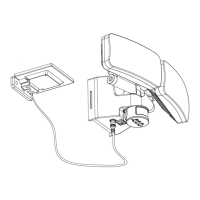

 To Next Page