Need help?
Do you have a question about the Pax Technology A35 and is the answer not in the manual?
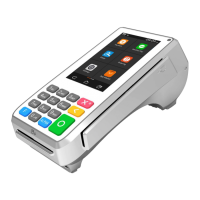
Connects the A35 to AC power adapter or powered USB for power supply.
Reboots the operation system by pressing 'X' and 'O' buttons for 5-8 seconds.
Connects the communication cable to the Type-C interface after removing the back cover.
Insert SAM cards into the corresponding card slot after removing the back cover.
Insert the SD card into its corresponding slot after removing the back cover.
Swipe cards with magnetic stripe side facing interior for reading.
Insert IC card with chip side upward into the IC card slot.
Tap contactless card on the Top LCD screen area when prompted.
Position 1D/2D code towards the top center area of the LCD for reading.
Supports electronic signature using finger on the touchscreen.
Utilizes Kensington security hole for locking the terminal.
Connect headphones to the 3.5mm output jack for audio prompting.
 General
| Model | A35 |
|---|---|
| Manufacturer | PAX Technology |
| Memory | 1GB RAM |
| Storage | 8GB Flash |
| Operating System | Android |
| Camera | 5MP Rear Camera |
| Processor | Quad-core |
| Connectivity | 4G, Wi-Fi, Bluetooth |
| Card Reader | NFC |
| Certifications | PCI PTS 5.x, EMV L1 & L2 |

 To Next Page