3
2. Specifications
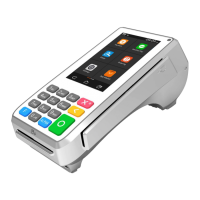
Model A35
Processor Quad-core Cortex A53, 1.6GHz
Memory 8GB Flash + 1GB DDR, 128GB MicroSD Optional
Display 4'' WVGA 480 x 800 Pixels, Capacitive Touch Screen
Keys / Buttons 13 keys: 0-9 | Enter | Clear | Cancel, Back-Lighting (Optional)
Cards Handle Chip & PIN | NFC Contactless | Magnetic Stripe
Cameras 0.3MP Fixed Front-Facing, 5MP Fixed Front-Facing Optional
Audio 1 Speaker | 1 Audio Jack
Communications RS232 | Ethernet (Gigabit Optional) | USB 2.0 |
Wi-Fi® (2.4GHz / 5GHz ) + Bluetooth® (4.2/5.0) (Optional)
Ports Multi-Functional Port |1 Kensington | MicroSD (Optional)
SIM/SAM Up to 2 PSAM
Power Supply Input: 100-240VAC, 50Hz/60Hz | Output: 5.0V DC, 1.0A
Physical 163.69mm x 76.90mm x 30.10mm(L x W x H)
Accessories Multiple Cabling Options | Stand
Environmental 0°C ~ 50°C (32°F ~ 122°F) Operating Temperature
-20°C ~ 70°C (-4°F ~ 158°F) Storage Temperature
5% ~ 93% Relative Humidity, Non-Condensing
3.Instructions
A35 connects to a POS or an ECR by a communication cable for entering password,taping
contactless card, swiping magstripe card, inserting smart card or reading 1D/2D code during
transaction process. To use it correctly, you should refer to following instructions:
1) Power Connections
Power can be supplied to the A35 by connecting the AC power adapter to the communication
cable, as in the case of RS232 or USB configurations, or via a powered USB cable (12V Powered
USB) where the connected POS terminal provides the power.
2) Reset
Press and hold the 'X' and ‘O’ button for 5-8 seconds, the operation system will reboot.
3) Communication cable
① Remove the back cover (At the bottom of the terminal).
② Put the communication cable head to the Type-C interface.
4) SAM Cards
① Remove the back cover (At the bottom of the terminal).
② Insert the SAM cards to the corresponding card slot.
5) SD Card
① Remove the back cover (At the bottom of the terminal).
② Insert the SD card to the corresponding card slot.
6) Magnetic stripe card reader
To use the magnetic stripe card reader, put magnetic stripe side of magnetic card towards device
interior, swipe the card with a steady speed during through magnetic reader slot. (Support
bi-directional swiping).


 To Next Page